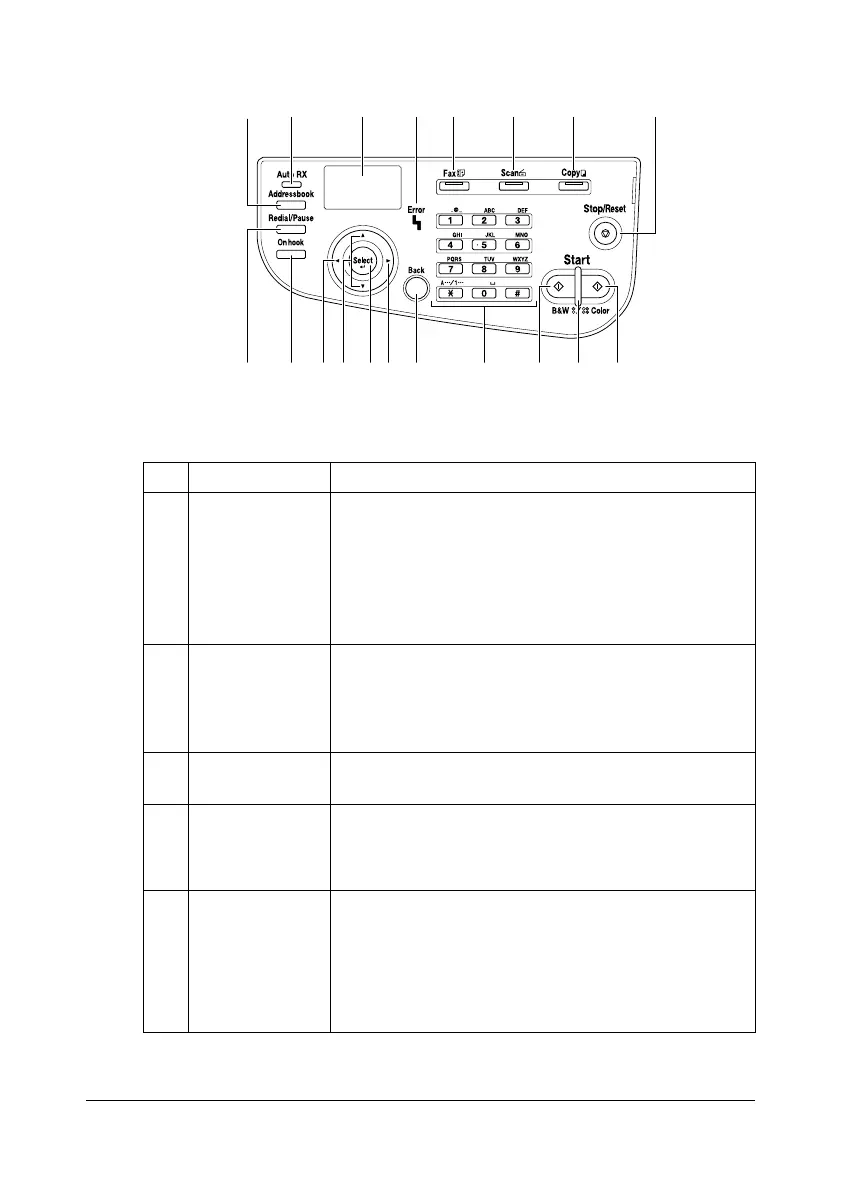
About the Control Panel2-2
About the Control Panel
Control Panel Indicators and Keys
No. Part Name Description
1 Addressbook
key
- Displays the information registered in the favorite
list, speed dial destinations and group dial desti-
nations.
- For details, refer to “Specifying the Destination
Address (Scan to E-mail/FTP/SMB)” on
page 7-12.
2 Auto RX indica-
tor
- Lights up when the automatic receiving function
is selected.
- For details, refer to the [Facsimile User’s Guide]
on the Documentation CD/DVD.
3 Message win-
dow
Displays settings, menus, and messages.
4 Error indicator - Indicates an error condition.
- For details, refer to “Error Messages” on
page 10-40.
5 Fax key/LED - Enters Fax mode.
- Lights up in green to indicate that the machine is
in Fax mode.
- For details, refer to the [Facsimile User’s Guide]
on the Documentation CD/DVD.
1 2 4 5 6 7 83
1011
914151618 13
17 12
14










 To Next Page