About the Control Panel 2-3
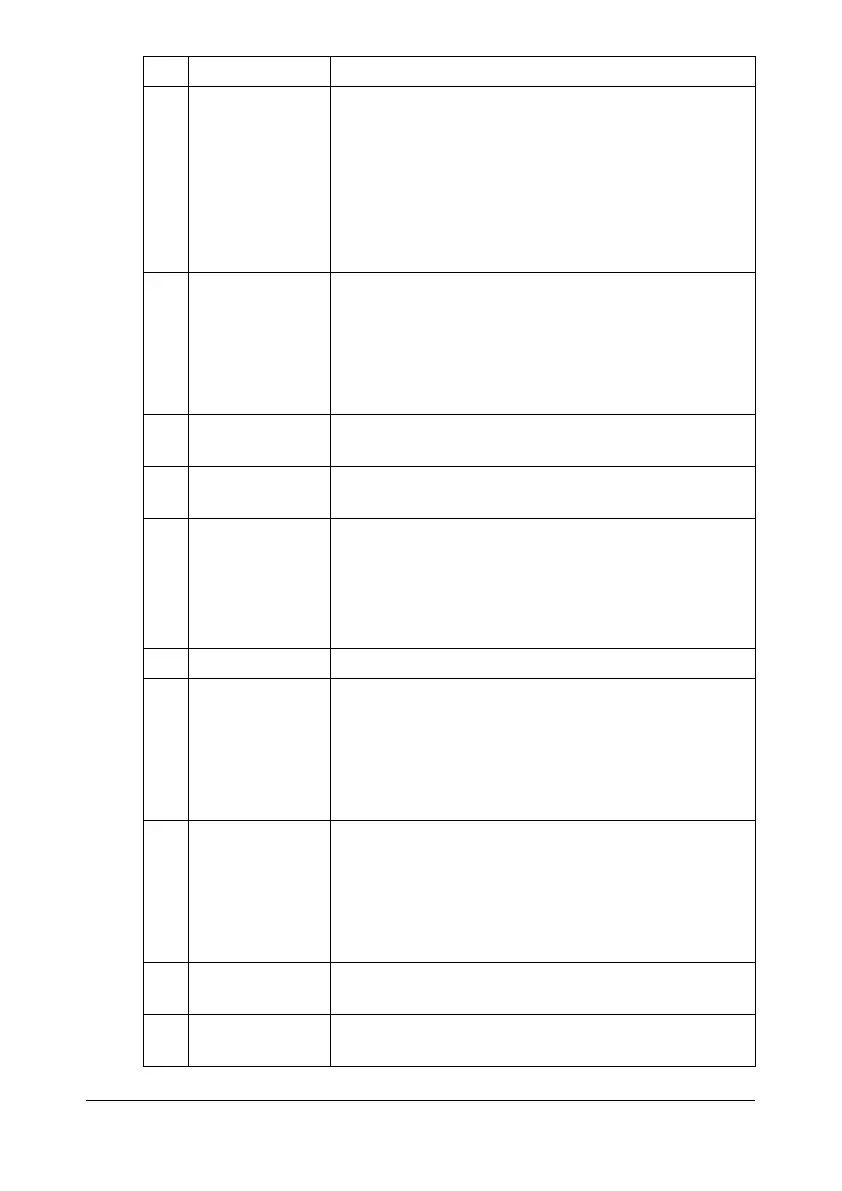
6 Scan key/LED - Enters Scan mode. (Scan to E-mail, Scan to FTP,
Scan to a shared folder on a computer, Scan to
PC, or Scan to USB Memory)
- Lights up in green to indicate that the machine is
in Scan mode.
- For details on the scanner functions, refer to
chapter 7, “Using the Scanner”.
7 Copy key/LED - Enters Copy mode.
- Lights up in green to indicate that the machine is
in Copy mode.
- For details on the copy functions, refer to chapter
6, “Using the Copier”.
8 Stop/Reset key Returns the settings to their defaults and stops
functions.
9 Start (Color)
key
Starts color copying, scanning or faxing.
10 Start indicator - Lights up in blue when copying and fax transmis-
sion are possible.
- Lights up in orange when copying and fax trans-
missions are not possible, for example, during
warm-up or if an error has occurred.
11 Start (B&W) key Starts monochrome copying, scanning or faxing.
12 Keypad - Enters desired number of copies.
- Enters fax numbers, mail addresses, and names
of recipients.
- For details on entering text, refer to “Entering
Text” on page 12-8.
13 Back key - Clears the specified number of copies and
entered text.
- Press to return to the previous screen.
- Press to cancel the setting that is currently dis-
played.
14 */) keys Moves left and right through menus, options, or
choices.
15 Select key Press to select the setting that is currently dis-
played.
No. Part Name Description










 To Next Page