Replacing Consumables 8-25
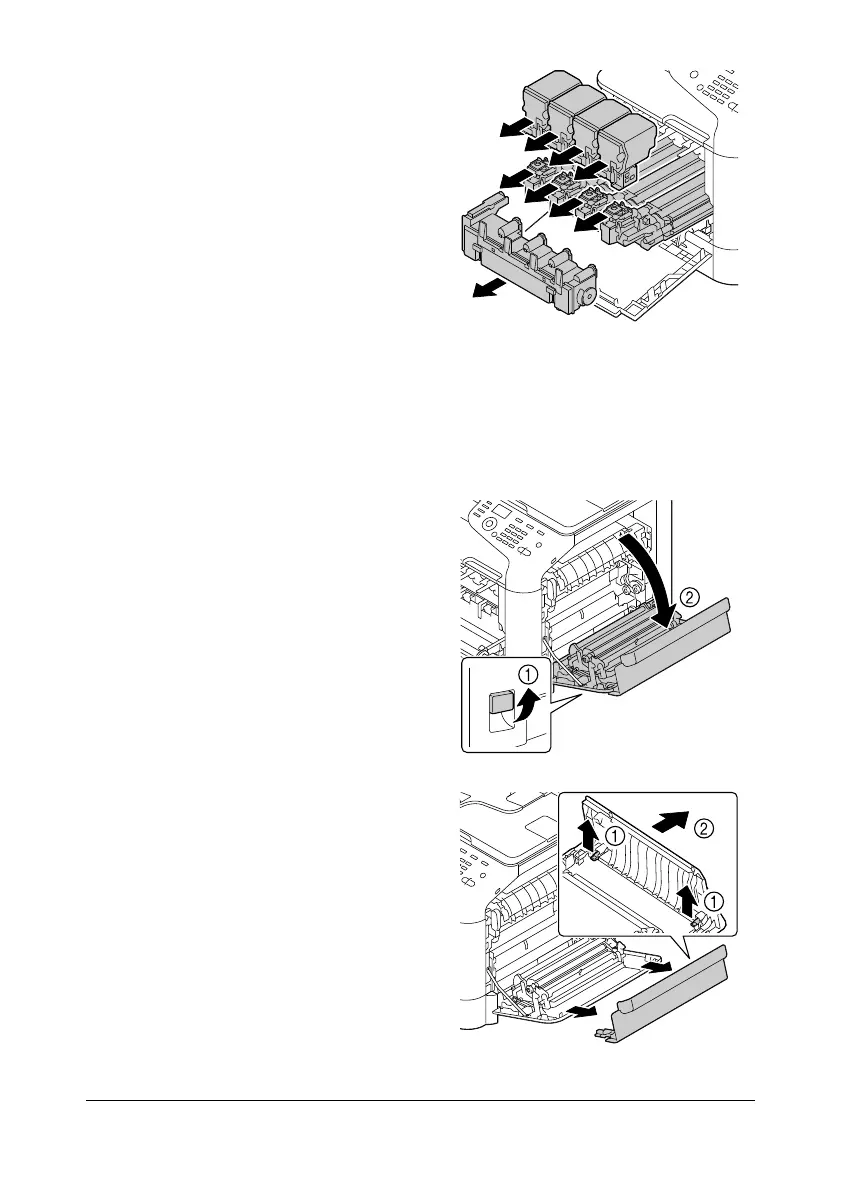
3 Remove the all toner cartridges,
all imaging units and waste
toner bottle.
d
For details on removing
the toner cartridges,
imaging units or waste
toner bottle, refer to
“Replacing a Toner Car-
tridge” on page 8-5 or
“Replacing an Imaging
Unit” on page 8-10.
d
Cover the removed imag-
ing unit to protect it from direct sunlight.
d
Do not tilt removed toner cartridge, otherwise toner may spill.
d
Do not tilt removed waste toner box, otherwise waste toner may
spill.
4 Pull the lever, and then open the
right door.
d
Before opening the right
door, fold up Tray 1.
5 Remove the top part of the right
door.










 To Next Page