Maintaining the Machine 9-3
- Do not cover the machine immediately after using it. Turn it off and wait
until it cools down.
- Do not leave the machine’s covers open for any length of time, especially
in well-lit places; light may damage the imaging units.
- Do not open the machine during printing.
- Do not tap media stacks on the machine.
- Do not lubricate or disassemble the machine.
- Do not tilt the machine.
- Do not touch the electrical contacts, gears, or laser devices. Doing so
may damage the machine and cause the print quality to deteriorate.
- Keep media in the output tray at a minimum level. If the media is stocked
too high, your machine may experience media misfeeds and excessive
media curl.
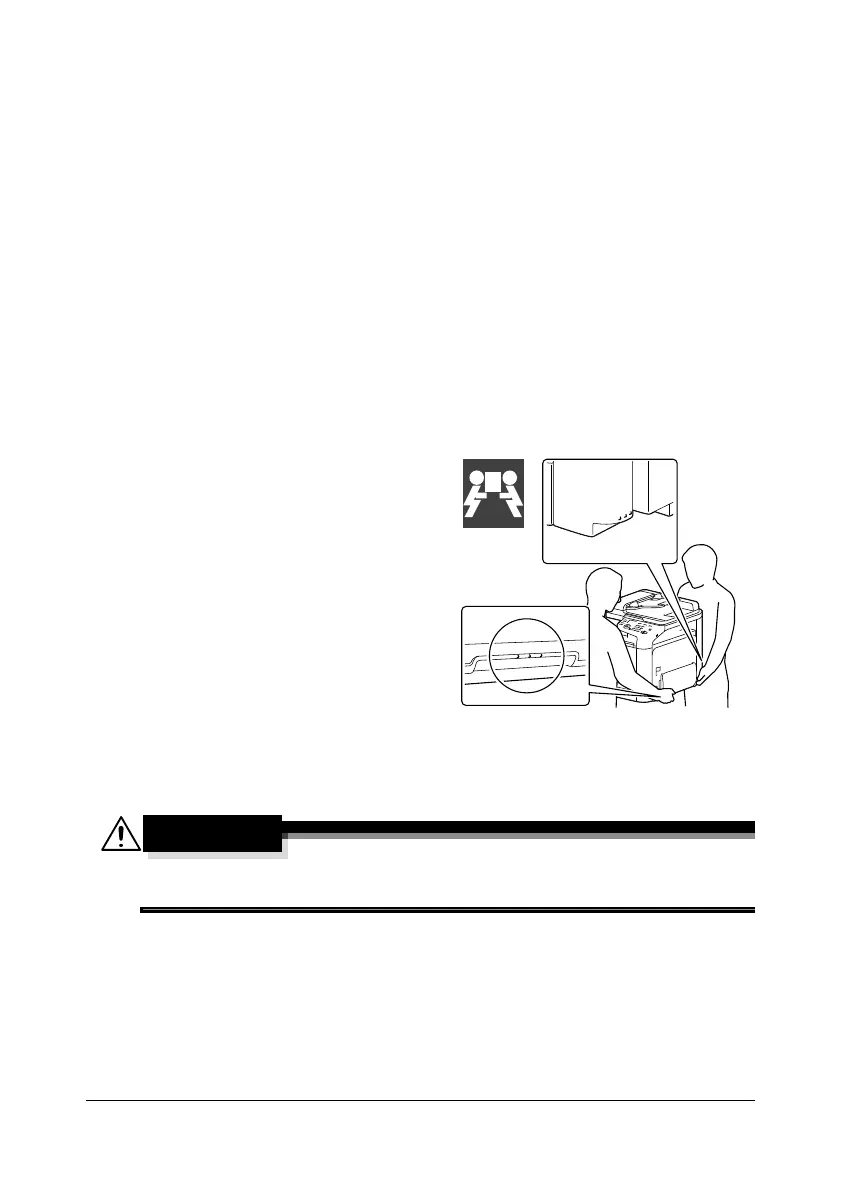
- Make sure two people are avail-
able to lift the machine when
moving it.
Keep the machine level to avoid
toner spillage.
- When lifting the machine, fold
up Tray 1, and then lift the
machine as shown in the illus-
tration at the right.
- If the optional Lower Feeder
Unit PF-P09 is installed, move it
and the machine separately. Do
not grasp the grip of Tray 3, or
the right side cover; otherwise,
the Lower Feeder Unit PF-P09
may be damaged.
- If you get toner on your skin, wash it off with cool water and a mild soap.
If you get toner in your eyes, wash it out immediately with cool water
and consult a doctor.
- Make sure any parts removed during cleaning are replaced before you
plug in the machine.










 To Next Page