About the Control Panel 2-7
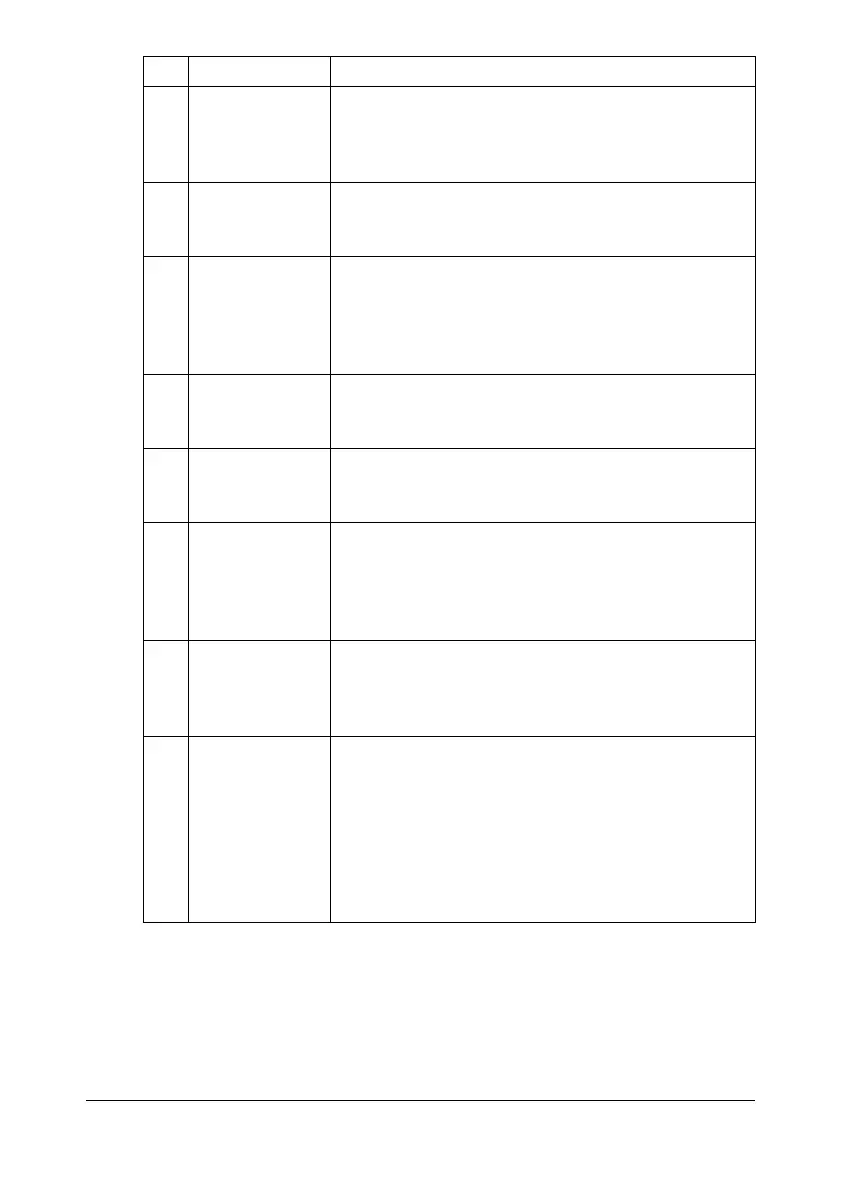
4 Collated (Sort)
copying
Indicates whether or not collated (Sort) copying is
selected. For details on selecting collated (Sort)
copying, refer to “Setting Collated (Sort) Copying”
on page 6-14.
5 2in1/4in1 copy-
ing
Indicates whether or not 2in1/4in1 copying is
selected. For details on selecting 2in1/4in1 copying,
refer to “Setting 2in1/4in1 Copying” on page 6-6.
6 Double-sided/
single-sided
copying
Indicates whether double-sided copying or sin-
gle-sided copying is selected. For details on select-
ing double-sided/single-sided copying, refer to
“Setting Duplex (Double-Sided) Copying” on
page 6-11.
7 Copy function Indicates the copy function that is set. For details on
setting a copy function, refer to “Setting a Copy
Function” on page 6-7.
8 [UTILITY] Select this menu item to change the various
machine settings. For details, refer to “UTILITY
Menu” on page 2-19.
9[REPORT/STA-
TUS]
Select this menu item to view the total number of
pages printed by this machine and the results of fax
transmissions/receptions as well as to print the
reports. For details, refer to “REPORT/STATUS
Menu” on page 2-15.
10 [PS/PCL PRINT] Select this menu item to print or delete jobs stored
on the machine’s hard disk (optional) and to change
the settings related to PS/PCL printing. For details,
refer to “PS/PCL PRINT Menu” on page 2-55.
11 [MEMORY
PRINT]
Select this menu item to perform memory direct
printing operations and to specify settings for these
operations. For details, refer to “MEMORY PRINT
Menu” on page 2-85.
d
This menu item appears only if an optional
Hard Disk Kit HD-P03 or a CompactFlash
card is installed.
No. Indication Description










 To Next Page