Configuration Menu Overview2-48
d
Manufacturer’s default settings appear in bold.
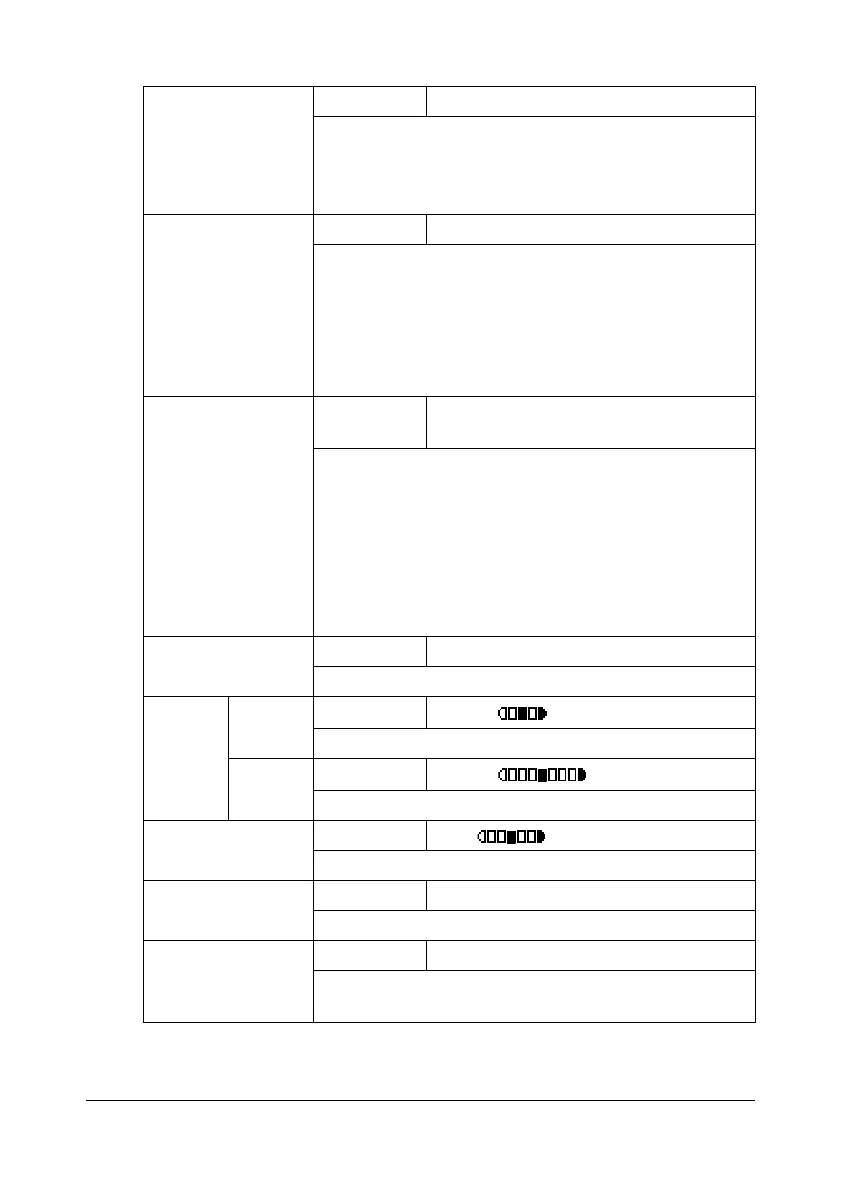
[PAPER PRIORITY] Settings [TRAY1] / [TRAY2] / [TRAY3]
Specify the paper tray that is normally used.
d
If an optional Lower Feeder Unit PF-P09 is not
installed, [TRAY3] does not appear.
[TRAY CHAINING] Settings [DISABLE] / [ENABLE]
If [ENABLE] is selected and the specified tray runs out
of paper during printing, a tray loaded with paper of
the same size is automatically selected so printing can
continue.
If [DISABLE] is selected and the specified tray runs out
of paper, printing stops.
[QUALITY PRIOR-
ITY]
Settings [MIX] / [TEXT] / [PHOTO] / [FINE/MIX] /
[FINE/TEXT] / [FINE/PHOTO]
Select the type of document being copied.
d
When a document is loaded into the ADF, the
default setting [MIX] is automatically selected.
d
For the resolution of each setting, refer to
“Resolution of QUALITY PRIORITY Settings” on
page 2-49.
[DENSITY PRIOR-
ITY]
Settings [AUTO] / [MANUAL]
Select the density that is normally used.
[DEN-
SITY
LEVEL]
[AUTO] Settings
(LIGHT) (DARK)
Adjust the density of the background color.
[MAN-
UAL]
Settings
(LIGHT) (DARK)
Specify the default copy density.
[SHARPNESS] Settings
(Soft) (Clear)
Select the setting for SHARPNESS.
[OUTPUT PRIOR-
ITY]
Settings [NON-SORT] / [SORT]
Select whether or not to sort copies by sets.
[N-UP PRIORITY] Settings [1IN1] / [2IN1] / [4IN1]
Select the number of document pages to be printed
on a single page.










 To Next Page