Configuration Menu Overview 2-53
d
Manufacturer’s default settings appear in bold.
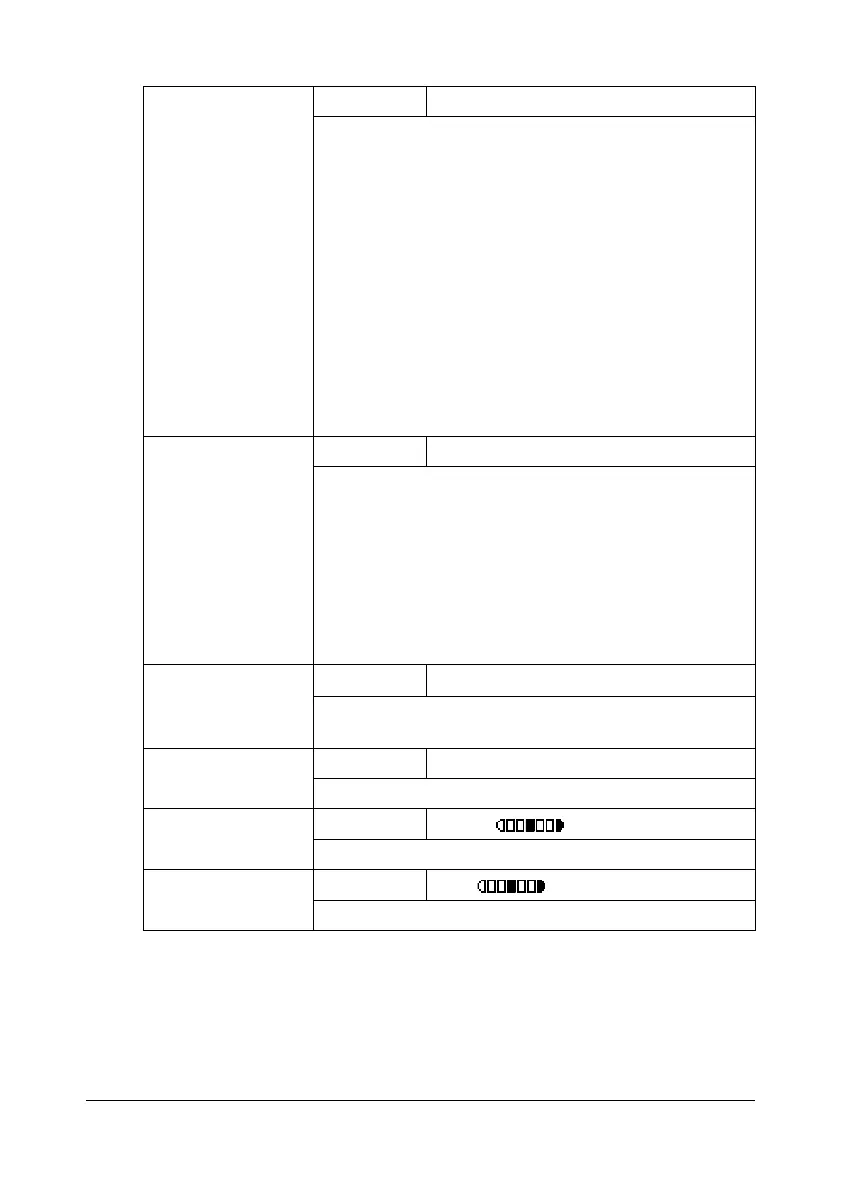
[IMAGE FORMAT] Settings [TIFF] / [PDF] / [JPEG]
Select the default format for saving files with scan to
e-mail operations.
d
PDF data can be opened in Adobe Acrobat
Reader.
d
TIFF files of images that have been scanned
with the [COLOR or GRAY] setting cannot be
opened with the Windows Picture and FAX
Viewer, which is included with Windows XP as a
standard component. These files can be
opened with image-processing applications
such as PhotoShop, Microsoft Office Document
Imaging or ACDsee.
[CODING METHOD] Settings [MH] / [MR] / [MMR]
Select the default compression method for scan to
e-mail operations.
The compression ratio for these methods increases in
the following order: [MH] > [MR] > [MMR].
d
These settings are available only if [BW Only]
was selected for the color setting during the
e-mail transmission.
[RESOLUTION] Settings
[150e150dpi] / [300
e300dpi]
Select the default scanning resolution for scan to
e-mail operations.
[QUALITY PRIOR-
ITY]
Settings [MIX] / [TEXT] / [PHOTO]
Select the scan data quality that is used as a default.
[DENSITY LEVEL] Settings
(LIGHT) (DARK)
Select the scan data density that is used as a default.
[SHARPNESS] Settings
(Soft) (Clear)
Select the setting for [SHARPNESS].










 To Next Page