Maintenance Manual D900
49-MD900EN05
40
Number of Temporary Promotion: Enter the value of the Temporary Promotion assigned to the
article.
The offers programmed in the article will be enabled in the time period programmed in the temporary
promotion assigned to the article. See paragraph 3.4.10 Temporary Promotions.
When the temporary offer has the value 0 the temporary offer will not be applied, if the article has
other type of offer it will always be applied.
3.1.1.5.Images
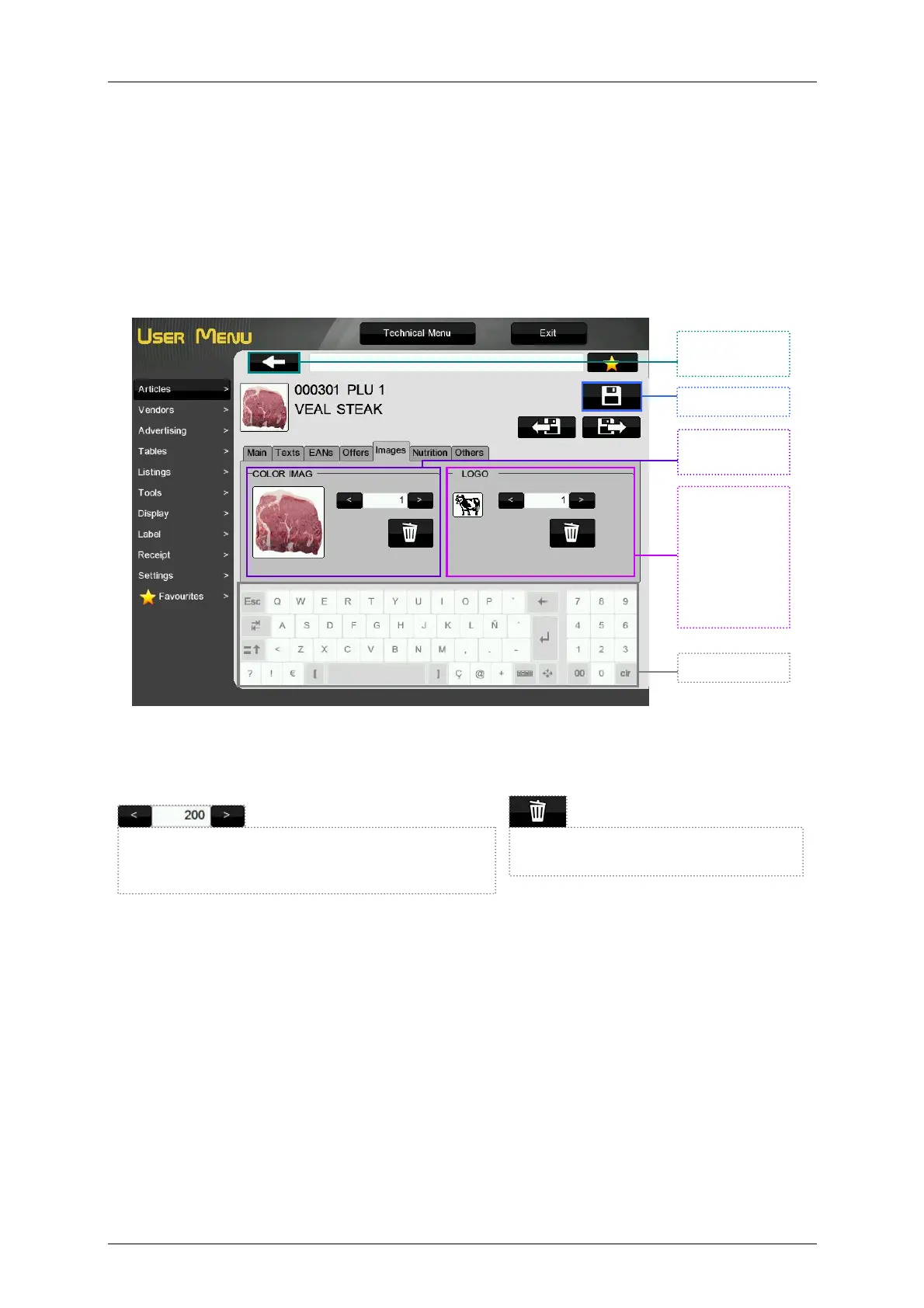
This menu allows to program the images of the article
Color Image: Color image associated to the article (see paragraph 6.1.1 Load Article Images).
Logo Number: Logotype number associated to the article.
Save and exit.
Exit without
saving
Keyboard
Logotype of
the article that
will be printed
on the label if
it is
programmed
the field Article
logo.
Image of the
article.
Cancel the association of the image to
the article
Selection of the image of the article. Enter the value
with the keyboard or increase or decrease it by
pressing the arrows.



 To Next Page