Manual D900 Maintenance
49-MD900EN05
59
3.5. LISTINGS
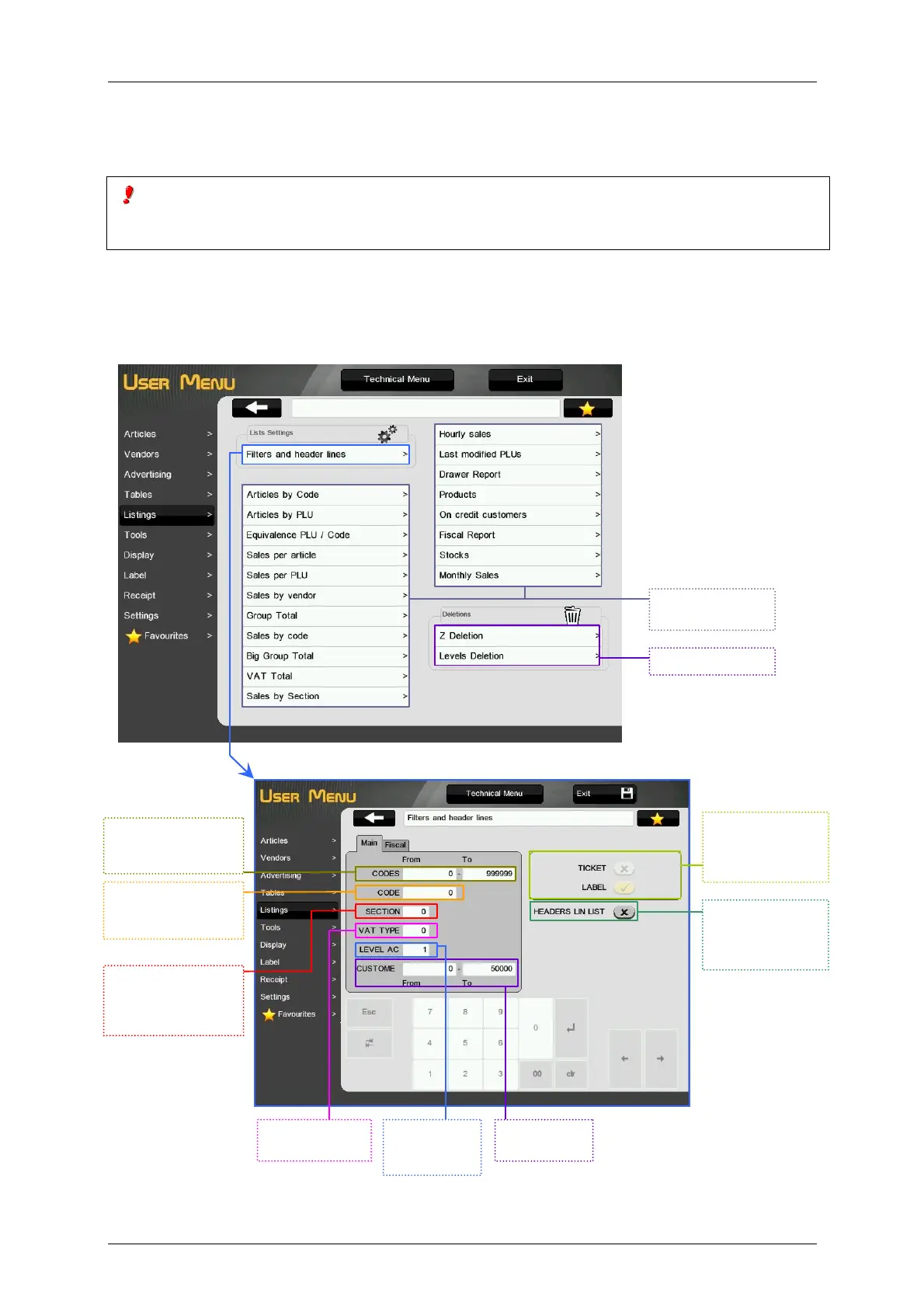
This menu allows to select the listing to be printed and configure and filter these listings.
To avoid manipulation in the management of the cash drawer, listings involving the sum total of sales cannot be
issued until the DRAWER REPORT has previously been printed if the parameter Draw Control has the value
Control ON ( see paragraph 3.10.4.8 Draw Control)).
3.5.1.Filters and Header Lines
This menu allow to program different parameters for the listings, in two options: main and fiscal. It is also
possible to define if the listings will be printed in receipt or label format and configure the printing of the
header lines in the listings (see paragraph 3.9.1.2 Receipt headers).
Filter the articles
which code is in the
selected range.
Filter the articles
which code ends by
the selected number.
Filter the articles
belonging to this
section (‘0’ – All the
sections).
Filter by type of
VAT.
Filter by level
of
accumulated.
Filter by
customers.
Selection of the
printing format of
the listings
Enable or disable
the printing of
header lines in the
receipt.
Available listings.
Press to print.
Available deletions



 To Next Page