Manual D900 Maintenance
49-MD900EN05
35
3.1.1.New article
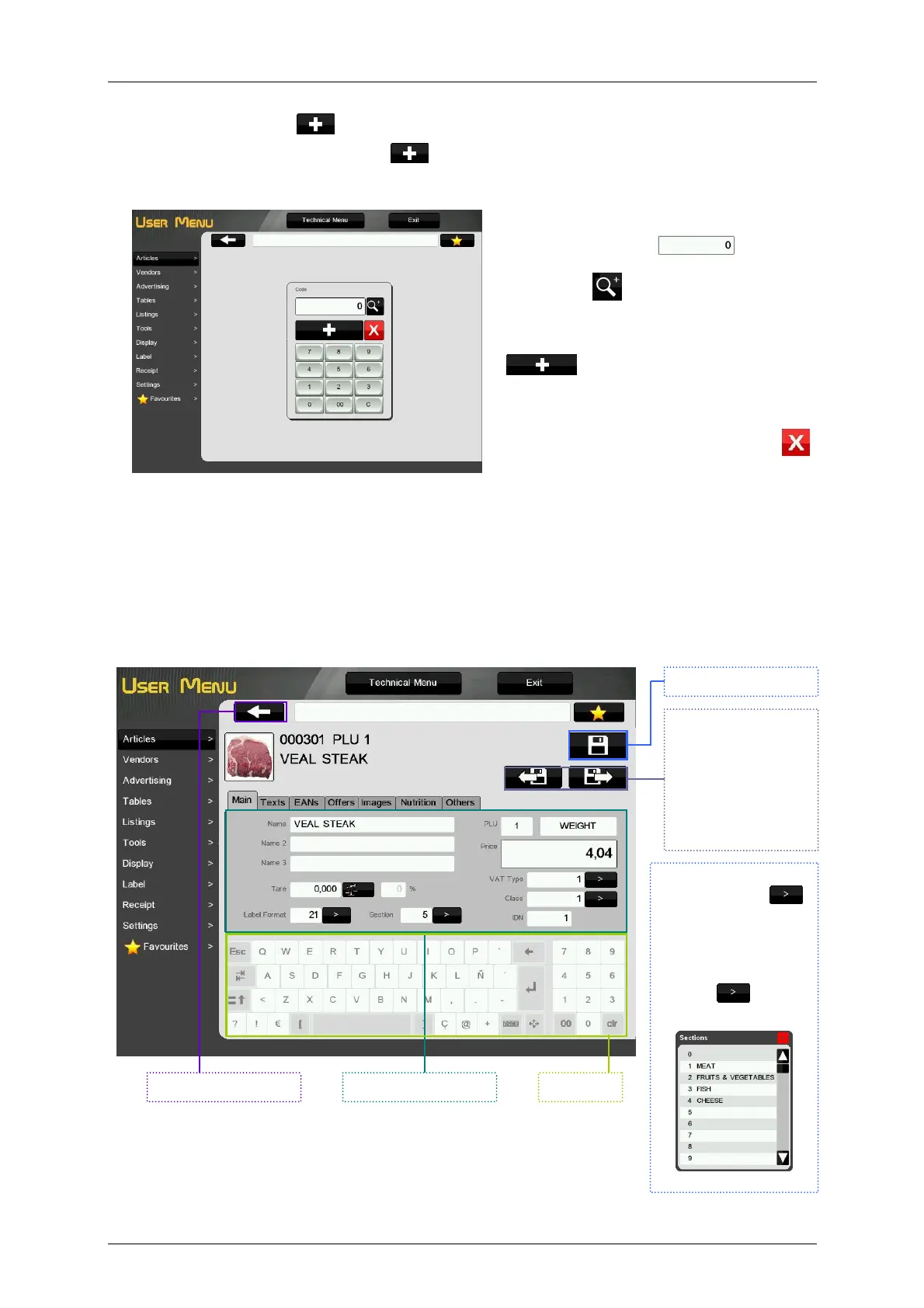
To program a new article press the key , the scale will show a window to enter the Code of the
Article.
- Enter the article code in the window by means
of the numeric keypad .
- By pressing the scale will show the first
non-used code.
- Once the code has been entered, by pressing
the code will be assigned to the
article and it will be possible to program the
rest of the parameters of the article.
- To cancel the creation of the article press .
If the entered code corresponds to an existing article the scale will ask about the edition of the existing
article
Then the scale will show the detailed article information, divided into six groups: Main, Texts, EANs,
Offers, Images and Others.
3.1.1.1.Main
For the parameters that
has the button ,
we can introduce the
value in the
conventional way or we
can display a list with
the possible options by
pressing and then
select one of them.
Main parameters .
Save and exit.
Exit without saving. Keyboard
Press this buttons to
go to the
next/previous article
by code order. The
current article will be
saved with the
changes we have
done.



 To Next Page