Manual D900 Maintenance
49-MD900EN05
49
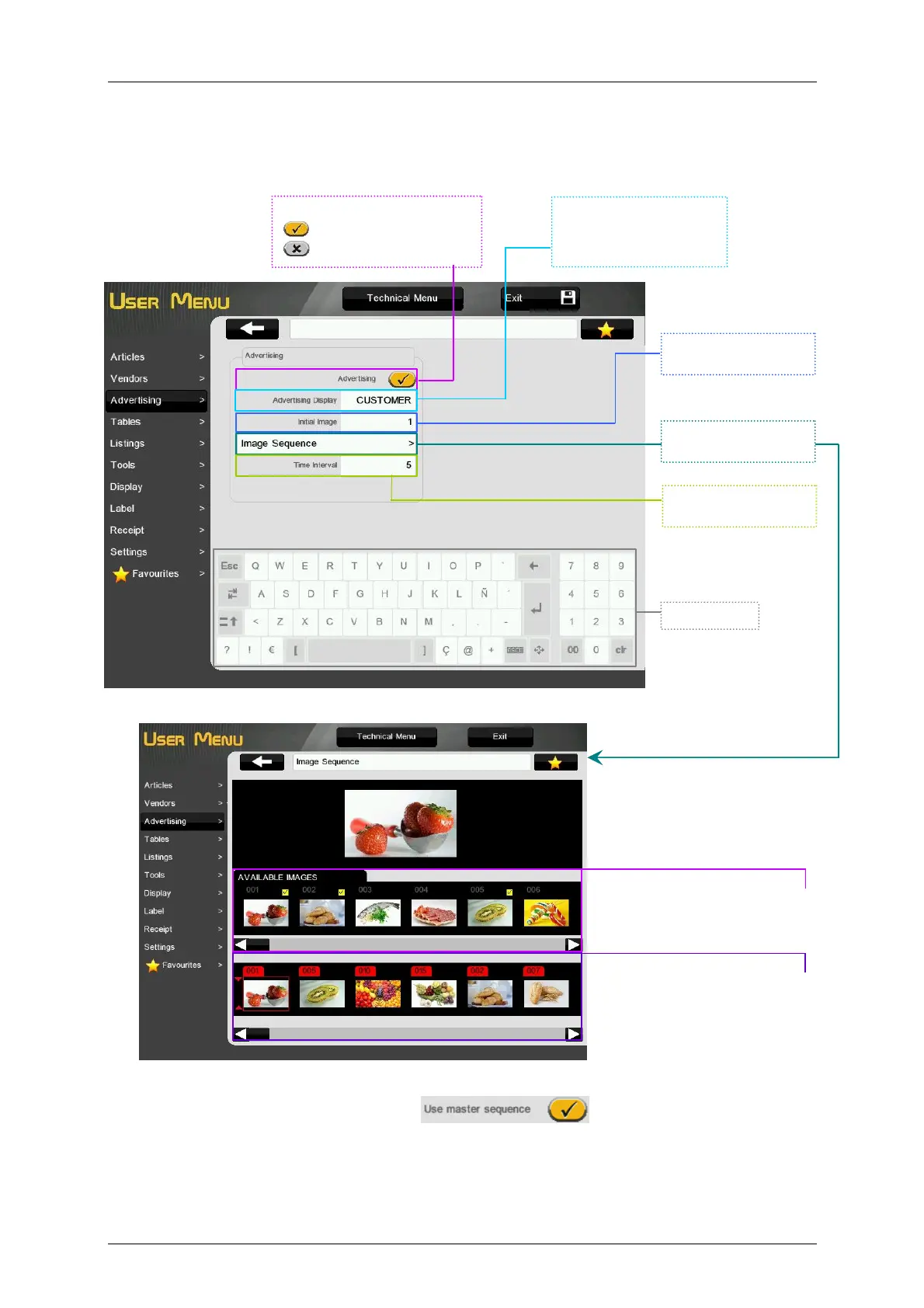
Images available in the scale. Press
two seconds in a image to add it to
the Programmed sequence of images
Programmed Sequence of Images
which will be shown in the rearward
display.
Press one image to select the
position where the images will be
inserted.
Press an image for two seconds to
remove it.
Programming of the
Advertising Sequence.
Time to display every
advertising image.
Keyboard.
Initial image of the
advertising sequence.
Advertising:
- With advertising images.
- Without advertising images.
You could select in which
display the advertising will
be shown. It may be vendor,
customer or both.
3.3. ADVERTISING
The D-900 scales allow to show advertising images in the customer’s display.
According to the value of the parameter Advertising, it is possible to enable or disable the advertising.
If the scale is configured as slave, the button will be shown on the Advertising
menu. This button allows to use the same advertising sequence that is configured on the master scale.
This way we can program the advertising only in the master scale and use it in all slave scales we want
without having to configure them one by one.
To load images in the scale see paragraph 6.1.2 Loading of Advertising Images



 To Next Page