Maintenance Manual D900
49-MD900EN05
76
3.7.2.User Display Configuration
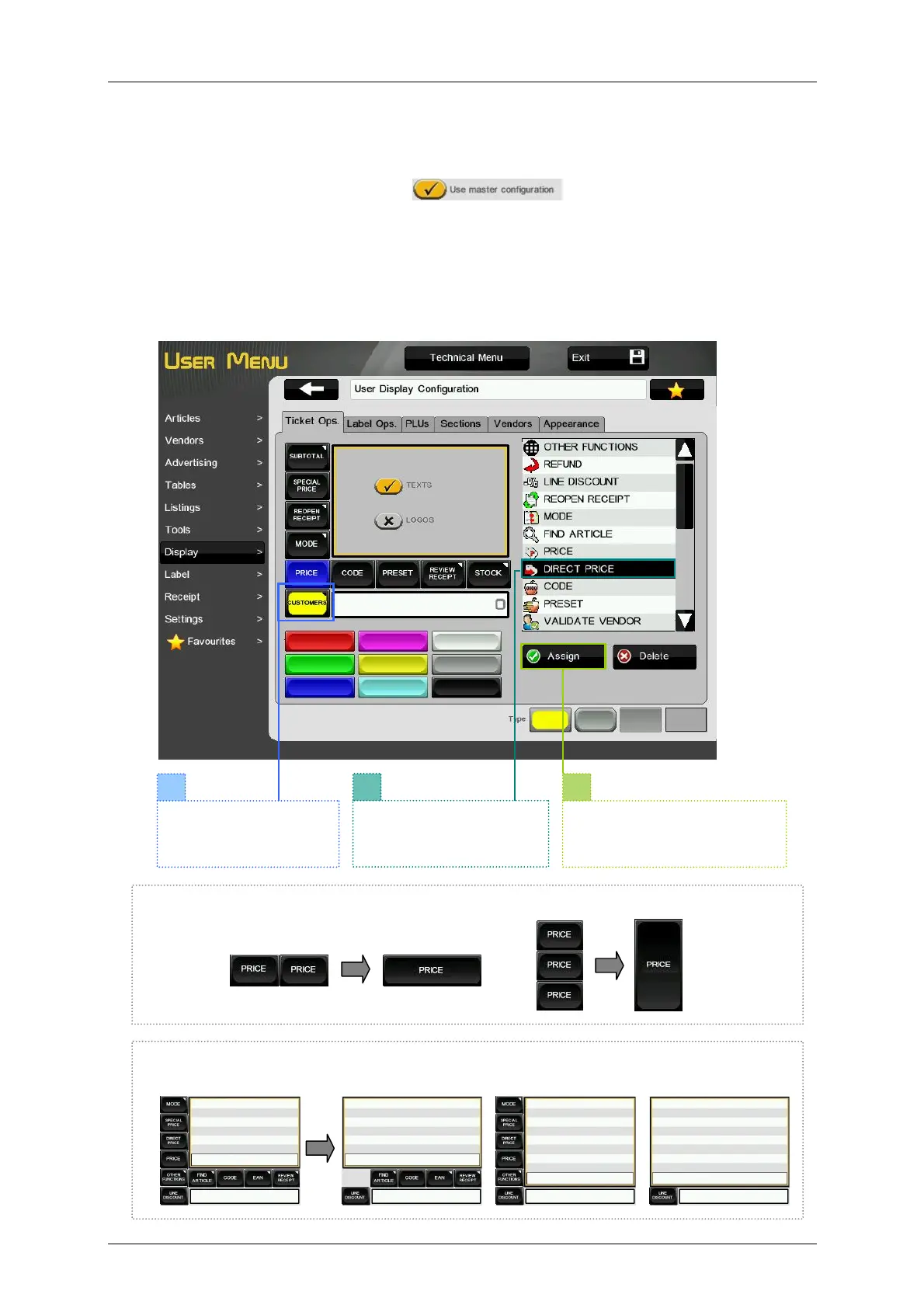
This menu allows to customize the interface of the user display in the different working modes. The
different keypads are resized automatically depending on the required space for an optimal viewing.
If the scale is configured as slave, the button will be enabled. This option allows us
to use the same display configuration as in the master scale. If we want to use a different configuration,
the options are shown in several tabs:
3.7.2.1.Ticket Operations
This menu allows to customize the programmable keys (functions) of the display in receipt working mode.
It is possible to assign a function, a color and a style to the programmable keys. If we are working on
Receipt-1 mode the tab will show as below. To assign a function to a key:
If we delete all horizontal or vertical keys (or both) next to the receipt/label preview, this preview
will get larger.
If we program consecutive keys without an asigned function or with the same function, it will
result a larger key.
1
3
2
Select the key to edit. It
will be highlighted in
yellow.
Select the new function
to be assigned to the key.
It will be marked in black.
Press the key Assign. The
key will be configured with the
assigned function.



 To Next Page