OPERATOR’S MANUAL
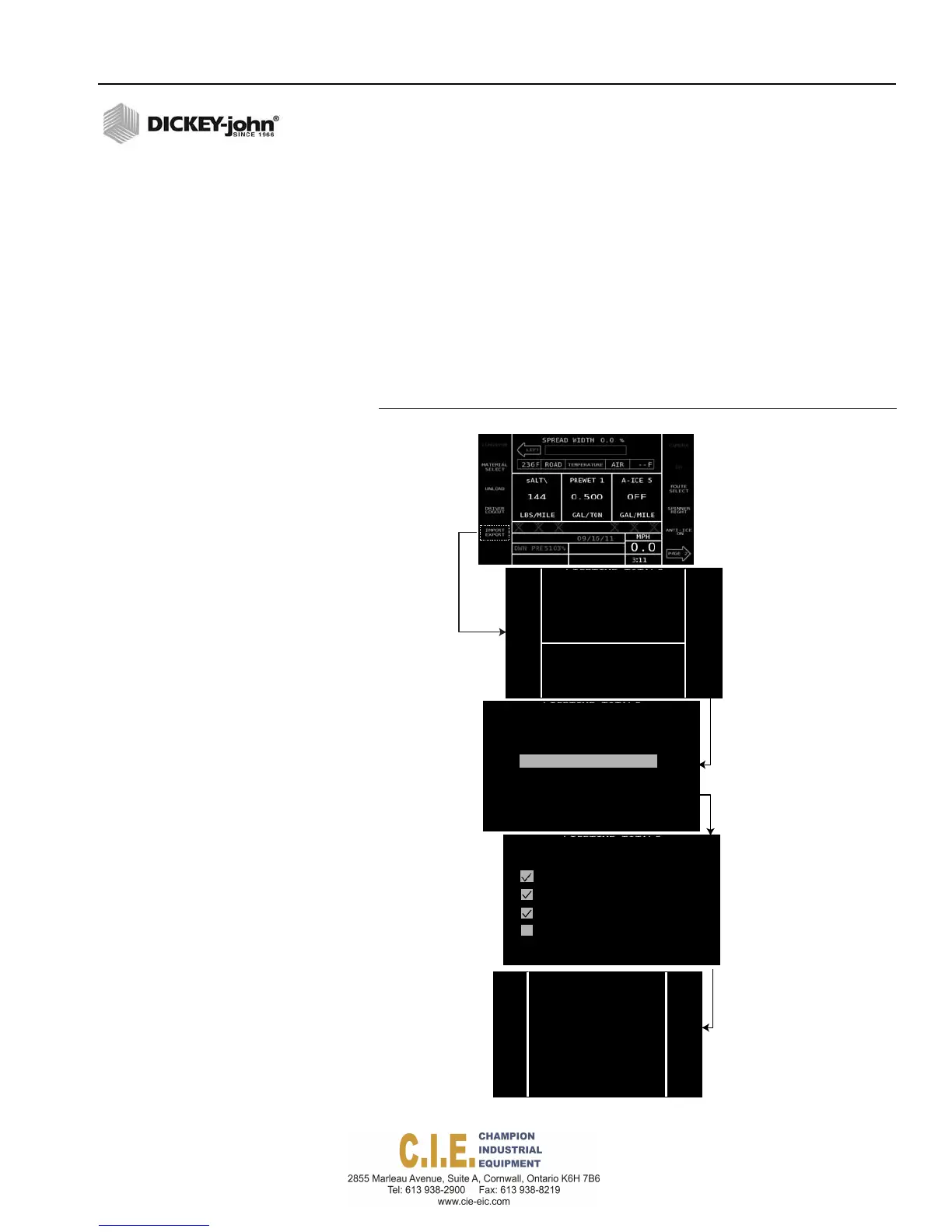
IMPORT CONFIGURATION FILES
To import Configuration Files:
1.
Insert USB memory device into USB port.
2.
At the Operate screen an Import/Export button appears after the USB
memory device is inserted.
3.
At the Import/Export screen, select Config USB Import button. This
button only appears if files exist on the USB memory device.
4.
Select the desired file to import and press the Import File button.
5.
Select the desired file types to import and press the Import Now
button.
– A Data Import screen indicates file(s) are loaded.
Figure 106
Importing Configuration Files
Flex4 Pro
TM
Control System
6010541 Rev A
IMPORT/EXPORT DATA FILES / 125
CONFIGURATION
IMPORT/EXPORT
CONFIG
USB
IMPORT
CONFIG
USB
EXPORT
DATA
USB
EXPORT
LOGGED DATA
BACK
IMPORT FROM USB
SELECT FILE FROM BELOW LIST
Dj_Flex4_Settings_42067.xml
IMPORT
FILE
BACK
IMPORT SETTINGS
SELECT DATA TO BE IMPORTED
CONFIGURATIONS
ROUTE NAMES
DRIVER NAMES
PASSCODES
IMPORT
now
USETERMINALKEYSTOSELECTDATA
BACK
DATA
IMPORT
DONE
BACK



 To Next Page