OPERATOR’S MANUAL
Flex4 Pro
TM
Control System
6010541 Rev A
DISPLAY PCECU
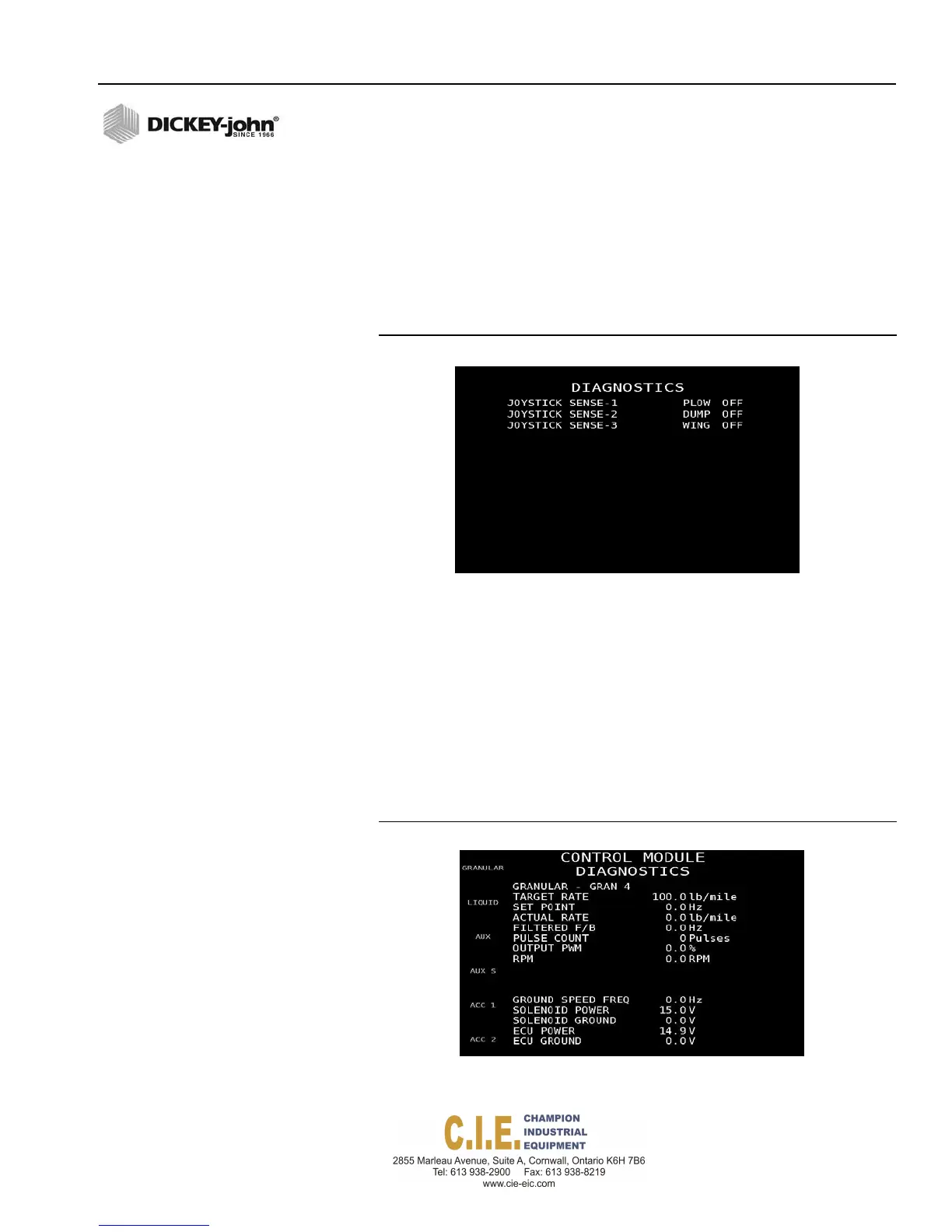
The PCECU screen indicates the current state of the joystick inputs as
either ON or OFF. Pressing the appropriate joystick function while on this
screen indicates if the joystick is functioning properly.
– An incorrect state on the screen that doesn’t correspond with the
actual joystick function could indicate the joystick is not wired
correctly or a defective joystick.
Figure 111
PCECU Diagnostics Screen
CONTROL MODULE
The Control Module Diagnostics screen provides sensor readings for
control channels, auxiliary channel, spinner, and accessory sensors. Any
misreadings could indicate a control module problem, a faulty sensor, or
bad sensor connection.
1.
At the Main Diagnostics screen, press 2 on the keyboard to display the
Control Module Diagnostics screen.
2.
Select the appropriate material (Granular, Liquid, Aux, Aux S), spinner,
or accessory sensor to perform the relevant diagnostic check.
Figure 112
Control Module Diagnostics Screen
DIAGNOSTICS / 131
DISPLAYPCECU



 To Next Page