OPERATOR’S MANUAL
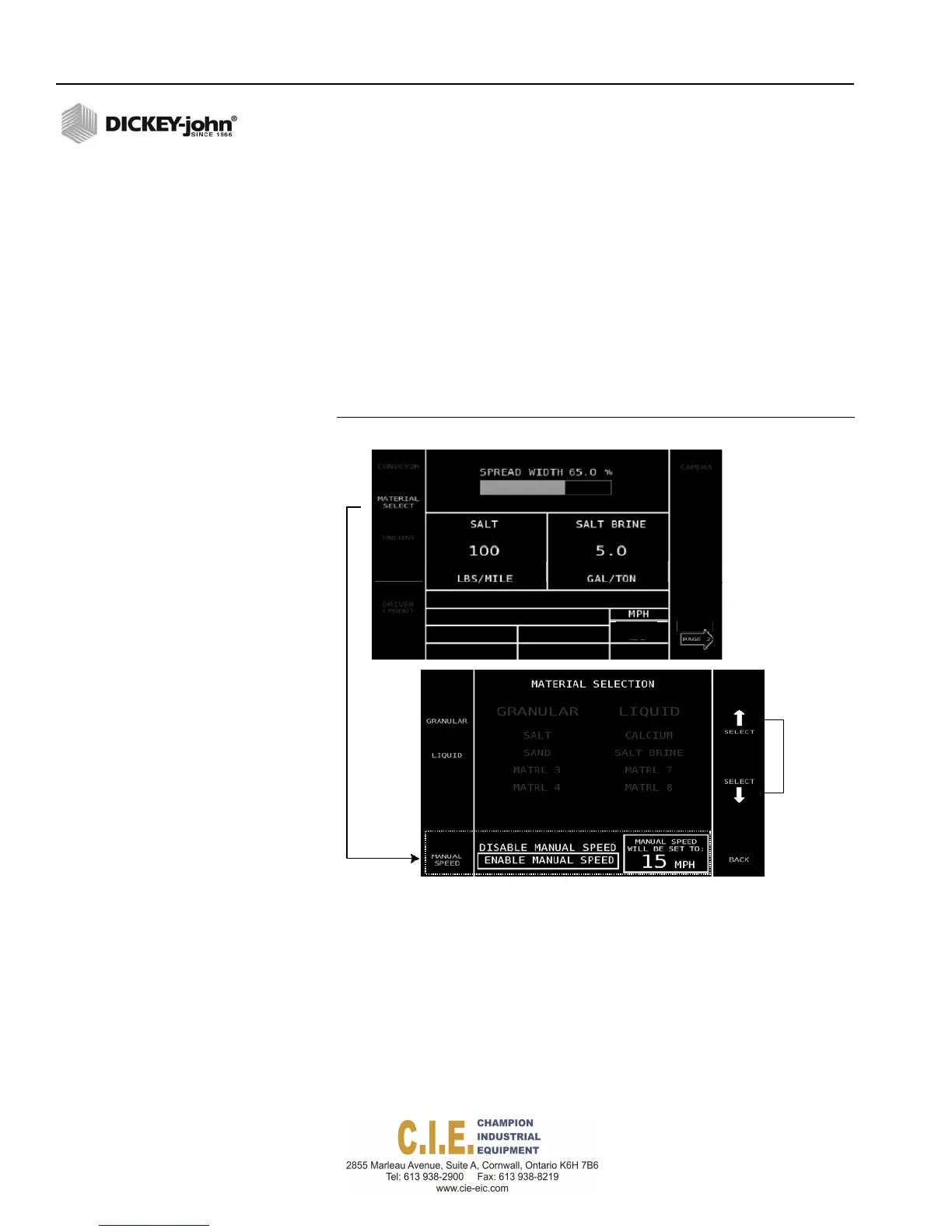
MANUAL GROUND SPEED OVERRIDE
Manual ground speed override is a manual override feature used when the
ground speed sensor has failed. A manual speed can be entered in setup
mode forcing the system to operate in manual speed mode and to spread
material at the specified rate.
To operate in Manual Override:
1.
At the Operate screen, press the Material Select button.
2.
At the Material Select screen, press the Manual Speed button.
Continue pressing the Manual Speed button until Enable Manual
Speed is highlighted.
3.
Press the Select Arrow buttons to increase/decrease manual speed.
Figure 35
Manual Override
Increase/
decrease
manual
speed
4.
Press the Back button to return to the Operate screen. Manual Speed
is now enabled and displays on the Operate screen.
When operating in manual mode, the system is turned on and off using the
Auto On/Off button.
IMPORTANT: The Pause button is functional in manual mode however
miles driven during Pause mode will not be added to
total miles driven while operating with manual ground
speed enabled.
38 / OPERATION
Flex4 Pro
TM
Control System
6010541 Rev A
CH
ROUTE
SELECT
DRIVER
LOGIN
SPINNER
ANTI‐ICE
O.O



 To Next Page