OPERATOR’S MANUAL
NOTE: Calibration Gate Height only
appears on this screen when
enabled and configured at the
Accessory Sensors (F9)
screen.
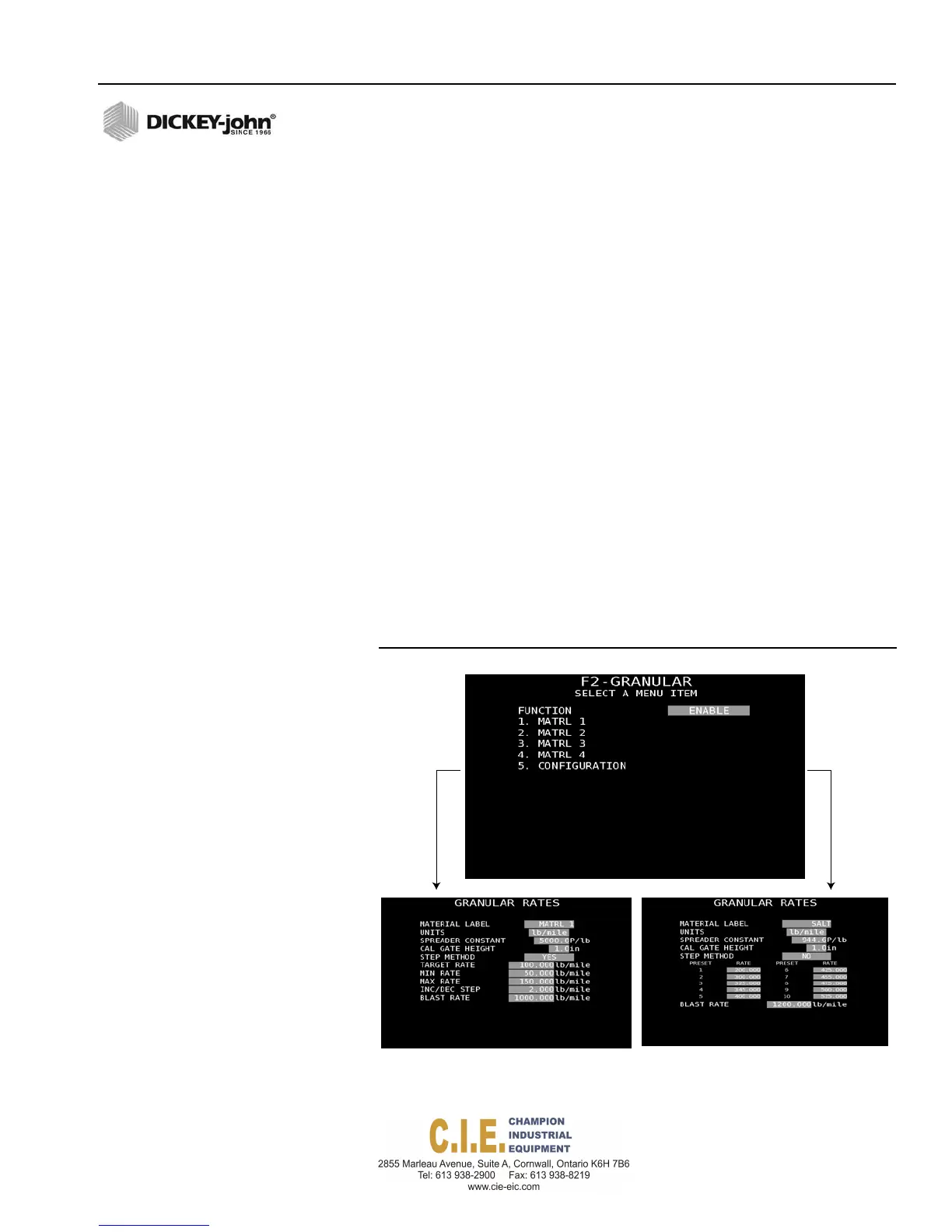
GRANULAR CHANNEL SETUP (F2)
Granular channel setup screen defines the set of values of four material
application rates, min/max limits, and blast rates as well as the configuration
parameters for hydraulic valves and sensors.
Granular channel parameters include:
•
Material Label
•
Units
•
Spreader Constant
•
Calibration Gate Height
•
Application Rate Method (Step or Rate)
•
Blast Rate
The channel’s current status displays as Enabled or Disabled.
To Change the Channel’s Status:
1.
Use the Up or Down arrow keys on the keyboard to select and
highlight the function box.
2.
Press the Enter key and select the desired function status as either
Enable or Disable.
3.
Press the Enter key to accept.
4.
To define material rates, press the respective item number (1 - 4) using
the keyboard to display the Granular Rates screen.
5.
Press the Enter key to open a menu selection box to display and
select the appropriate parameters.
Figure 52
Granular Channel Setup
STEPMETHOD
RATE METHOD
Flex4 Pro
TM
Control System
6010541 Rev A
SYSTEM PROGRAMMING / 55



 To Next Page