Liquidchannel
CHON
DRIVER
LOGIN
OUTE
SELECT
DRIVER
LOGIN
SPINNER
ANTI‐ICE
OPERATOR’S MANUAL
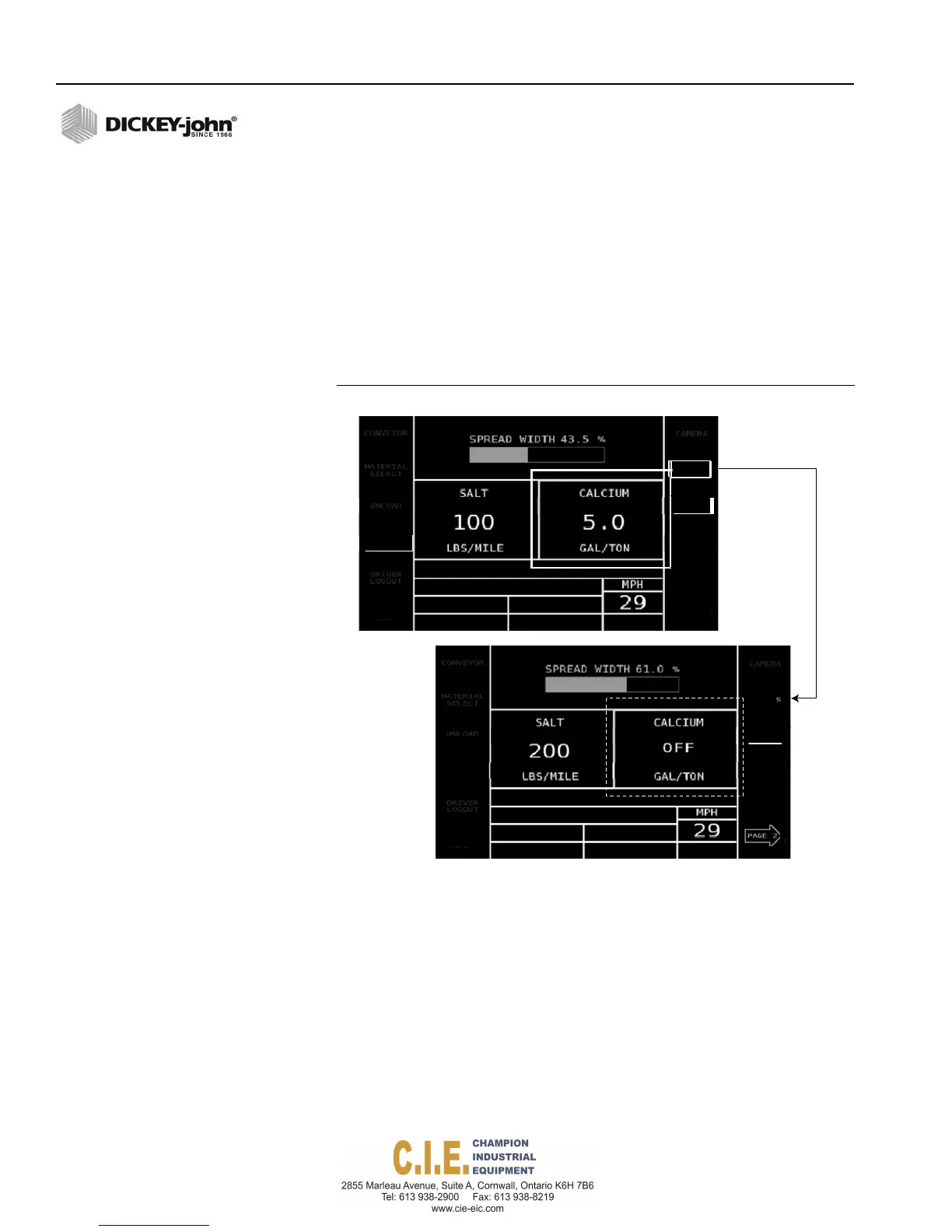
TURN OFF AN ACTIVE CHANNEL
A channel can be turned off while in Auto mode.
1.
Push in the spreader width knob on the switch module to highlight the
desired channel/material. To select the liquid channel, an additional
press is required.
2.
Press the CH OFF button. If a granular channel is turned off, any active
material spreading in gallons/ton will also turn off simultaneously. A
liquid channel can be independently turned off and the granular
channel will stay active.
3.
Press the CH ON button to re-activate the channel.
Figure 33
Turning a Channel Off
CHOFF
ROUTE
SELECT
SPINNER
ANTI‐ICE
UNLOAD MATERIAL
The Unload feature quickly removes remaining material from the vehicle.
Vehicle must be stationary for operation to begin.
To Unload Material:
1.
Position vehicle to appropriate location with ground speed at 0.
2.
At the Operate screen, press the Unload button.
3.
At the Material Select screen, choose materials by pressing the
corresponding button. Selected materials for removal displays at
center of screen, i.e. “Salt Selected”.
4.
Press the Start button to begin unload.
5.
Press the Stop button when unload is complete.
36 / OPERATION
Flex4 Pro
TM
Control System
6010541 Rev A



 To Next Page