OPERATOR’S MANUAL
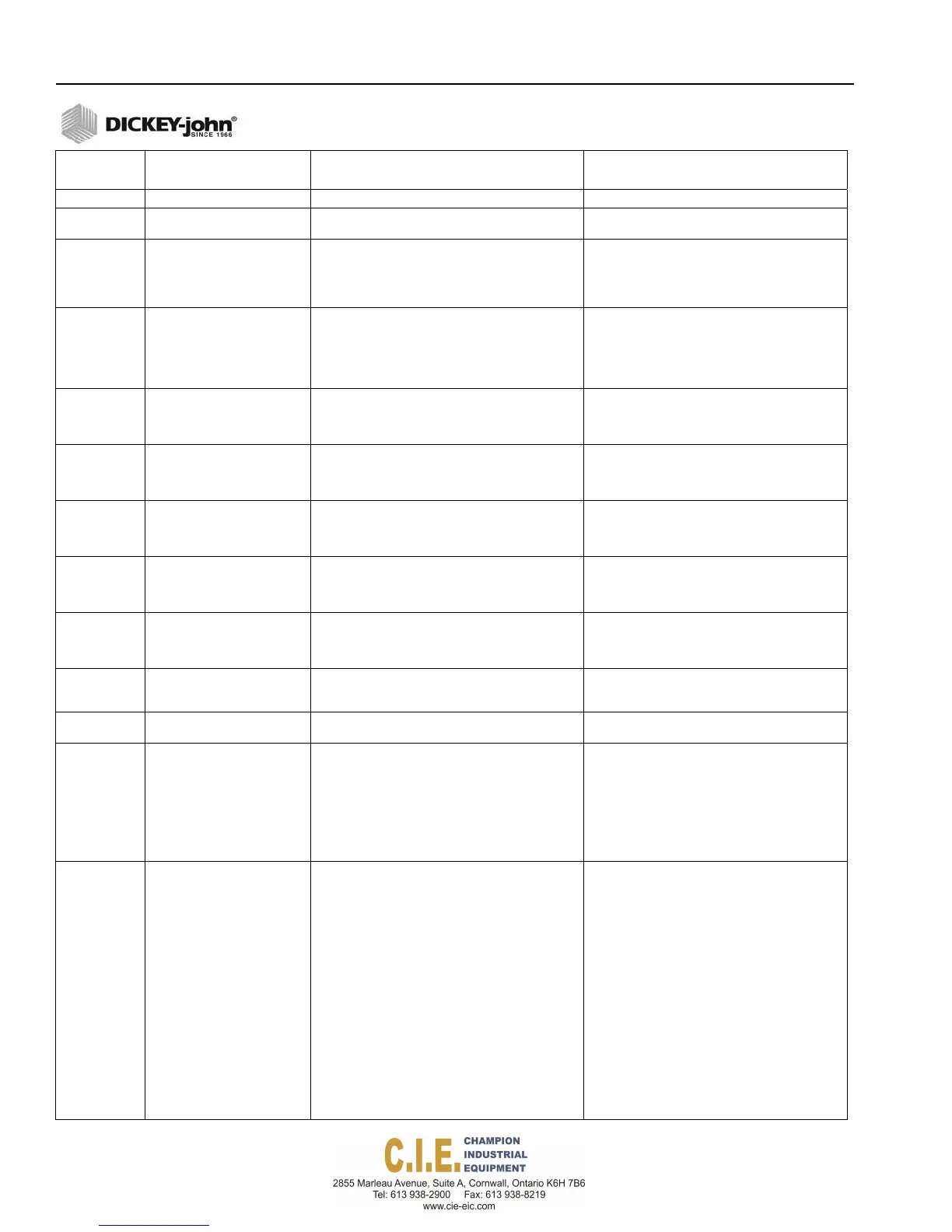
ERROR
CODE
ERROR
PROBABLE CAUSE
CORRECTIVE ACTION
10 Rate Controller Stack Alarm Internal system software error. Cycle system power off and on.
11 Rate Controller System
Stack Alarm
Internal system software error. Cycle system power off and on.
50 Rate Controller Offline Alarm Communication to the rate controller has been lost.
1.
Verify rate control module has a good
connection.
2.
Inspect CAN harness for damage.
3.
Inspect ECU harness and fuse for damage.
4.
Inspect ECU for damage.
51 Rate Controller Intermittent
Alarm
Communication to the rate controller was lost but
has been re-established.
Check for intermittent connections.
1.
Verify rate control module has a good
connection.
2.
Inspect CAN harness for damage.
3.
Inspect ECU harness and fuse for damage.
4.
Inspect ECU for damage.
52 Remote Operator Controller
Offline Alarm
Communication to the switch module has been lost.
1.
Verify switch module is connected properly.
2.
Inspect CAN harness for damage.
3.
Inspect ECU harness and fuse for damage.
4.
Inspect ECU for damage
53 Output Module Offline Alarm Output member module is no longer online.
1.
Verify output module is connected properly.
2.
Inspect CAN harness for damage.
3.
Inspect ECU harness and fuse for damage.
4.
Inspect ECU for damage
54 Output Module Intermittent
Alarm
Communication to the output module was lost but
has been re-established.
Verify output module is connected properly.
2.
Inspect CAN harness for damage.
3.
Inspect ECU harness and fuse for damage.
4.
Inspect ECU for damage
55 PCECU Offline Alarm Member module is no longer online.
1.
Verify module is connected properly.
2.
Inspect CAN harness for damage.
3.
Inspect ECU harness and fuse for damage.
4.
Inspect ECU for damage
56 PCECU Intermittent Alarm Communication to the member module was lost but
has been re-established.
Verify module is connected properly.
2.
Inspect CAN harness for damage.
3.
Inspect ECU harness and fuse for damage.
4.
Inspect ECU for damage
200
Auto has been turned off
alarm
Master switch was left on (auto) and is now in a
state that does not allow the system to run.
Turn Auto off before entering setup mode with
keyboard. Check connections to feedback
sensors.
222
Valve Calibration Abort Alarm Control channel valve calibration has been aborted
due to an error.
Try calibration again.
206
“Channel” Auto Open (In
Manual Control)
A manual override state occurs when an application
rate sensor or flow meter fails. Manual override
allows material to be spread at the same
programmed rate without interruption. When a
failure occurs, the rate decreases to “0” and
“Manual” replaces the material name. Rate returns
from “0” back to target rate while manual override is
enabled. Material may be over or under applied in
this mode.
Check feedback sensors, i.e., application rate
sensors and flow meters.
208
“Channel” Application Rate
error (granular)
A fully open valve is indicated but the target APR
cannot be achieved.
1.
Reduce the truck ground speed to allow the
system to catch up and the error to clear.
2.
Shift to a lower gear to increase engine RPM
and hydraulic pump rotation.
3.
Check hydraulic disconnects and filter.
4.
Ensure correct spreader constant is
programmed into console. Check original setting
or run a granular calibration.
5.
Incorrect PWM SAT setting (See Granular
Configuration screen). Compare against original
setting or run system response on the granular
channel setting.
6.
Check for insufficient hydraulic oil flow at
normal engine RPM.
7.
Check spreader valve, electrical connections to
the valve coil, resistance of the coils (See
manufacturers specifications), and verify voltage
from control console.
138 / TROUBLESHOOTING
Flex4 Pro
TM
Control System
6010541 Rev A



 To Next Page