OPERATOR’S MANUAL
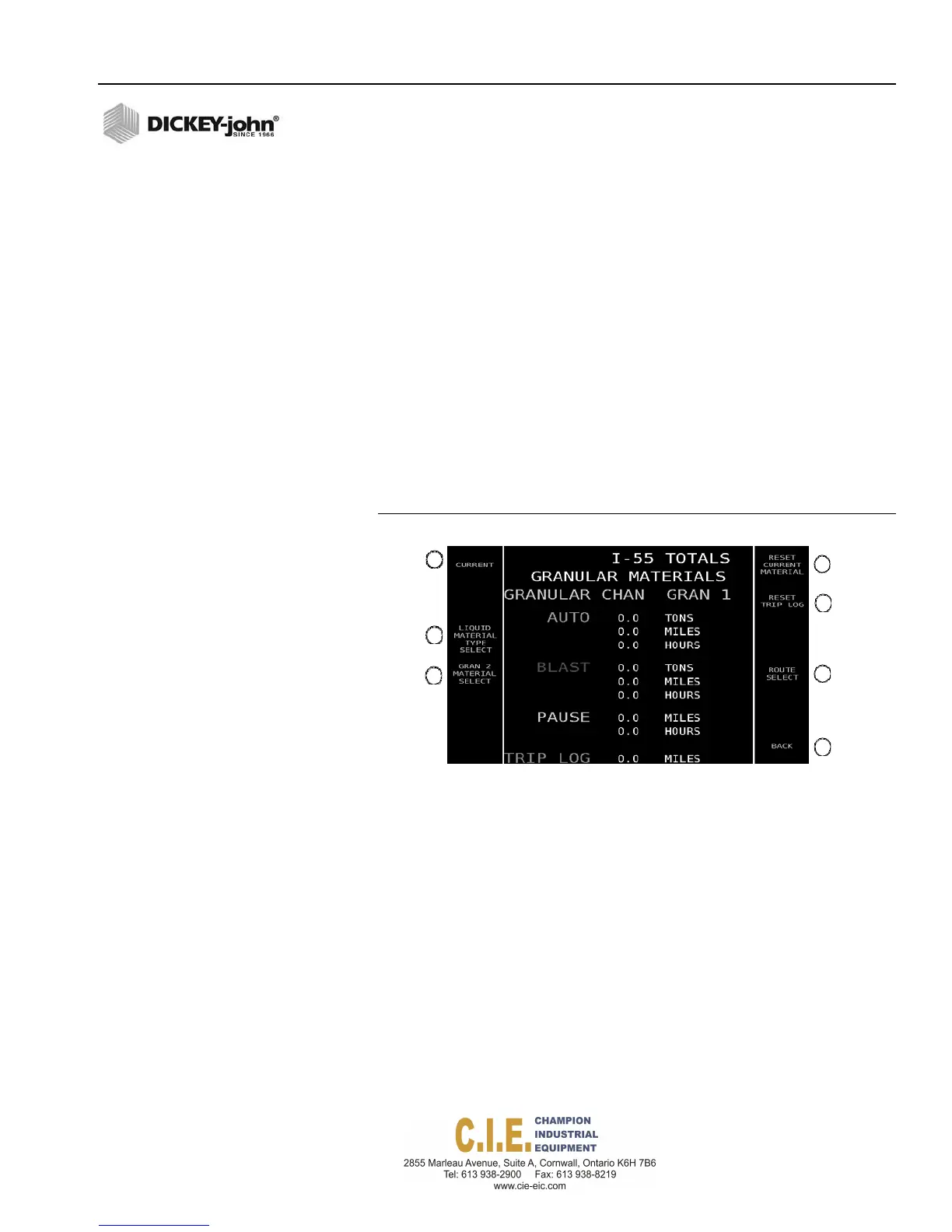
To view Totals:
At the Operate screen, press the Totals button.
1.
Current, Season, and Route button toggles between Current,
Season, and Route run total screens.
2.
Material Type Select button toggles between granular and liquid
materials.
3.
Material Select button scrolls through and displays totals for each
material.
4.
To reset totals, press the Reset Current Material button.
5.
Reset Trip Log button clears accumulated miles to zero.
6.
Route Select button toggles and displays totals for each route.
7.
Back button returns to previous screen.
IMPORTANT: Season totals are cleared at the F12 Data Logging/
Operational Totals screen. Current and Route totals are
clearable at this screen, if the capability is enabled at
F12 Operational Totals.
Figure 46
Total Screen
Flex4 Pro
TM
Control System
6010541 Rev A
OPERATION / 45
1
4
5
2
3
6
7



 To Next Page