OPERATOR’S MANUAL
IMPORTANT: The maximum or minimum rates may not be reached if
the % increase or decrease, based off the target rate,
exceeds the maximum or minimum rate limits set.
7.
Enter a desired blast rate that applies a higher-than-normal, spot
application when the Blast button is pressed during operation.
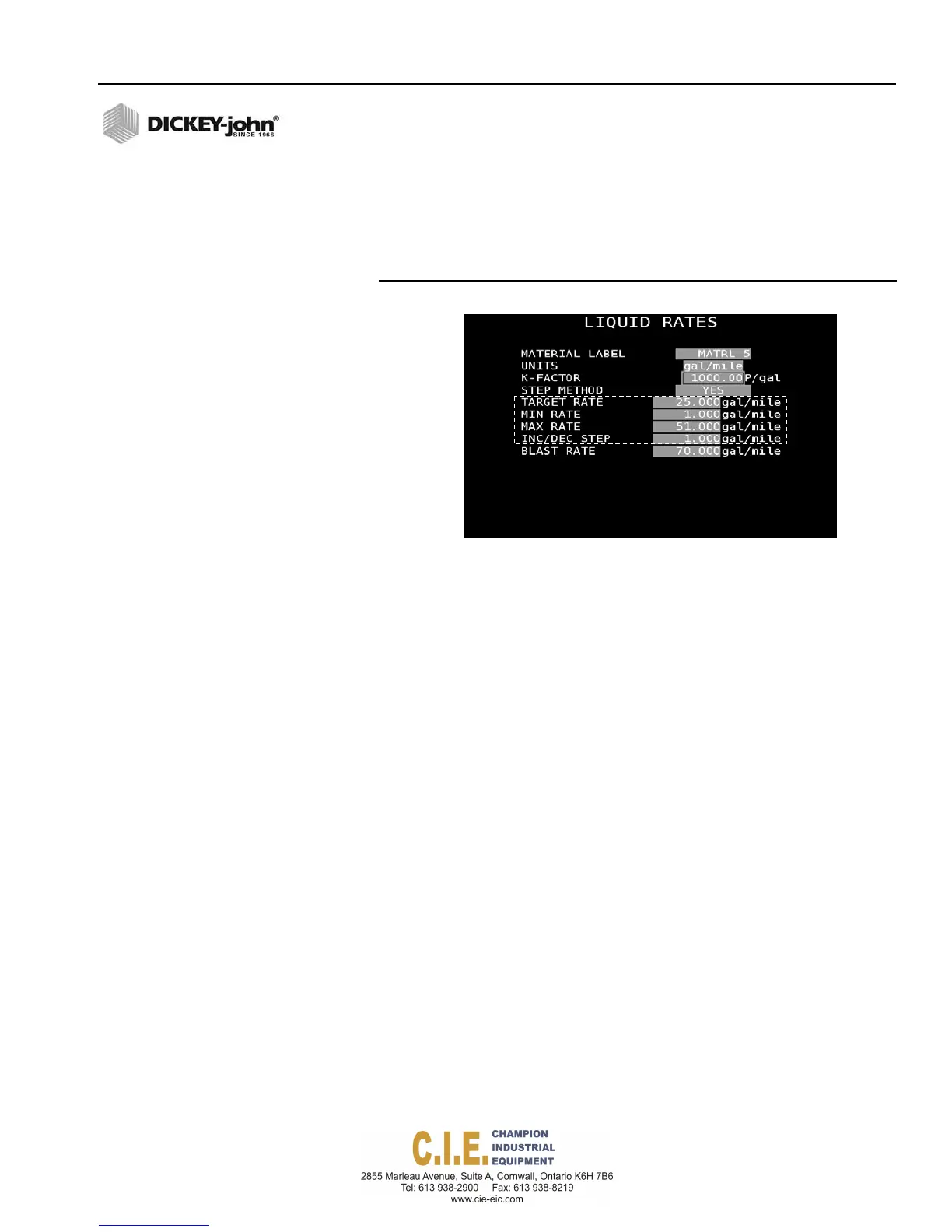
Figure 58
STEP Method Enabled
TARGET RATE
Target rate establishes the desired amount of material to be applied in
gallons/mile by a control channel.
MINIMUM/MAXIMUM RATE
The minimum and maximum rates establish the minimum and maximum
application rates that the control will allow. Target rate cannot be
decremented to a value lower than this established minimum and maximum
rates.
INC/DEC STEP
The increment/decrement rate establishes the amount of change of the
entered target rate that is applied each time the Rate Increase/Decrease
button is pressed.
BLAST RATE
Blast Rate defines a higher than normal, spot-application rate applied when
the Blast button is pressed.
Rate Method:
Rate Method allows ten user-defined application rates to be entered. Rates
can be adjusted during operation using the Rate Increase/Decrease
buttons on the switch module.
To select the Rate Method:
1.
Highlight the Step method selection box and press the Enter key on
the keyboard.
2.
Select No and press the Enter key again.
Flex4 Pro
TM
Control System
6010541 Rev A
SYSTEM PROGRAMMING / 65



 To Next Page