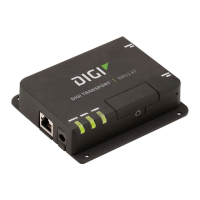
TransPort WR31 hardware
Digi TransPort User Guide 48
Ethernet Ports (2) RJ-45ports
Physical Layer 10/100Base-T
Data Rate 10/100 Mbps (auto-sensing)
Mode Full or half duplex (auto-sensing)
Interface Auto MDI/MDIX
Serial Ports (1) RS-232/422/485
DTE/DCE DCE
Signal Support TXD, RXD, RTS, CTS, DTR, DCD, DSR, RI
Flow Control
• Software (XON/XOFF)
• Hardware supported
COM Port Redirector
Digi RealPort
®
Digital and analog I/O
(see also TransPort
WR31 digital and
analog inputs and
outputs on page 41)
Connector (5) pin screw-down terminal block
Digital 0-30VDC. (2) I/O, software-selectable
Analog
• (1) analog input
• 4-20mA or 0-10V
• Software Selectable
• 12 bit resolution
USB Ports (1) USB Type A
Standard USB2.0
Physical Dimensions (L x W x H) 5 in x 3.5 in x 2 in (12.7 cm x 8.9 cm x 5.1cm);
Weight 1.1 lb. (.5kg)
Status LEDs
•Power
•Service
•WWAN
• Signal strength (3x)
• System (user-programmable LED)
Enclosure Aluminum
Mounting DIN rail, wall, shelf mount, or NEMA enclosure mount
Power requirements Power input 9-30VDC
Power connector Screw down removable terminal block
Power consumption Typical 4 W (Max 6 W)
Category Specification Value



 To Next Page