C
HAPTER
4
| Basic Management Tasks
Configuring Support for Jumbo Frames
– 116 –
WEB INTERFACE
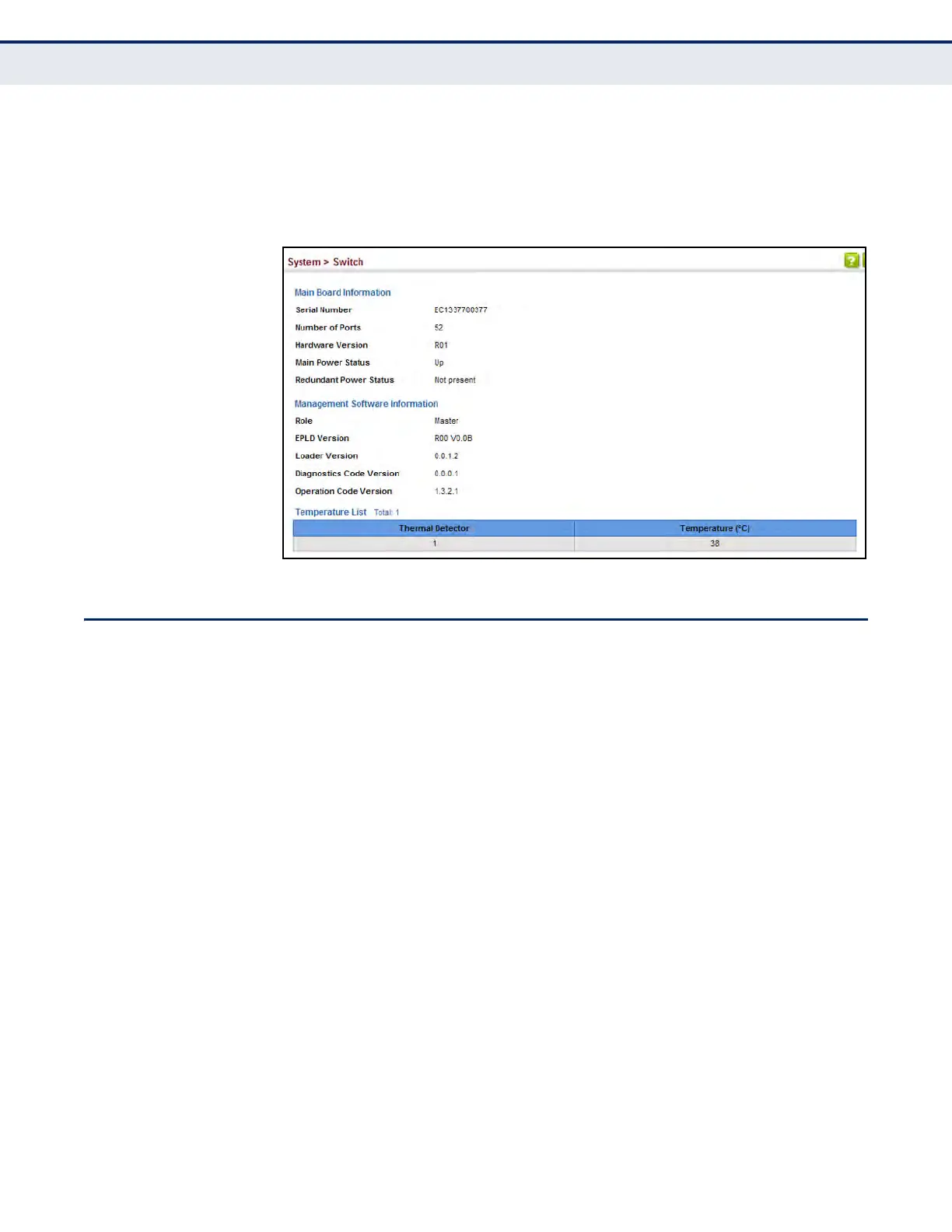
To view hardware and software version information.
1. Click System, then Switch.
Figure 4: General Switch Information
CONFIGURING SUPPORT FOR JUMBO FRAMES
Use the System > Capability page to configure support for layer 2 jumbo
frames. The switch provides more efficient throughput for large sequential
data transfers by supporting jumbo frames up to 10240 bytes for Gigabit
Ethernet and 10 Gigabit Ethernet ports or trunks. Compared to standard
Ethernet frames that run only up to 1.5 KB, using jumbo frames
significantly reduces the per-packet overhead required to process protocol
encapsulation fields.
CLI REFERENCES
u "System Management Commands" on page 703
USAGE GUIDELINES
To use jumbo frames, both the source and destination end nodes (such as
a computer or server) must support this feature. Also, when the connection
is operating at full duplex, all switches in the network between the two end
nodes must be able to accept the extended frame size. And for half-duplex
connections, all devices in the collision domain would need to support
jumbo frames.
PARAMETERS
The following parameters are displayed:
u Jumbo Frame – Configures support for jumbo frames.
(Default: Disabled)




 To Next Page