C
HAPTER
17
| IP Services
Configuring the PPPoE Intermediate Agent
– 636 –
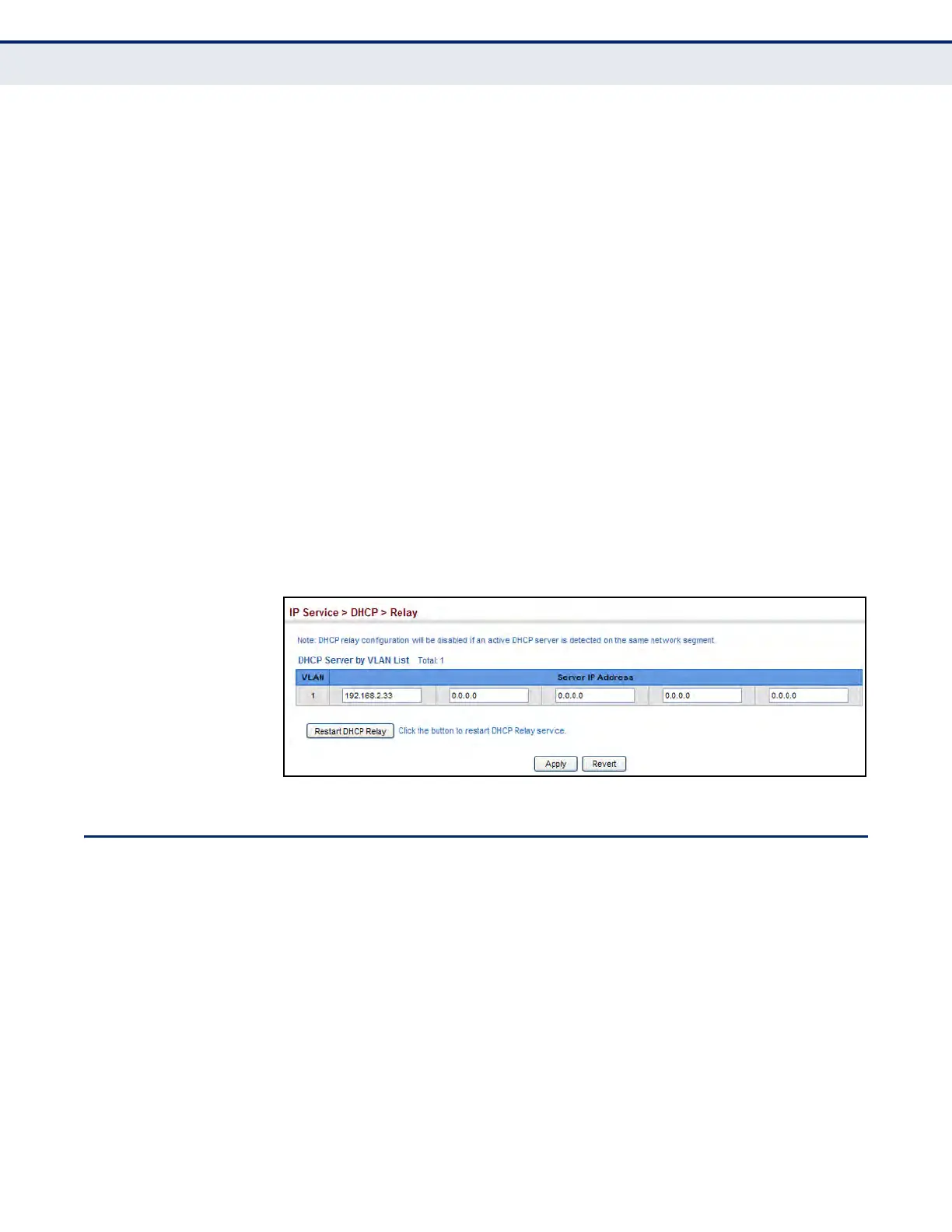
u DHCP relay configuration will be disabled if an active DHCP server is
detected on the same network segment.
PARAMETERS
These parameters are displayed:
u VLAN ID – ID of configured VLAN.
u Server IP Address – Addresses of DHCP servers to be used by the
switch’s DHCP relay agent in order of preference.
u Restart DHCP Relay – Use this button to re-initialize DHCP relay
service.
WEB INTERFACE
To configure DHCP relay service:
1. Click IP Service, DHCP, Relay.
2. Enter up to five IP addresses for any VLAN.
3. Click Apply.
Figure 390: Configuring DHCP Relay Service
CONFIGURING THE PPPOE INTERMEDIATE AGENT
This section describes how to configure the PPPoE Intermediate Agent
(PPPoE IA) relay parameters required for passing authentication messages
between a client and broadband remote access servers.
CONFIGURING PPPOE
IA G
LOBAL SETTINGS
Use the IP Service > PPPoE Intermediate Agent (Configure Global) page to
enable the PPPoE IA on the switch, set the access node identifier, and set
the generic error message.
CLI REFERENCES
u "pppoe intermediate-agent" on page 867
u "pppoe intermediate-agent port-format-type" on page 869
u "show pppoe intermediate-agent info" on page 872













 To Next Page