C
HAPTER
5
| Interface Configuration
Traffic Segmentation
– 181 –
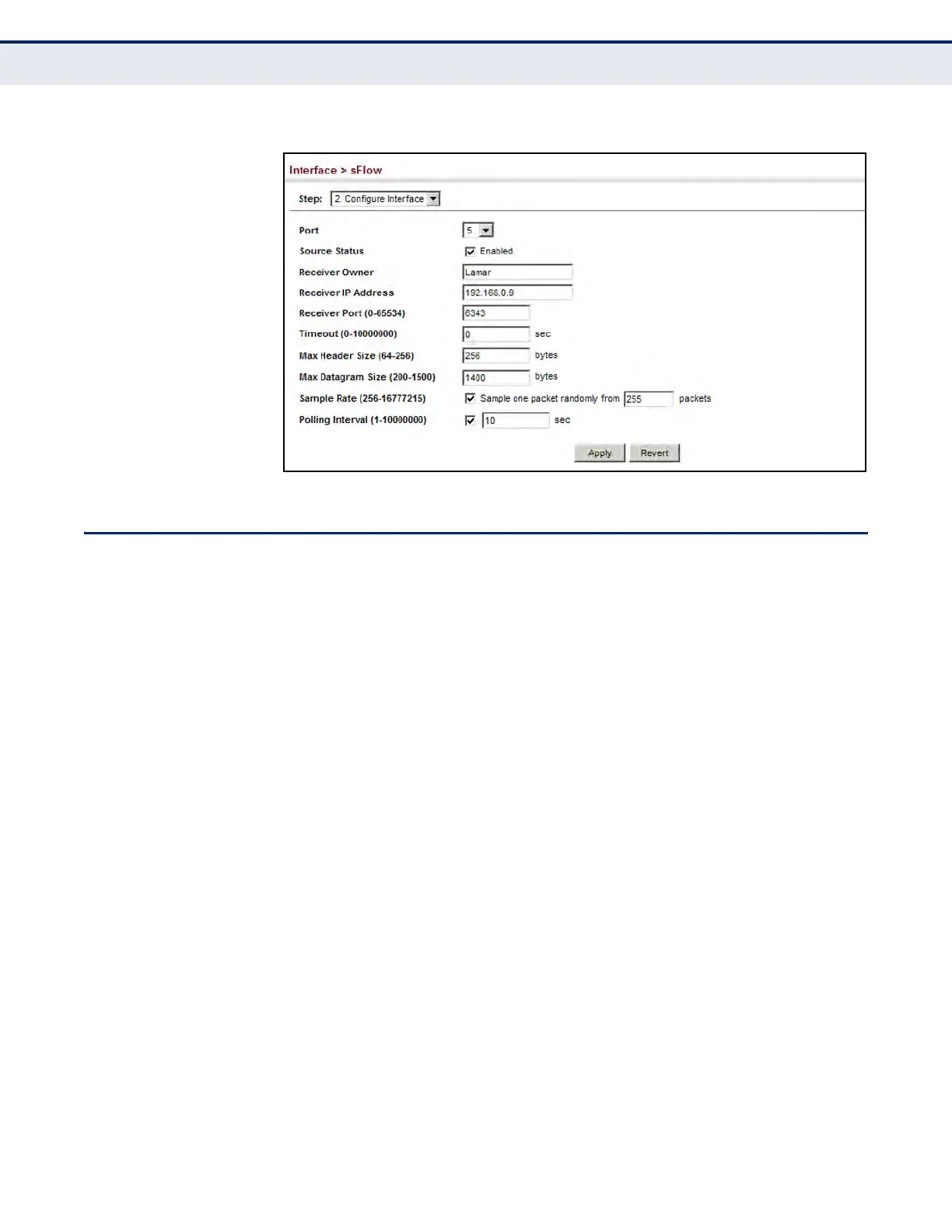
Figure 59: Configuring Interface Settings for Traffic Flow Sampling
TRAFFIC SEGMENTATION
If tighter security is required for passing traffic from different clients
through downlink ports on the local network and over uplink ports to the
service provider, port-based traffic segmentation can be used to isolate
traffic for individual clients. Data traffic on downlink ports is only forwarded
to, and from, uplink ports.
Traffic belonging to each client is isolated to the allocated downlink ports.
But the switch can be configured to either isolate traffic passing across a
client’s allocated uplink ports from the uplink ports assigned to other
clients, or to forward traffic through the uplink ports used by other clients,
allowing different clients to share access to their uplink ports where
security is less likely to be compromised.
ENABLING TRAFFIC
SEGMENTATION
Use the Interface > Traffic Segmentation (Configure Global) page to enable
traffic segmentation.
CLI REFERENCES
u "Configuring Port-based Traffic Segmentation" on page 1130
PARAMETERS
These parameters are displayed:
u Status –
Enables port-based traffic segmentation. (Default: Disabled)
u Uplink-to-Uplink Mode – Specifies whether or not traffic can be
forwarded between uplink ports assigned to different client sessions.




 To Next Page