C
HAPTER
14
| Basic Administration Protocols
Link Layer Discovery Protocol
– 416 –
WEB INTERFACE
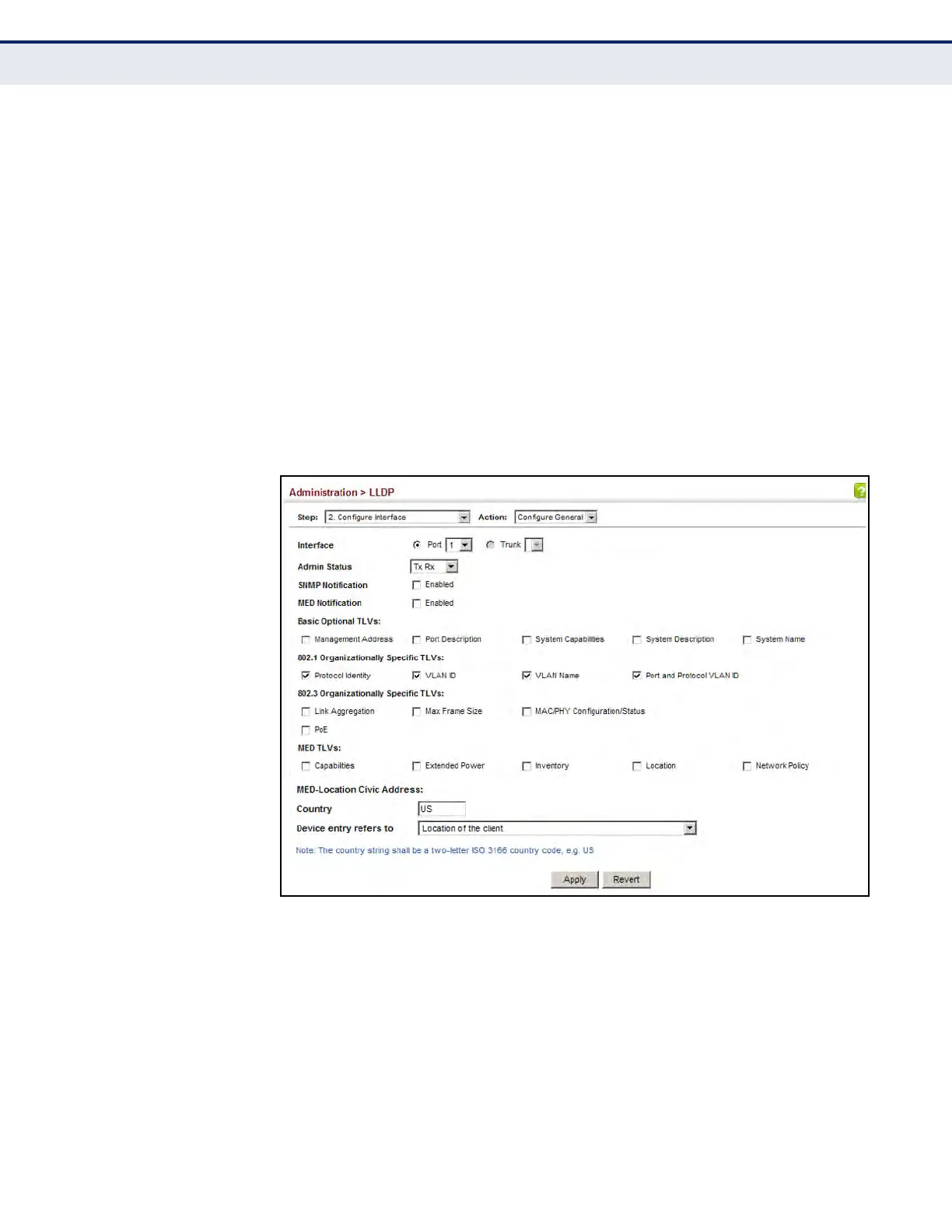
To configure LLDP interface attributes:
1. Click Administration, LLDP.
2. Select Configure Interface from the Step list.
3. Select Configure General from the Action list.
4. Select an interface from the Port or Trunk list.
5. Set the LLDP transmit/receive mode, specify whether or not to send
SNMP trap messages, and select the information to advertise in LLDP
messages.
6. Click Apply.
Figure 231: Configuring LLDP Interface Attributes
CONFIGURING LLDP
I
NTERFACE CIVIC-
A
DDRESS
Use the Administration > LLDP (Configure Interface – Add CA-Type) page
to specify the physical location of the device attached to an interface.
CLI REFERENCES
u "lldp med-location civic-addr" on page 1264
COMMAND USAGE
u Use the Civic Address type (CA-Type) to advertise the physical location
of the device attached to an interface, including items such as the city,
street number, building and room information. The address location is













 To Next Page