C
HAPTER
5
| Interface Configuration
Sampling Traffic Flows
– 179 –
CONFIGURING SFLOW
GLOBAL SETTINGS
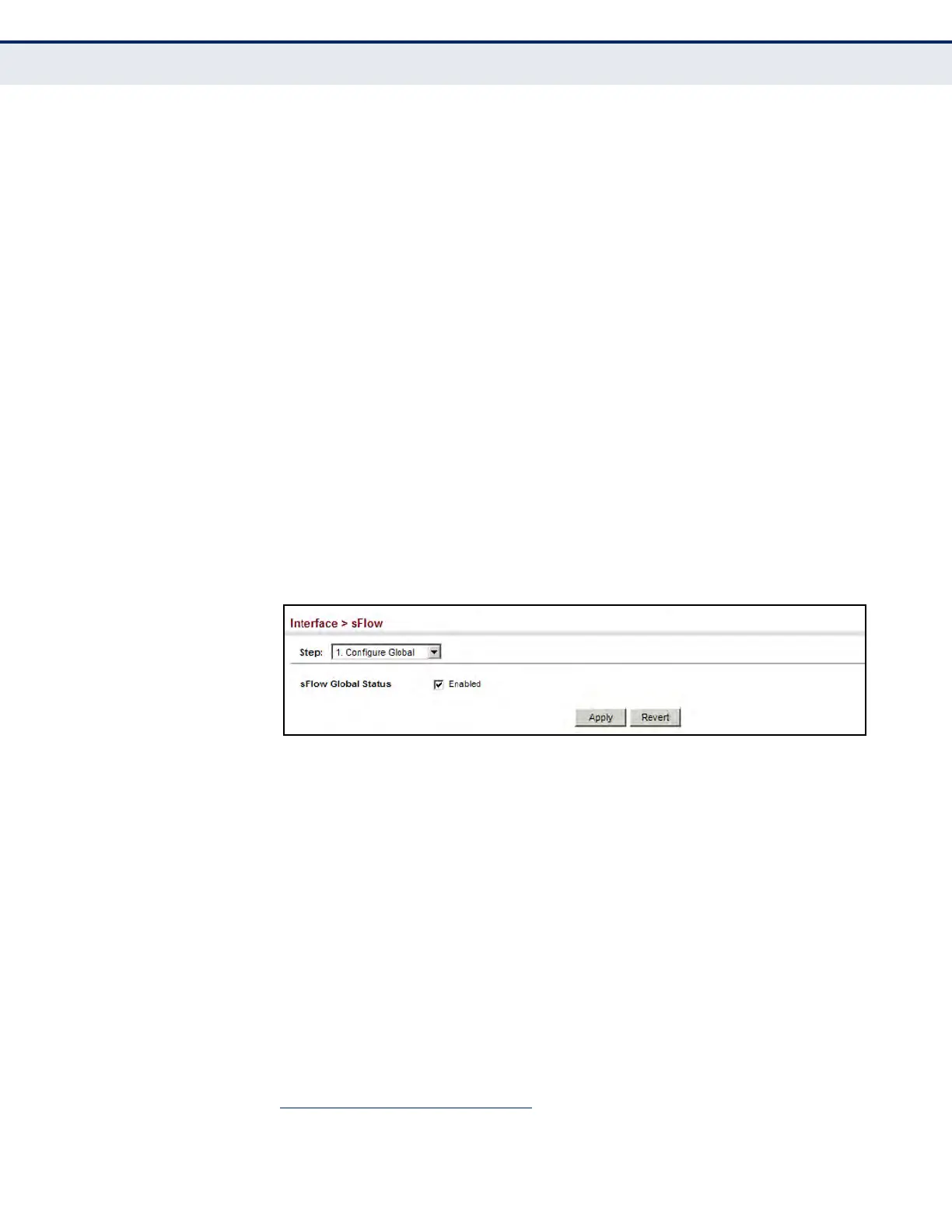
Use the Interface > sFlow (Configure Global) page to enable sFlow globally
for the switch.
CLI REFERENCES
u "sflow" on page 803
PARAMETERS
These parameters are displayed in the web interface:
u sFlow Global Status – Enables sFlow globally for the switch.
(Default: Disabled)
WEB INTERFACE
To configure flow sampling:
1. Click Interface, sFlow.
2. Select Configure Global from the Step list.
3. Enable or disable flow sampling.
4. Click Apply.
Figure 58: Enabling Traffic Flow Sampling
CONFIGURING SFLOW
INTERFACE SETTINGS
Use the Interface > sFlow (Configure Interface) page to set the source and
destination parameters for the sampled data, payload parameters, and
sampling interval.
CLI REFERENCES
u "Flow Sampling Commands" on page 803
PARAMETERS
These parameters are displayed in the web interface:
u Port – Choose the port to configure. (Range: 1-28/52; Default: 1)
u Source Status – Enables sFlow on the selected port.
u Receiver Owner
5
– The name of the receiver. (Range: 1-256
characters; Default: None)
5. Sampling must be disabled by setting the time out to 0 before these fields can be
configured.




 To Next Page