C
HAPTER
5
| Interface Configuration
Port Configuration
– 150 –
WEB INTERFACE
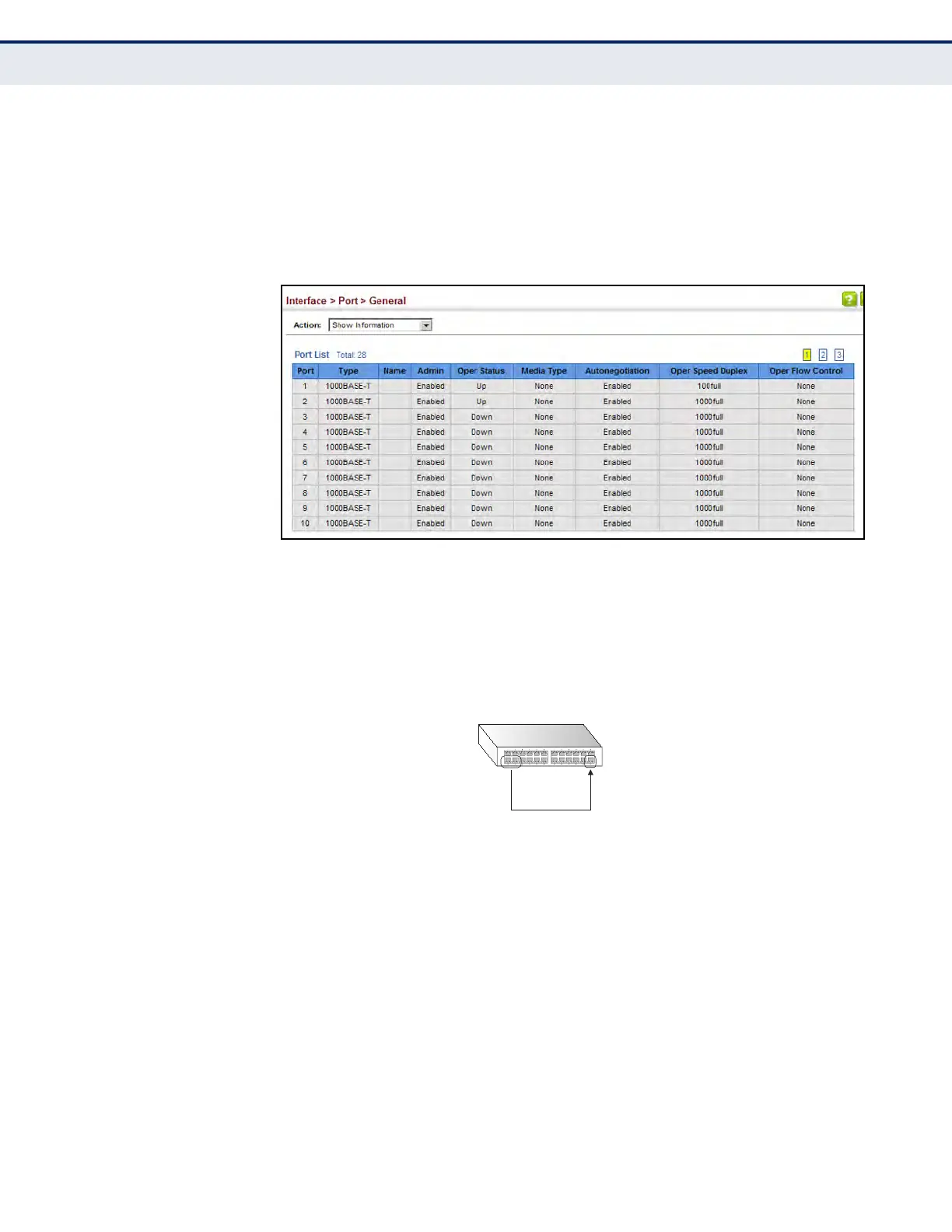
To display port connection parameters:
1. Click Interface, Port, General.
2. Select Show Information from the Action List.
Figure 31: Displaying Port Information
CONFIGURING LOCAL
PORT MIRRORING
Use the Interface > Port > Mirror page to mirror traffic from any source
port to a target port for real-time analysis. You can then attach a logic
analyzer or RMON probe to the target port and study the traffic crossing
the source port in a completely unobtrusive manner.
Figure 32: Configuring Local Port Mirroring
CLI REFERENCES
u "Local Port Mirroring Commands" on page 995
COMMAND USAGE
u Traffic can be mirrored from one or more source ports to a destination
port on the same switch (local port mirroring as described in this
section), or from one or more source ports on remote switches to a
destination port on this switch (remote port mirroring as described in
"Configuring Remote Port Mirroring" on page 152).
u Monitor port speed should match or exceed source port speed,
otherwise traffic may be dropped from the monitor port.
u When mirroring VLAN traffic (see "Configuring VLAN Mirroring" on
page 217) or packets based on a source MAC address (see "Configuring
Source
port(s)
Single
target
port













 To Next Page