C
HAPTER
13
| Security Measures
Configuring HTTPS
– 330 –
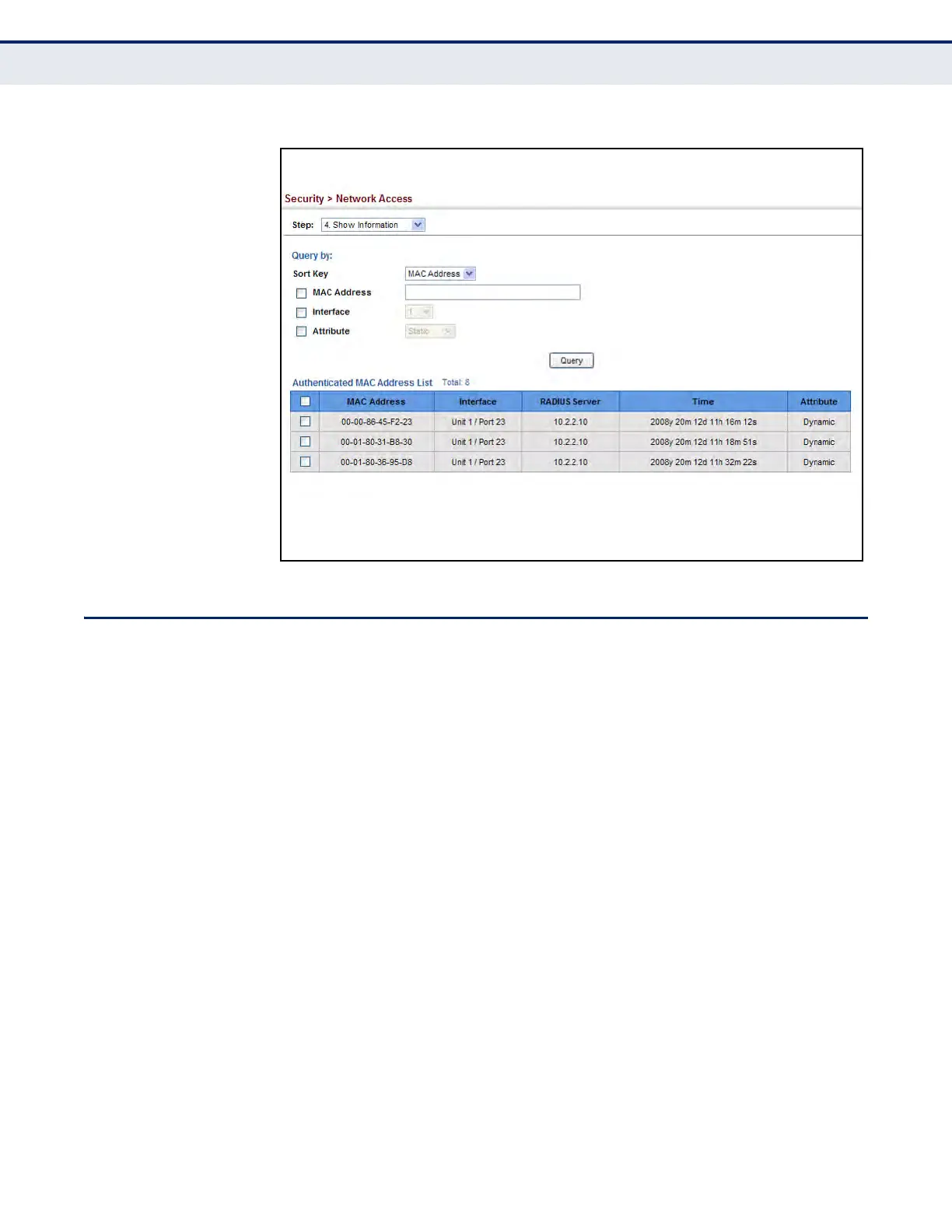
Figure 178: Showing Addresses Authenticated for Network Access
CONFIGURING HTTPS
You can configure the switch to enable the Secure Hypertext Transfer
Protocol (HTTPS) over the Secure Socket Layer (SSL), providing secure
access (i.e., an encrypted connection) to the switch’s web interface.
CONFIGURING
GLOBAL SETTINGS
FOR
HTTPS
Use the Security > HTTPS (Configure Global) page to enable or disable
HTTPS and specify the UDP port used for this service.
CLI REFERENCES
u "Web Server" on page 835
COMMAND USAGE
u Both the HTTP and HTTPS service can be enabled independently on the
switch. However, you cannot configure both services to use the same
UDP port. (HTTP can only be configured through the CLI using the ip
http server command described on page 836.)
u If you enable HTTPS, you must indicate this in the URL that you specify
in your browser: https://device[:port_number]
u When you start HTTPS, the connection is established in this way:
n
The client authenticates the server using the server’s digital
certificate.












 To Next Page