C
HAPTER
13
| Security Measures
IP Source Guard
– 390 –
URG flag to the target computer on TCP port 139 (NetBIOS), casing it
to lock up and display a “Blue Screen of Death.” This did not cause any
damage to, or change data on, the computer’s hard disk, but any
unsaved data would be lost. Microsoft made patches to prevent the
WinNuke attack, but the OOB packets. (Default: Disabled)
u WinNuke Attack Rate – Maximum allowed rate. (Range: 64-2000
kbits/second; Default: 1000 kbits/second)
WEB INTERFACE
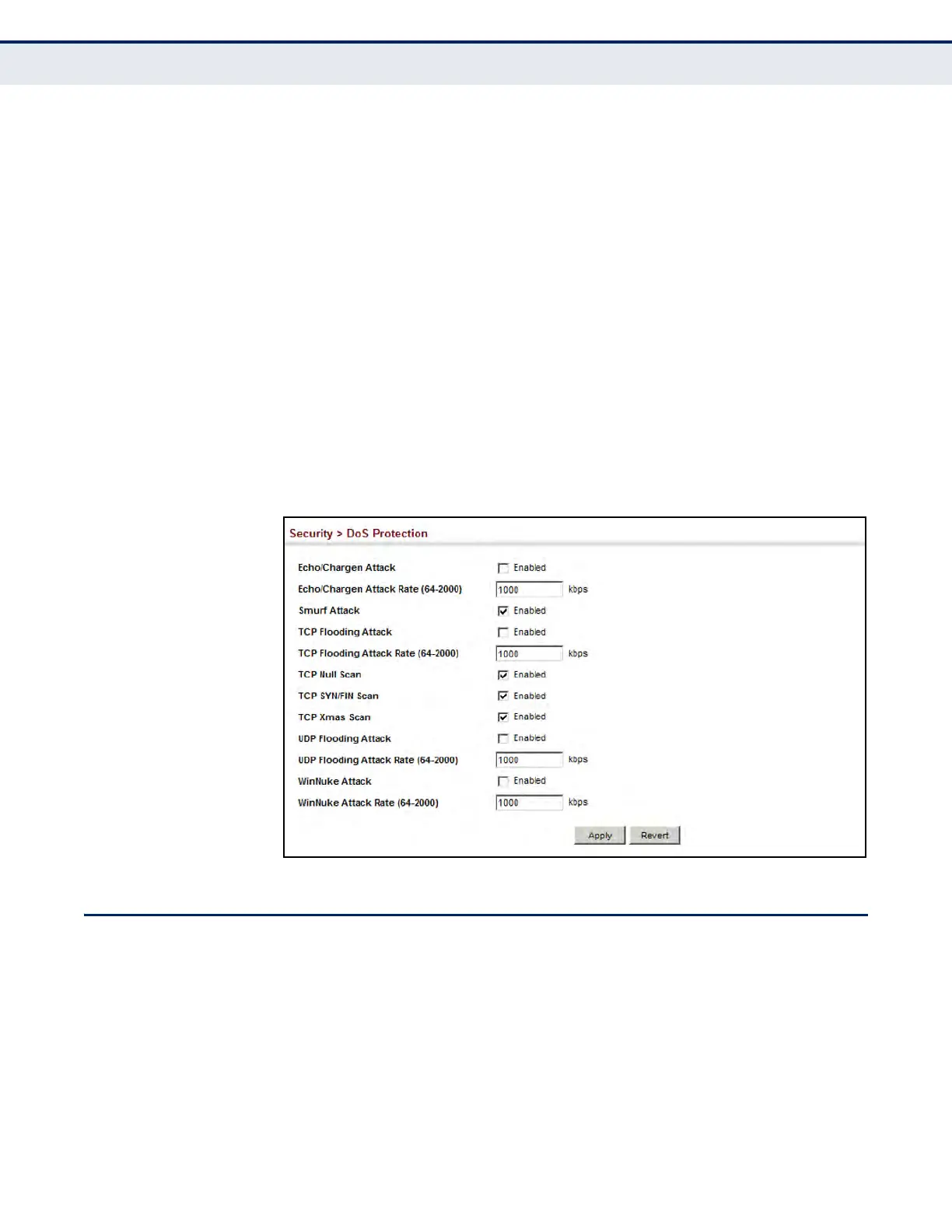
To protect against DoS attacks:
1. Click Security, DoS Protection.
2. Enable protection for specific DoS attacks, and set the maximum
allowed rate as required.
3. Click Apply
Figure 217: Protecting Against DoS Attacks
IP SOURCE GUARD
IP Source Guard is a security feature that filters IP traffic on network
interfaces based on manually configured entries in the IP Source Guard
table, or dynamic entries in the DHCP Snooping table when enabled (see
"DHCP Snooping" on page 396). IP source guard can be used to prevent
traffic attacks caused when a host tries to use the IP address of a neighbor
to access the network. This section describes commands how to use IP
Source Guard.













 To Next Page