C
HAPTER
14
| Basic Administration Protocols
Switch Clustering
– 471 –
CLUSTER MEMBER
CONFIGURATION
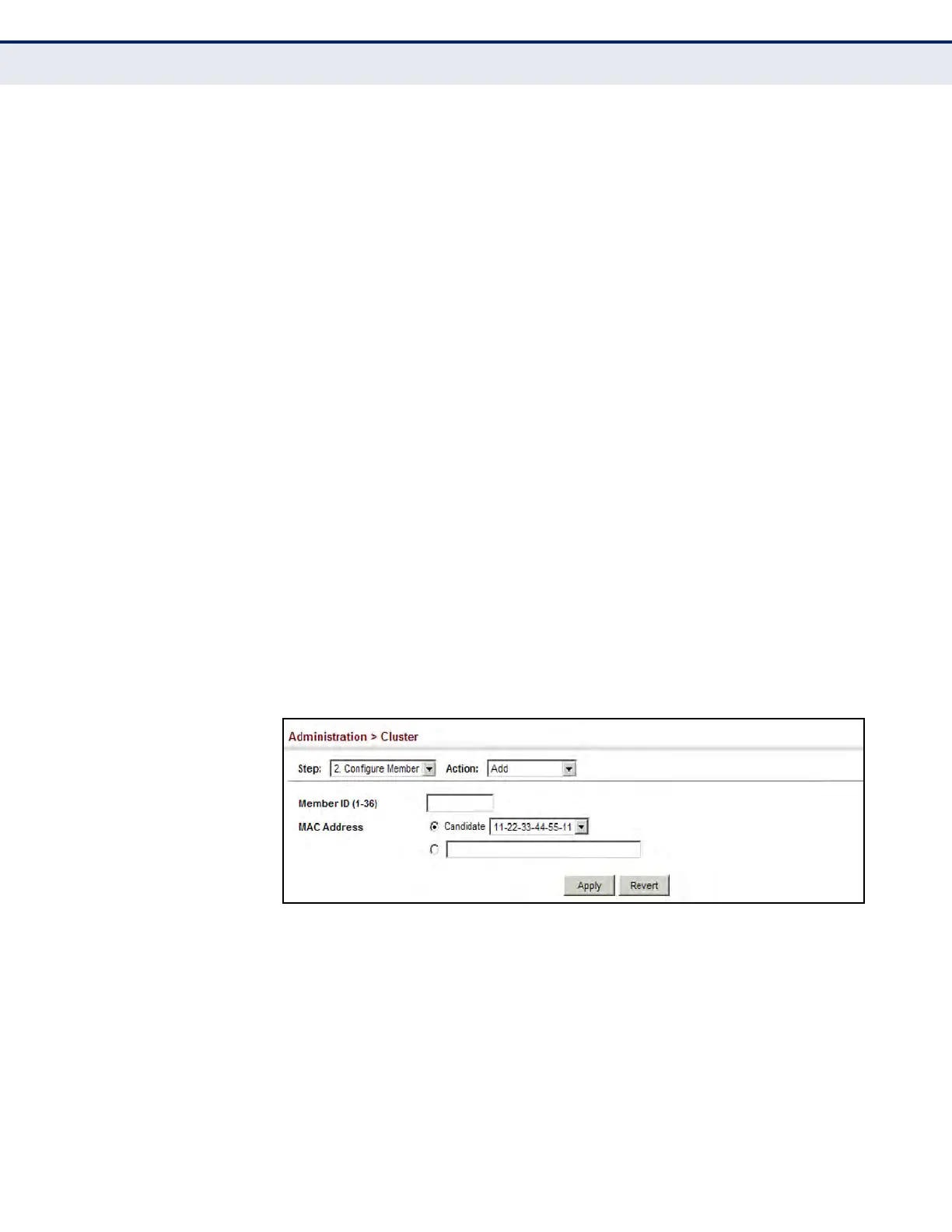
Use the Administration > Cluster (Configure Member - Add) page to add
Candidate switches to the cluster as Members.
CLI REFERENCES
u "Switch Clustering" on page 767
PARAMETERS
These parameters are displayed:
u Member ID – Specify a Member ID number for the selected Candidate
switch. (Range: 1-36)
u MAC Address – Select a discovered switch MAC address from the
Candidate Table, or enter a specific MAC address of a known switch.
WEB INTERFACE
To configure cluster members:
1. Click Administration, Cluster.
2. Select Configure Member from the Step list.
3. Select Add from the Action list.
4. Select one of the cluster candidates discovered by this switch, or enter
the MAC address of a candidate.
5. Click Apply.
Figure 276: Configuring a Cluster Members
To show the cluster members:
1. Click Administration, Cluster.
2. Select Configure Member from the Step list.
3. Select Show from the Action list.













 To Next Page