C
HAPTER
6
| VLAN Configuration
IEEE 802.1Q VLANs
– 195 –
Edit Member by Interface Range
All parameters are the same as those described under the earlier section
for Edit Member by VLAN, except for the items shown below.
u Port Range – Displays a list of ports. (Range: 1-28/52)
u Trunk Range – Displays a list of ports. (Range: 1-16)
N
OTE
:
The PVID, acceptable frame type, and ingress filtering parameters
for each interface within the specified range must be configured on either
the Edit Member by VLAN or Edit Member by Interface page.
WEB INTERFACE
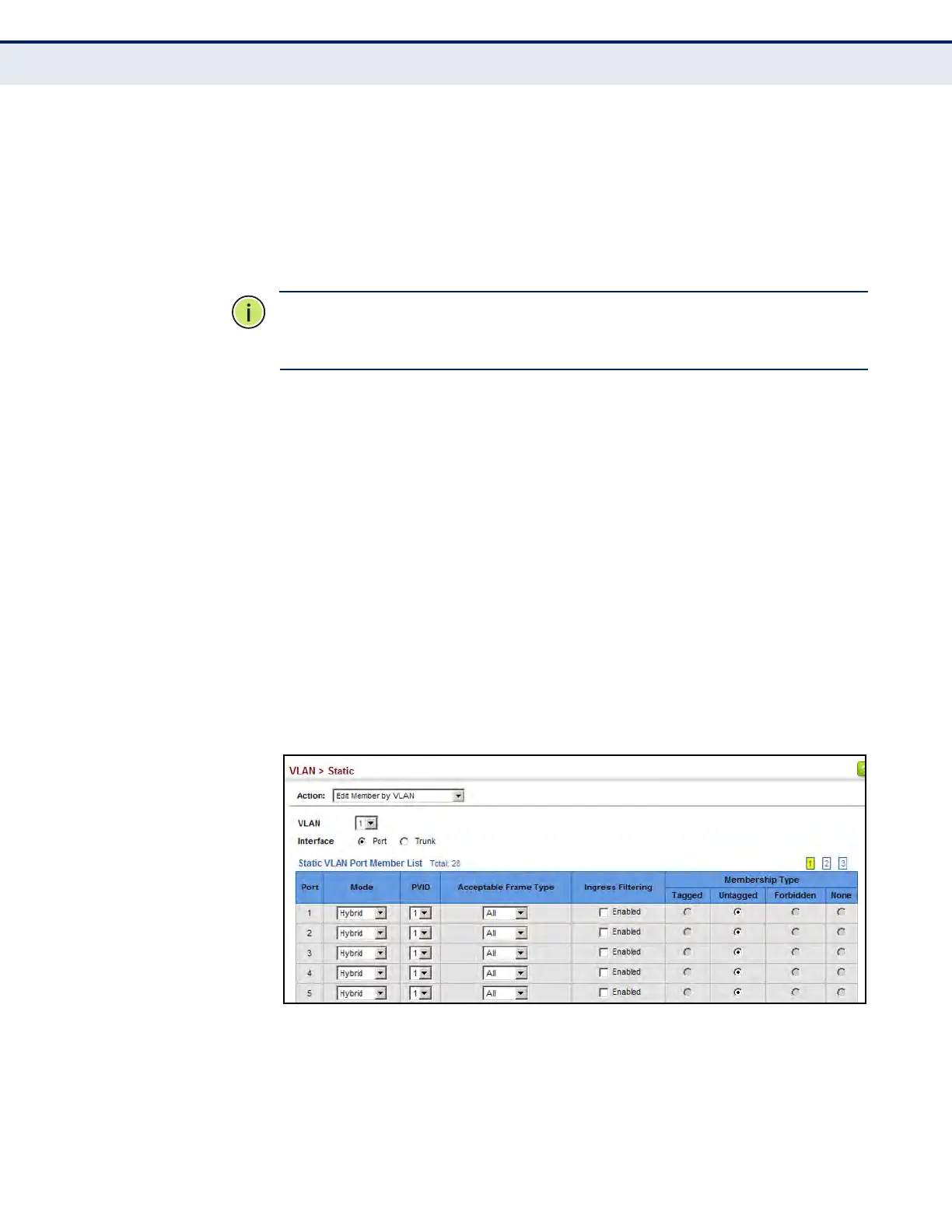
To configure static members by the VLAN index:
1. Click VLAN, Static.
2. Select a VLAN from the scroll-down list.
3. Select Edit Member by VLAN from the Action list.
4. Set the Interface type to display as Port or Trunk.
5. Modify the settings for any interface as required. Remember that
Membership Type cannot be changed until an interface has been added
to another VLAN and the PVID changed to anything other than 1.
6. Click Apply.
Figure 70: Configuring Static Members by VLAN Index













 To Next Page