C
HAPTER
13
| Security Measures
Configuring the Secure Shell
– 337 –
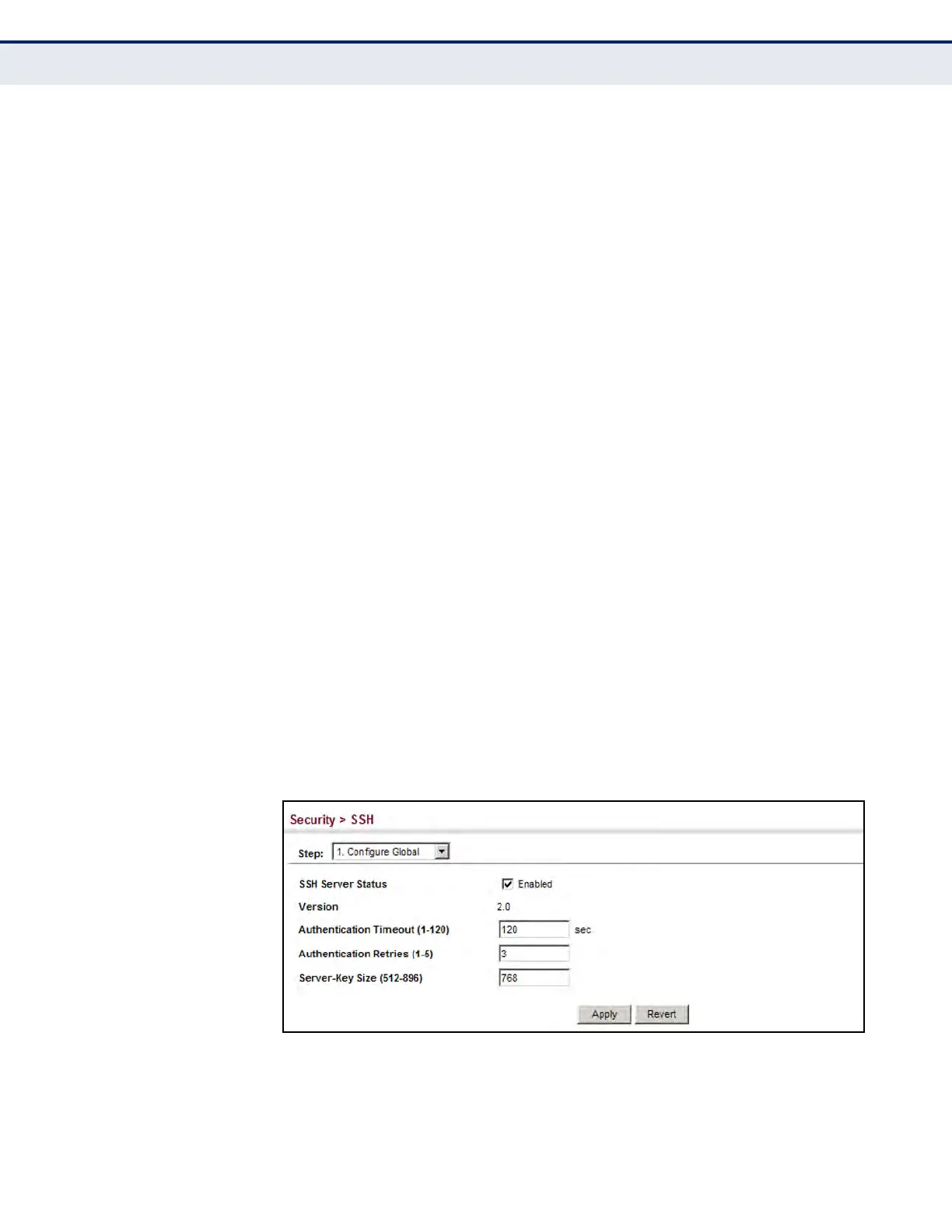
u Version – The Secure Shell version number. Version 2.0 is displayed,
but the switch supports management access via either SSH Version 1.5
or 2.0 clients.
u Authentication Timeout – Specifies the time interval in seconds that
the SSH server waits for a response from a client during an
authentication attempt. (Range: 1-120 seconds; Default: 120 seconds)
u Authentication Retries – Specifies the number of authentication
attempts that a client is allowed before authentication fails and the
client has to restart the authentication process. (Range: 1-5 times;
Default: 3)
u Server-Key Size – Specifies the SSH server key size.
(Range: 512-896 bits; Default:768)
n
The server key is a private key that is never shared outside the
switch.
n
The host key is shared with the SSH client, and is fixed at 1024 bits.
WEB INTERFACE
To configure the SSH server:
1. Click Security, SSH.
2. Select Configure Global from the Step list.
3. Enable the SSH server.
4. Adjust the authentication parameters as required.
5. Click Apply.
Figure 181: Configuring the SSH Server




 To Next Page