Dobot M1 User Guide 6 Operation
Issue V1.3.4 (2019-05-23) User Guide Copyright © Yuejiang Technology Co., Ltd
75
The Dobot M1 has been connected to a PC successfully.
The Dobot M1 has been connected to an emergency stop switch.
Application Scenario
Blockly is a programming platform based on Google Blockly. You can program through the
puzzle format, which is straightforward and easy to understand.
Procedure
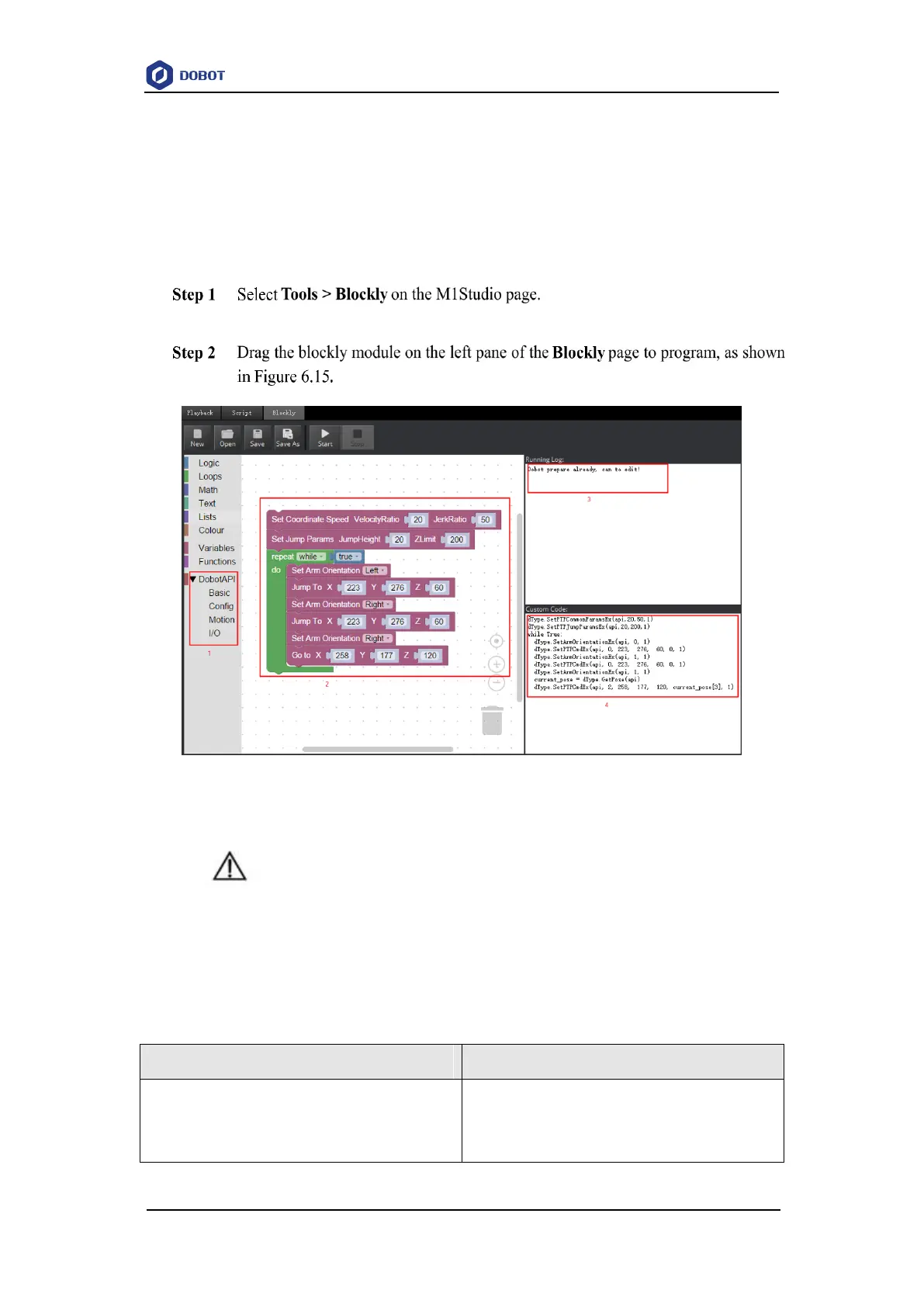
The Blockly page is displayed.
Figure 6.15 Blockly graphics programming
NOTICE
Only MOVL and JUMP modes are supported when writing a program. If you use the
motion command when writing a program, please add the orientation command before
every motion command, which indicates the arm orientation of Dobot M1.
Table 6.6 Description of blockly module
The selection area of blockly module, including
logistic, loop, math, and Dobot API. You can program
by dragging them to the window.



 To Next Page