Vigor3900 Series User’s Guide
99
Or,
Available parameters are listed as follows:
Item Description
3G/4G PPP
SIM PIN code -Type PIN code of the SIM card that will be
used to access Internet.
Modem Initial String 1-Such value is used to initialize
USB modem. Please use the default value. If you have any
question, please contact to your ISP.
Modem Initial String 2-The initial string 1 is shared with
APN. In some cases, user may need another initial AT
command to restrict 3G band or do any special settings.
APN -APN means Access Point Name which is provided
and required by some ISPs. Type the name.
Modem Dial String -Such value is used to dial through
USB mode. Please use the default value. If you have any
question, please contact to your ISP.
PPP Username -Type the PPP username (optional).
PPP Password -Type the PPP password (optional).
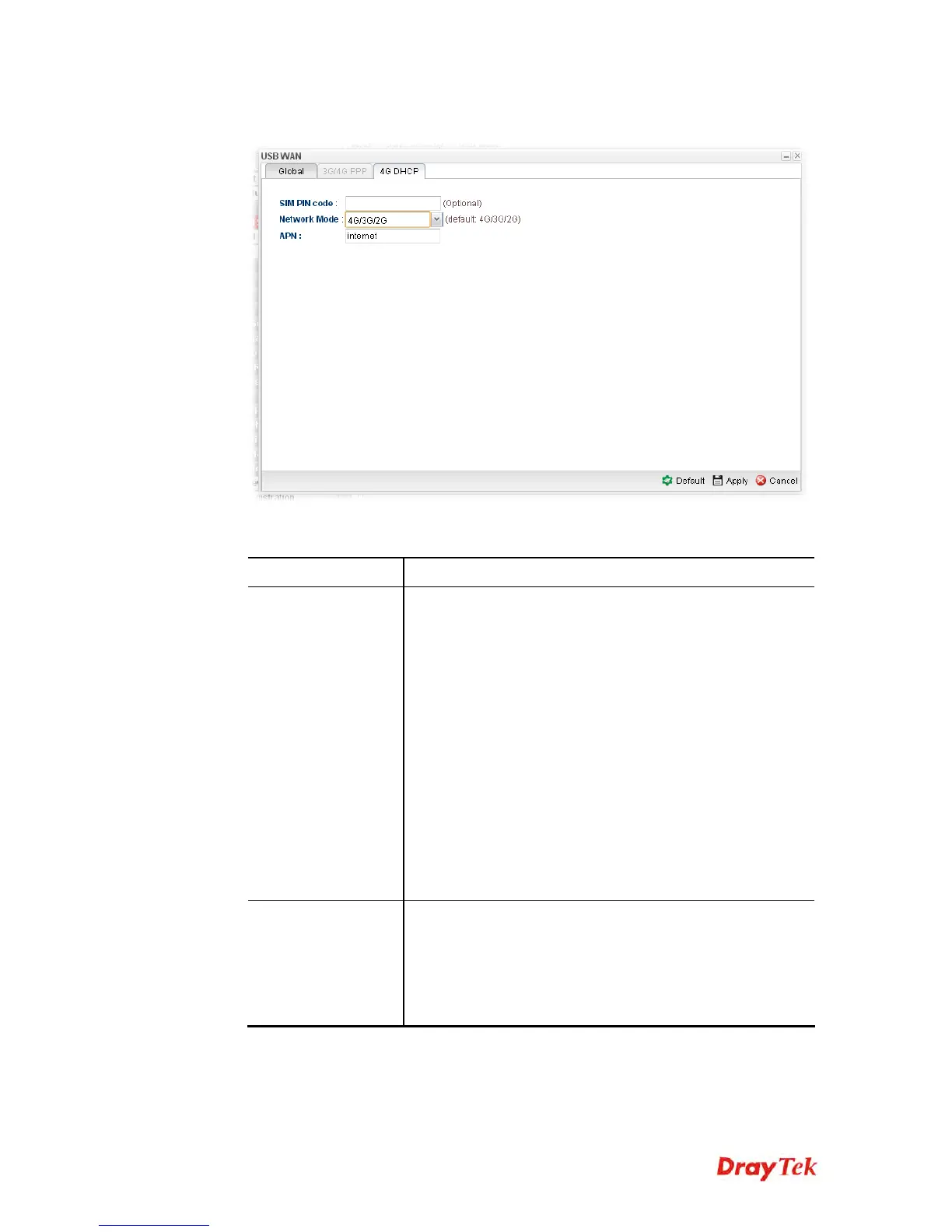
4G DHCP
SIM Pin code –Type PIN code of the SIM card that will be
used to access Internet.
Network Mode – Force Vigor router to connect Internet
with the mode specified here. If you choose 4G/3G/2G as
network mode, the router will choose a suitable one
according to the actual wireless signal automatically.














 To Next Page