Vigor3900 Series User’s Guide
111
4
4
.
.
1
1
.
.
3
3
.
.
3
3
I
I
n
n
t
t
e
e
r
r
f
f
a
a
c
c
e
e
C
C
o
o
n
n
f
f
i
i
g
g
u
u
r
r
a
a
t
t
i
i
o
o
n
n
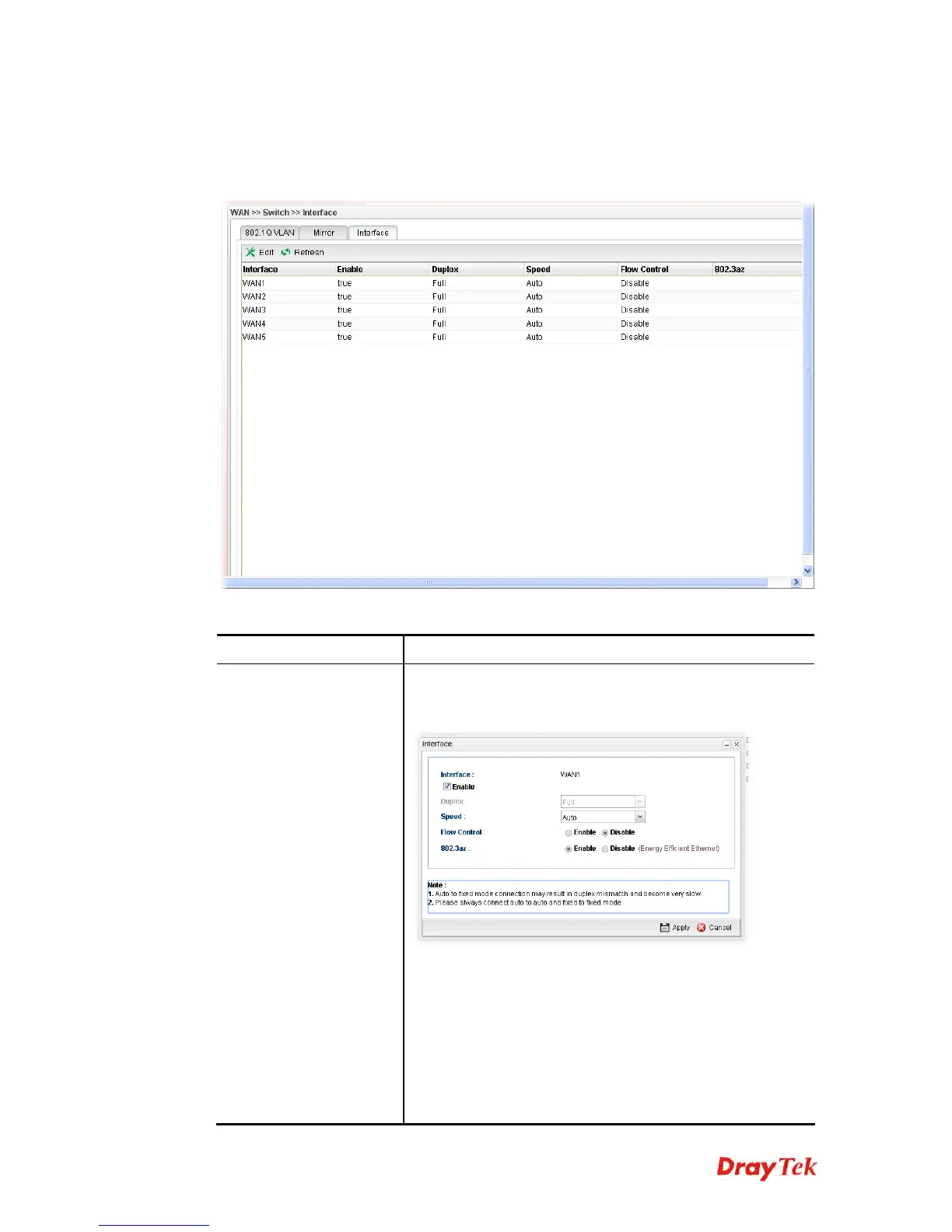
This page allows you to modify the status (enable / disable), duplex (Half/Full), speed, flow
control and 802.3az for the WAN ports respectively.
Each item will be explained as follows:
Item Description
Edit
Choose the interface listed below and click the Edit button
to modify the settings. A pop up window will appear for you
to change the settings.
Interface – Display the name of WAN interface.
Enable – Check it to enable such interface.
Speed – Use the drop down list to specify the transmission
rate (Auto, 10M, 100M or 1000M) for such interface.
Flow Control – The default setting is Disable. If Enabled is
clicked, Vigor router will drop the packet if too much to
handle.
802.3az – It is a function of energy-efficient Ethernet.














 To Next Page