Vigor3900 Series User’s Guide
155
H
H
o
o
w
w
t
t
o
o
a
a
d
d
d
d
a
a
n
n
e
e
w
w
p
p
o
o
l
l
i
i
c
c
y
y
r
r
u
u
l
l
e
e
1. Open Routing>>Policy Route.
2. Simply click the Add button.
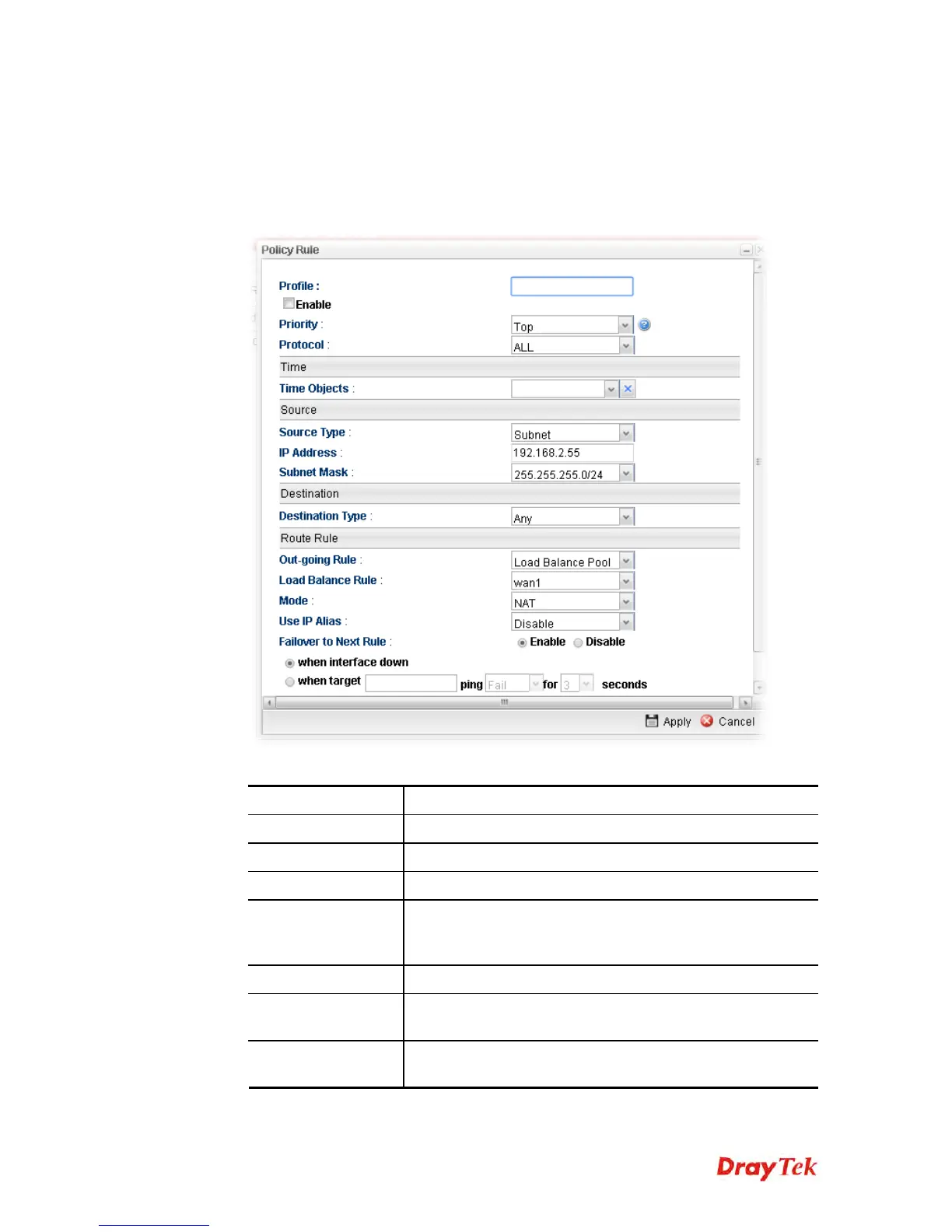
3. The following dialog will appear.
Available parameters are listed as follows:
Item Description
Profile
Type the name of the rule.
Enable
Check this box to enable such profile.
Priority
Choose the priority for such profile (top, high and normal).
Protocol
Choose a protocol (ALL, TCP, UDP, TCP/UDP and ICMP)
for such rule applied to load balance. All is the default
setting.
Time
Choose a time object to be applied by such profile.
Service Protocol
It is available when TCP/UDP is selected as protocol. Choose
a profile for such rule.
Source
Source Type - Choose the address type (Any, Subnet or
Object) for such rule.














 To Next Page