Vigor3900 Series User’s Guide
182
Private IP
Display the private IP used for this entry.
Protocol
Display the protocol used for the entry.
Port Redirection Mode
Display the direction for the port to be redirected.
Public Port Start
Display the starting number of the public port.
Public Port End
Display the ending number of the public port.
Private Port
Display the number of the private port.
H
H
o
o
w
w
t
t
o
o
a
a
d
d
d
d
a
a
n
n
e
e
w
w
P
P
o
o
r
r
t
t
R
R
e
e
d
d
i
i
r
r
e
e
c
c
t
t
i
i
o
o
n
n
p
p
r
r
o
o
f
f
i
i
l
l
e
e
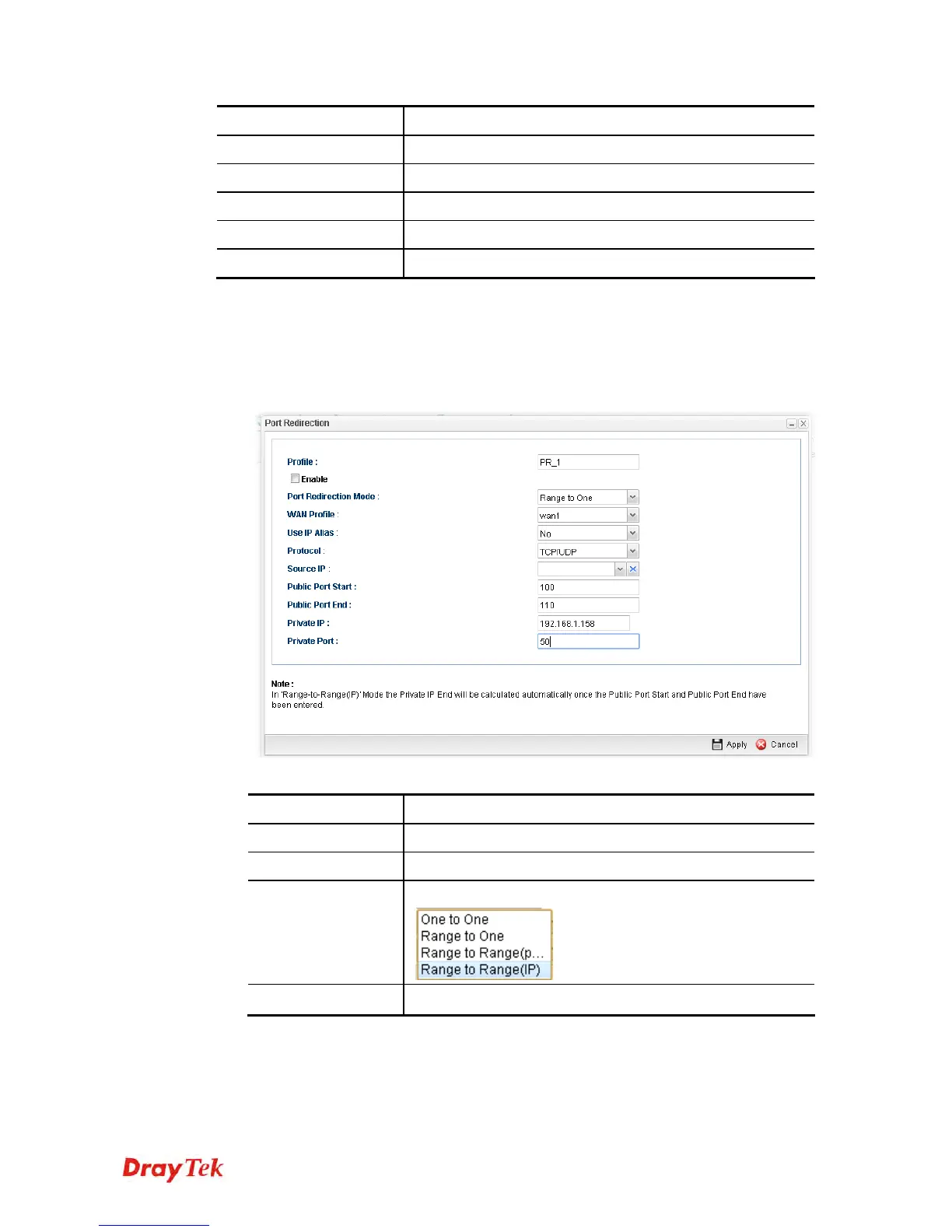
1. Open NAT>> Port Redirection.
2. Simply click the Add button.
3. The following dialog will appear.
Available parameters are listed as follows:
Item Description
Profile
Type the name of the profile.
Enable
Check the box to enable this profile.
Port Redirection
Mode
Specify the direction for the port to be redirected.
WAN Profile
Specify the WAN profile for such profile.














 To Next Page