Vigor3900 Series User’s Guide
264
Item Description
Refresh
Renew current web page.
Profile Number Limit
Display the total number (10) of the object profiles to be
created.
Profile
Display the name of the profile.
WAN Disconnection
Display if such function is enabled or disabled.
WAN Reconnection
Display if such function is enabled or disabled.
VPN Disconnection
Display if such function is enabled or disabled.
VPN Reconnection
Display if such function is enabled or disabled.
Temperature
Display if such function is enabled or disabled.
Router Reboot
Display if such function is enabled or disabled.
Syslog
Display if such function is enabled or disabled.
H
H
o
o
w
w
t
t
o
o
c
c
r
r
e
e
a
a
t
t
e
e
a
a
n
n
e
e
w
w
n
n
o
o
t
t
i
i
f
f
i
i
c
c
a
a
t
t
i
i
o
o
n
n
p
p
r
r
o
o
f
f
i
i
l
l
e
e
1. Open Objects Setting>> Mail Service Object.
2. Simply click the Add button.
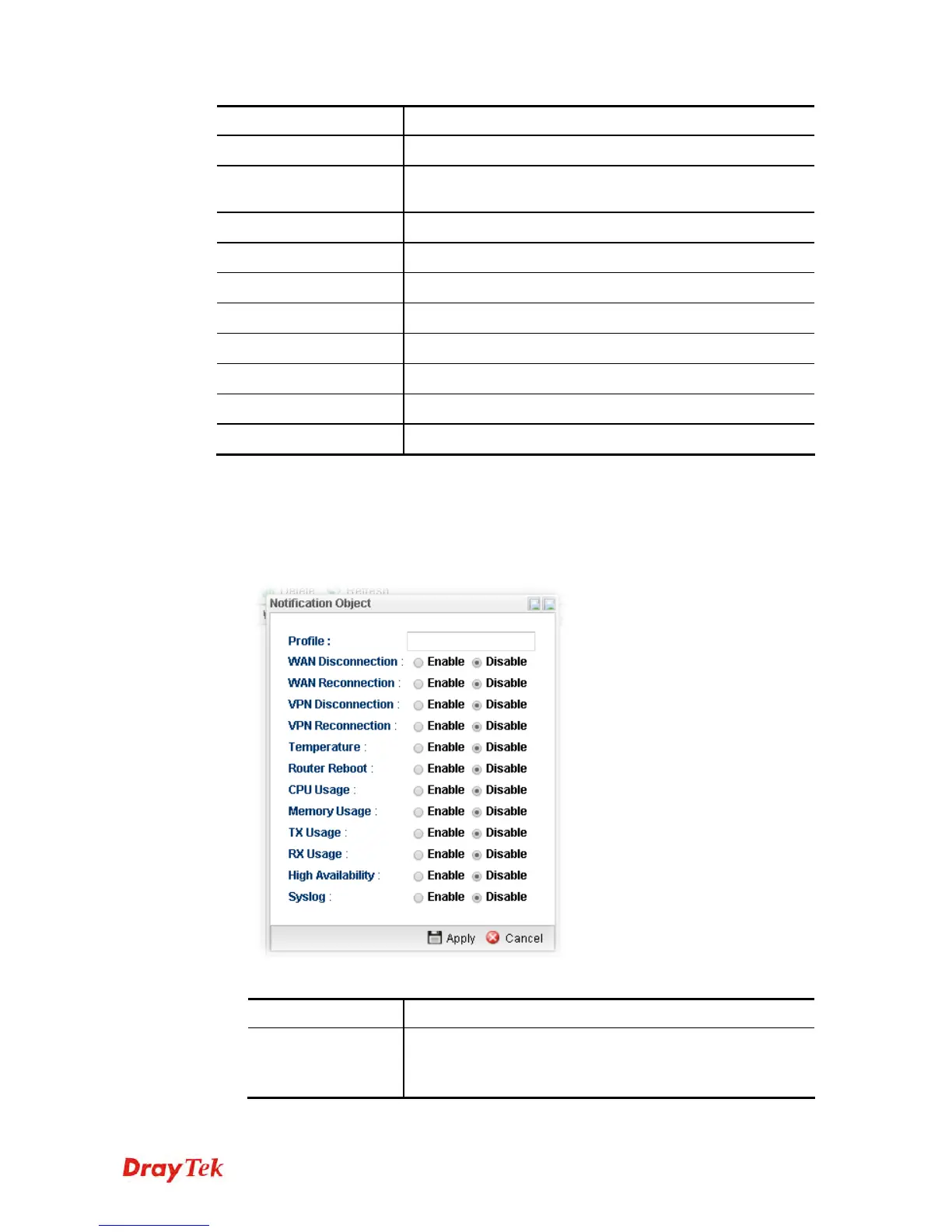
3. The following dialog will appear.
Available parameters are listed as follows:
Item Description
Profile
Type a name for such SMS profile. The maximum length of
the name you can set is 20 characters.
There are several situations to be monitored by such profile.














 To Next Page