Vigor3900 Series User’s Guide
323
H
H
o
o
w
w
t
t
o
o
e
e
d
d
i
i
t
t
t
t
h
h
e
e
S
S
M
M
S
S
a
a
l
l
e
e
r
r
t
t
s
s
e
e
r
r
v
v
i
i
c
c
e
e
p
p
r
r
o
o
f
f
i
i
l
l
e
e
1. Open Applications>> SMS/Mail Alert Service and click the SMS Alert Service tab.
2. Choose one of the index numbers and click the Edit button.
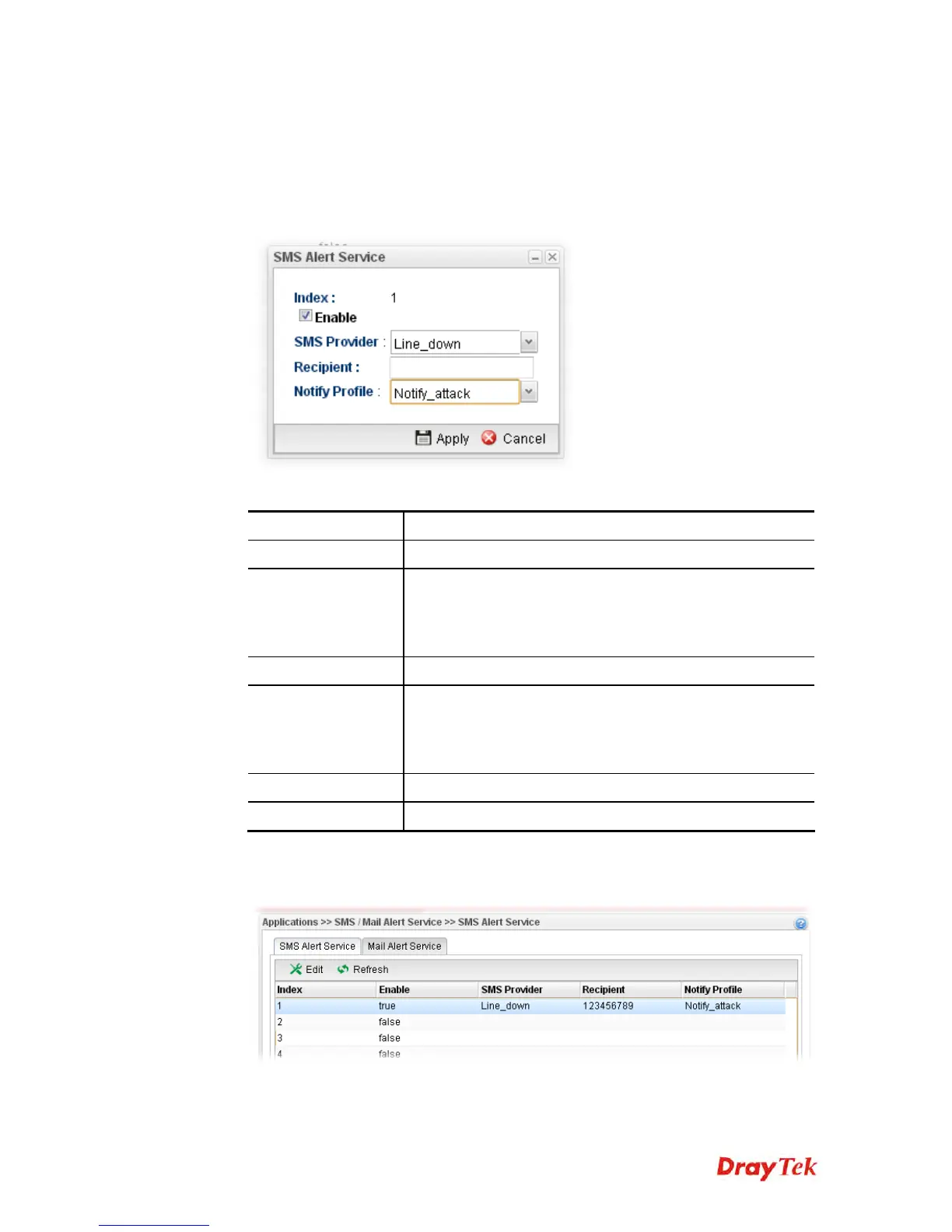
3. The following dialog will appear.
Available parameters are listed as follows:
Item Description
Enable
Check this box to enable such profile.
SMS Provider
Choose the SMS provider object profile from the drop down
list.
Such profiles can be created from Object Setting>>SMS
Service Object.
Recipient
Type the cell phone number to receive the SMS.
Notify Profile
Choose a profile (specify the timing for sending SMS) from
the drop down list.
Such profiles can be created from Object
Setting>>Notification Object.
Apply
Click it to save the configuration and exit the page.
Cancel
Click it to exit the dialog without saving the configuration.
4. Enter all the settings and click Apply.
5. The SMS alert service profile has been modified.














 To Next Page