Vigor3900 Series User’s Guide
338
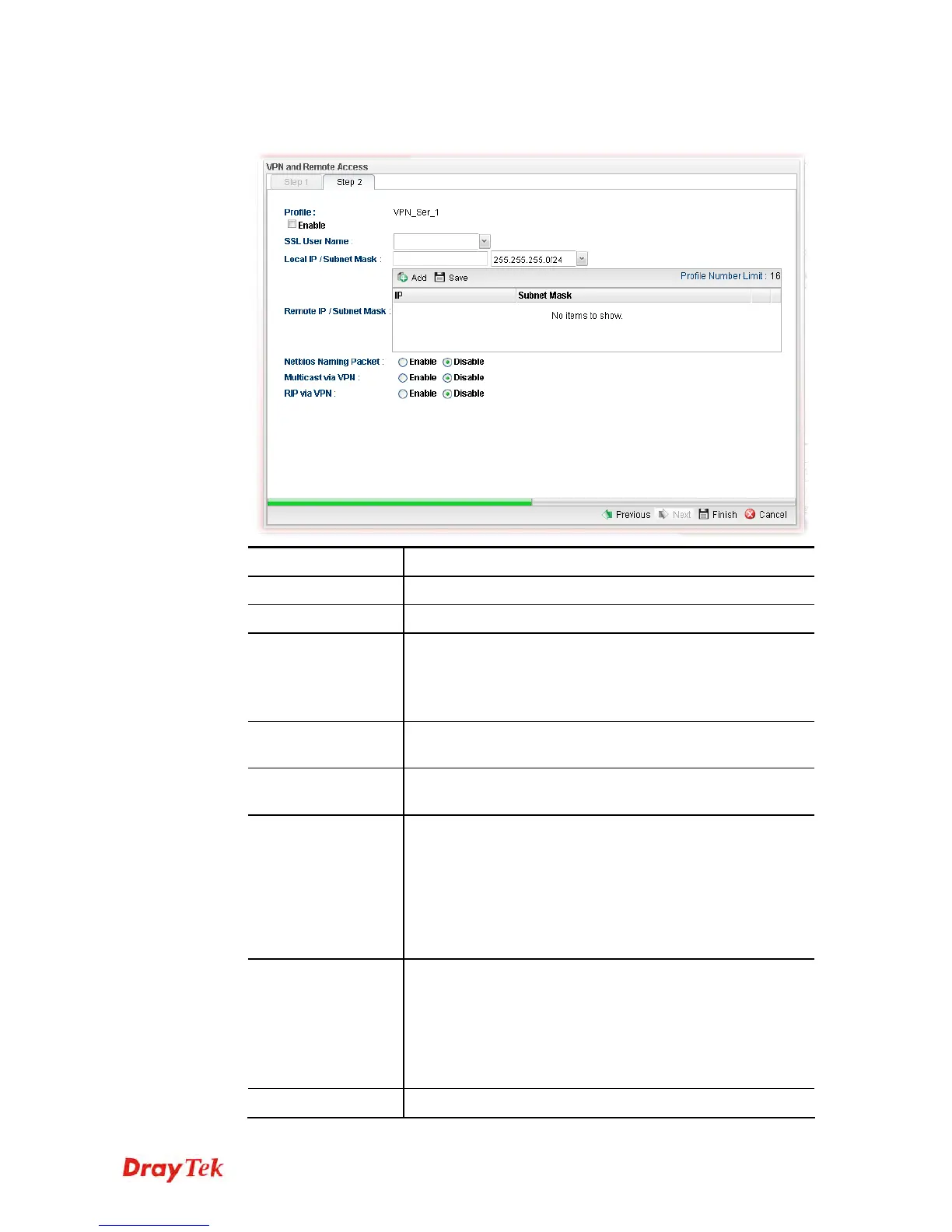
If you choose SSL as the Type in Step 1, you will get the following page:
Item Description
Profile
Display the name of the profile.
Enable
Check this box to enable such profile.
SSL User Name
Choose a user for authentication in SSL connection.
Such profile shall be created in User Management>>User
Profile previously. Otherwise, there are no selections
displayed here.
Local IP / Subnet
Mask
Type the IP address and subnet mask of local host.
Remote IP / Subnet
Mask
Type the LAN IP address and LAN subnet mask for the
remote host.
Netbios Naming
Packet
Enable – Click it to have an inquiry for data transmission
between the hosts located on both sides of VPN Tunnel
while connecting.
Disable –When there is conflict occurred between the hosts
on both sides of VPN Tunnel in connecting, such function
can block data transmission of Netbios Naming Packet inside
the tunnel.
Multicast via VPN
Some programs might send multicast packets via VPN
connection.
Enable – Click this button to let multicast packets pass
through the router.
Disable – This is default setting. Click this button to let
multicast packets be blocked by the router.
RIP via VPN
Enable – Click it to exchange routing information














 To Next Page