Vigor3900 Series User’s Guide
352
Item Description
Enable GRE
Function
Check the box to enable the function.
Local GRE IP
The virtual IP address of the router, specified for this tunnel.
Remote GRE IP
The virtual IP address of the remote client, specified for this
tunnel.
Auto Generate
GRE Key
Click Enable to generate the GRE key by the system
automatically.
If you click Disable, you need to type GRE key manually.
GRE In Key
Type the hexadecimal number as GRE In Key. This value is
used for the router to authenticate the source of the packet.
The length is 4 bytes.
GRE Out Key
Type the hexadecimal number as GRE Out Key. This value
is used for the remote client to authenticate the source of the
packet. The length is 4 bytes.
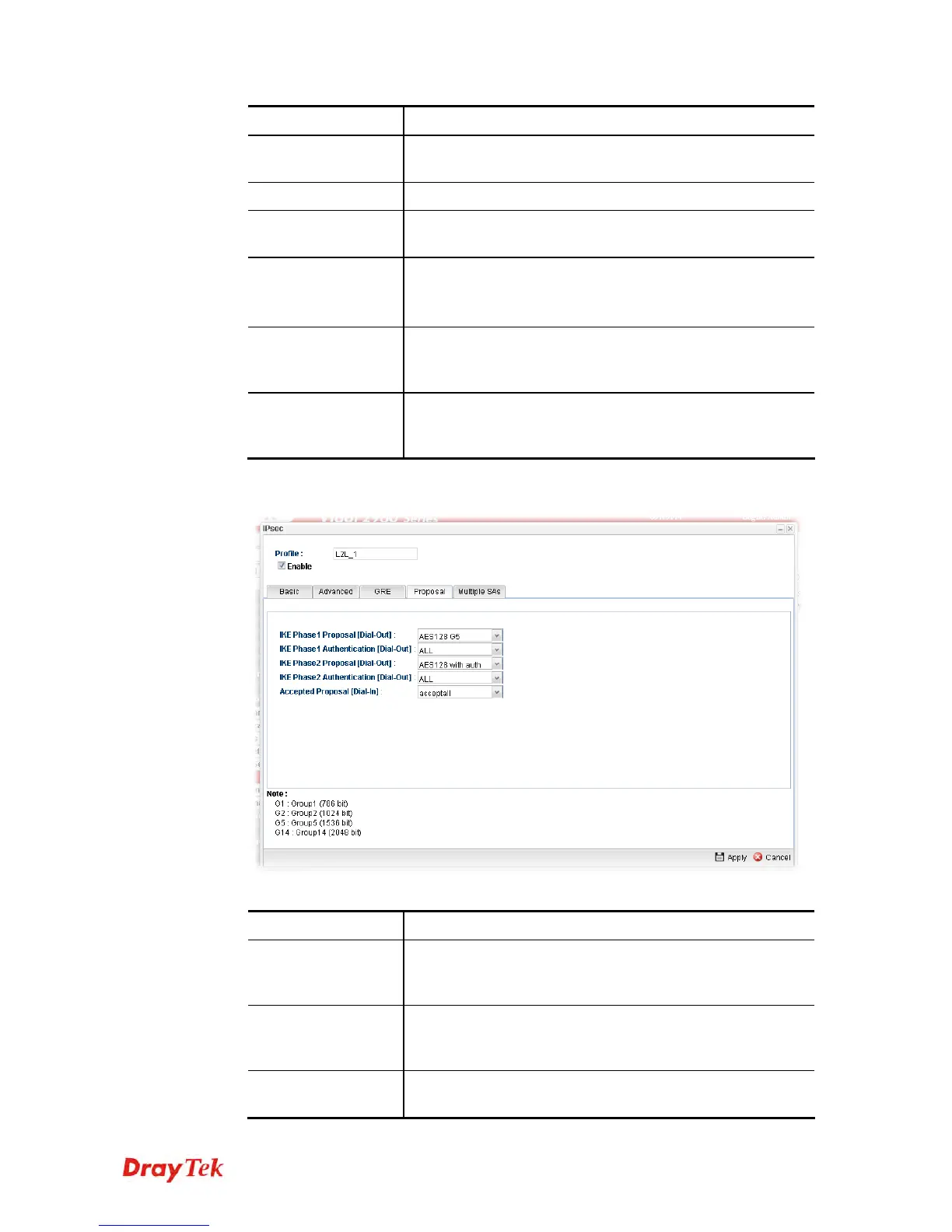
The Proposal tab lists encryption and authentication algorithms to be negotiated with
the remote IPsec peer. Change settings to meet the security requirement.
Available parameters are listed as follows:
Item Description
IKE Phase1
Proposal (Dial-Out)
Propose the local available authentication schemes and
encryption algorithms to the VPN peers, and get its
feedback to find a match.
IKE Phase1
Authentication
(Dial-Out)
Propose the local available algorithms to the VPN peers,
and get its feedback to find a match.
IKE Phase2
Proposal (Dial-Out)
Propose the local available authentication schemes and
encryption algorithms to the VPN peers, and get its














 To Next Page