Vigor3900 Series User’s Guide
353
feedback to find a match.
IKE Phase2
Authentication
(Dial-Out)
Propose the local available algorithms to the VPN peers,
and get its feedback to find a match.
Accepted Proposal
(Dial-In)
For the dial-in VPN user, please specify the limitation of the
proposal.
acceptall - When the VPN tunnel is established, all the
proposals supported by this device will be accepted and
applied.
acceptabove - When the VPN tunnel is established, only the
selected proposal will be accepted and applied by this
device.
Apply
Click it to save the configuration.
Cancel
Click it to exit the page without saving configuration.
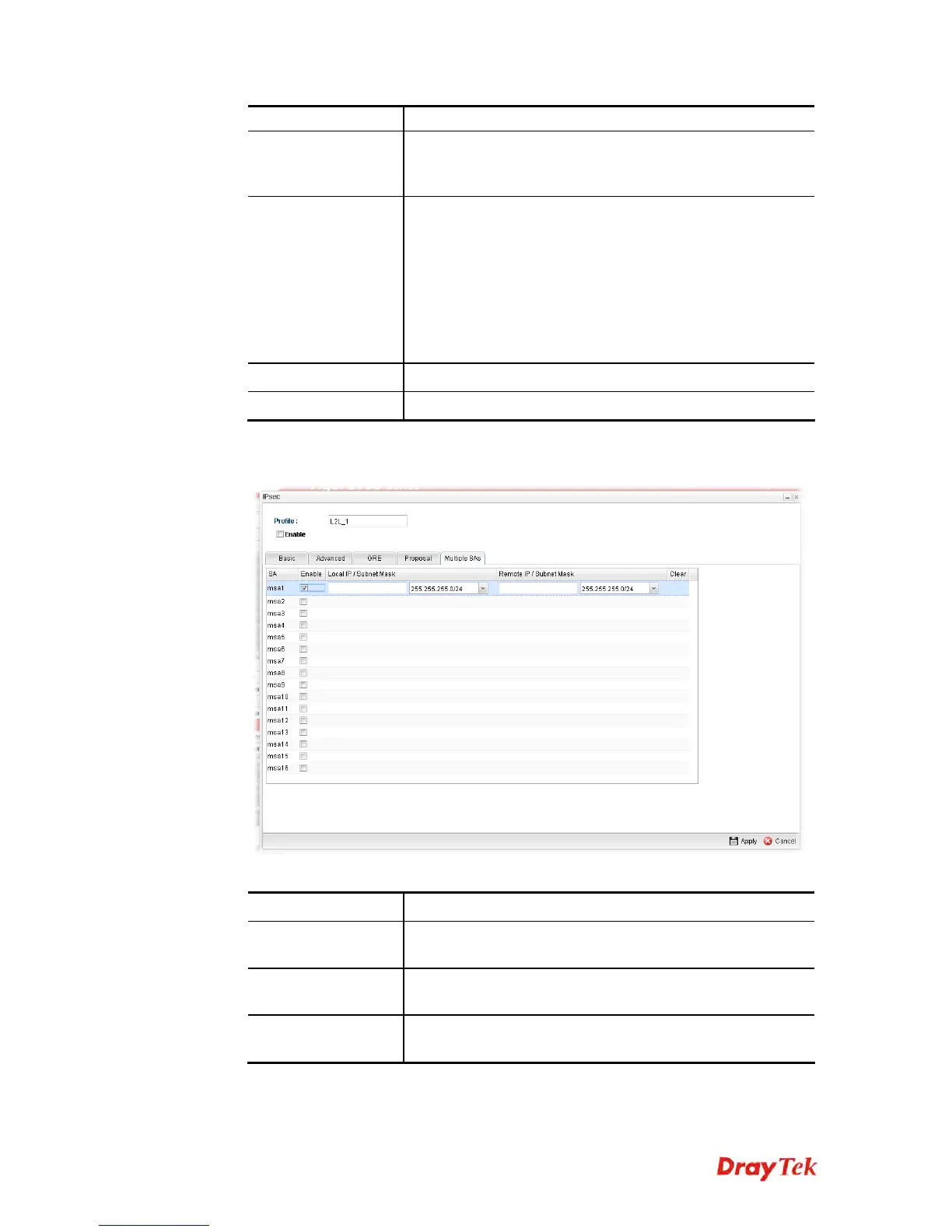
Multiple SAs will negotiate IPSec SAs in IKE phase 2 to establish multiple IPSec
tunnels for each subnet routing. Configure if required.
Available parameters are listed as follows:
Item Description
Enable
An IPsec VPN profile can support 1 up to 16 multiple SAs
(security association). Check the one you want to enable it.
Local IP /Subnet
Mask
Type the IP address and subnet mask of local host.
Remote IP /Subnet
Mask
Type the LAN IP address and LAN subnet mask for the
remote host.
4. After filling the required information, click Apply and a new IPsec LAN-to-LAN
profile will be created.














 To Next Page