Vigor3900 Series User’s Guide
421
VPN Log
Click Enable to make the VPN log recorded in the Syslog.
User Access Log
Click Enable to make the user access log recorded in the
Syslog.
WAN Log
Click Enable to make the WAN log recorded in the Syslog.
Others Log
Click Enable to make other logs recorded in the Syslog.
Apply
Click this button to save the configuration and exit the web
page.
Cancel
Click it to discard the settings configured in this page.
Enter all of the settings and click Apply.
4
4
.
.
1
1
4
4
.
.
4
4
.
.
3
3
M
M
a
a
i
i
l
l
A
A
l
l
e
e
r
r
t
t
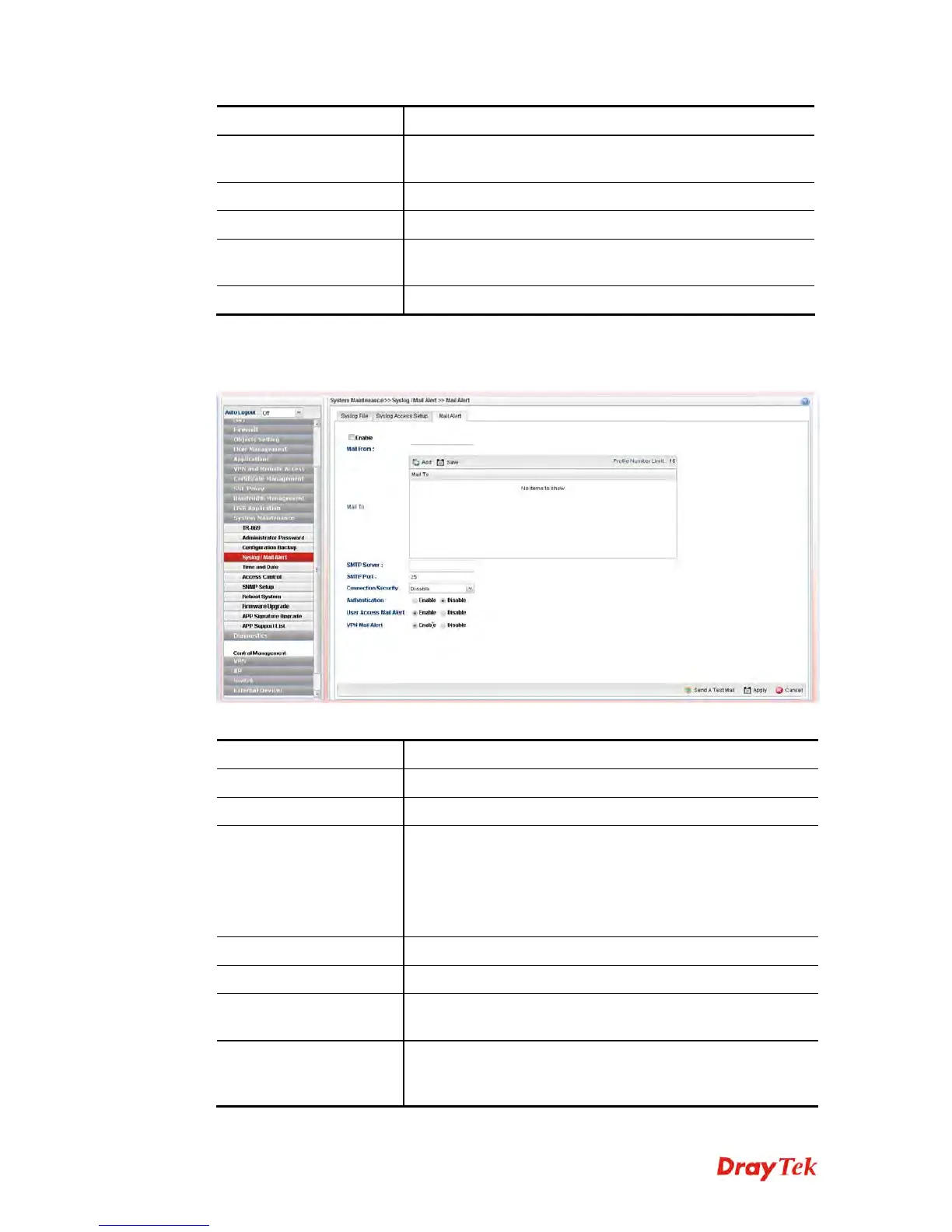
Available parameters are listed as follows:
Item Description
Enable
Check the box to enable such profile.
Mail From
Type a mail address for the mail sender.
Mail To
Assign a mail address for the mail receiver.
Add – Click this button to display a field for adding e-mail
address.
Save – After finished the address configuration, click Save
to save the setting onto the router.
SMTP Port
Type the port number for SMTP server.
SMTP Server
Type the IP address for SMTP server.
Connection Security
Choose SSL/TLS or StartTLS to activate corresponding
server.
Authentication
Click Enable to make any user logging into the mail server.
If you click Enable, you have to type user name and user
password on the below fields.














 To Next Page