Copyright 2008 Baker Hughes Company.
English–PACE5000/6000 Instruction Manual | 55
Supervisor Setup
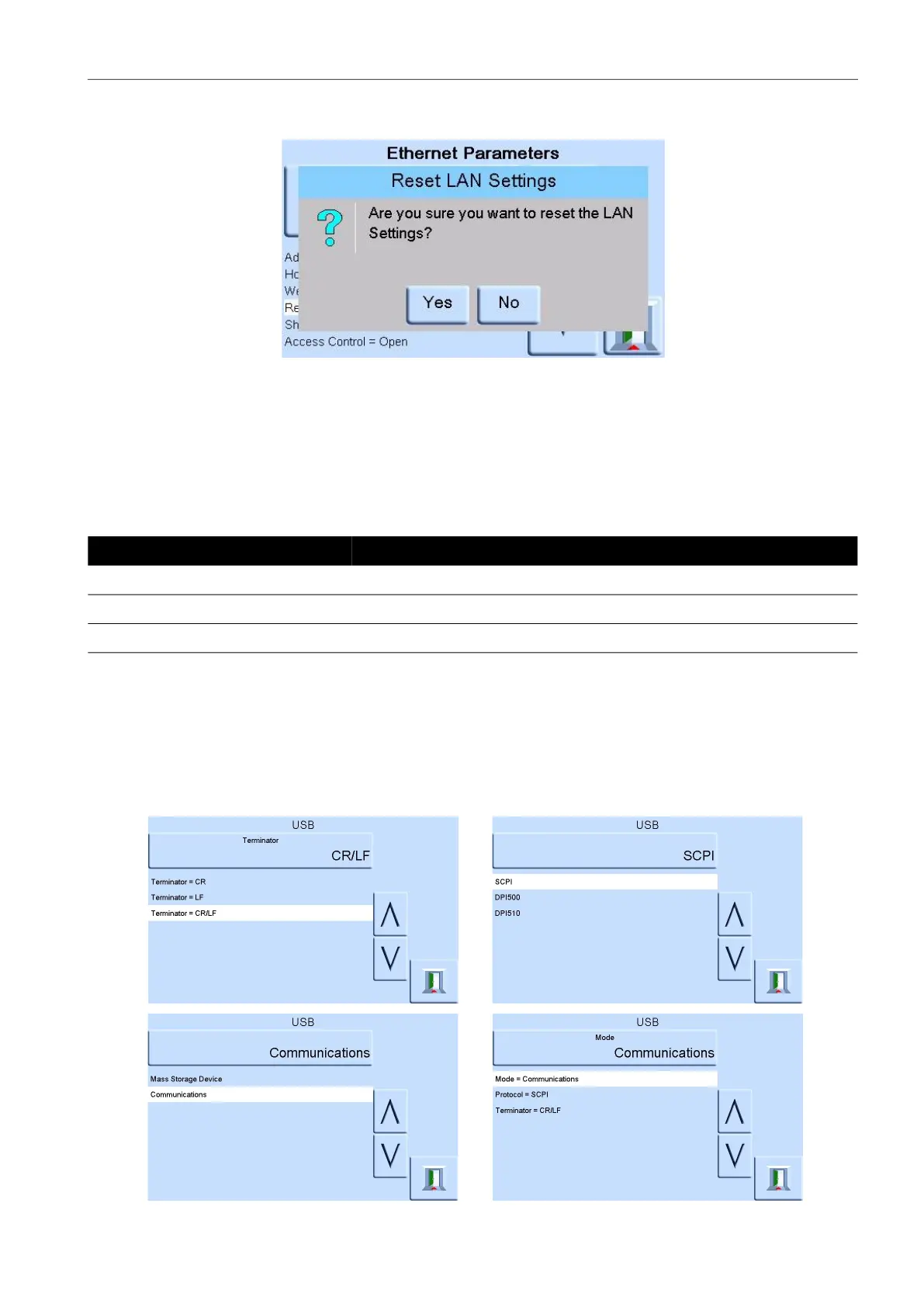
c. The RESET LAN SETTINGS sub-screen asking for confirmation of the reset. Press
YES to confirm reset of the LAN settings
.
11. To turn the LAN status indicator on or off, complete the following:
a. On the ETHERNET PARAMETER screen, use the UP and DOWN arrows on the right
of the screen to highlight the SHOW LAN STATUS field.
6.9.4.4 USB
Located on the rear panel an external USB ‘B’ connection has the following configuration:
Communications mode is selected for serial communications using the SCPI protocol.
Mass storage device is selected to mount an external USB ‘A’ connected mass storage device or
the internal memory SD card, from a PC connected to the USB ‘B’ port. When connecting a mass
storage device into the USB ‘A’ connector, the internal memory SD card becomes unaccessible.
Note: When upgrading software, make sure that the USB ‘B’ connection is disconnected.
To configure the USB connection:
Table 6-5: USB ‘B’ Configuration Options
Item Description
Communications Mode Mass Storage Device or Communications
Protocols SCPI
Terminator CR or LF or CR/LF


 To Next Page