Copyright 2008 Baker Hughes Company.
54 | PACE5000/6000 Instruction Manual–English
Chapter 6. Reference
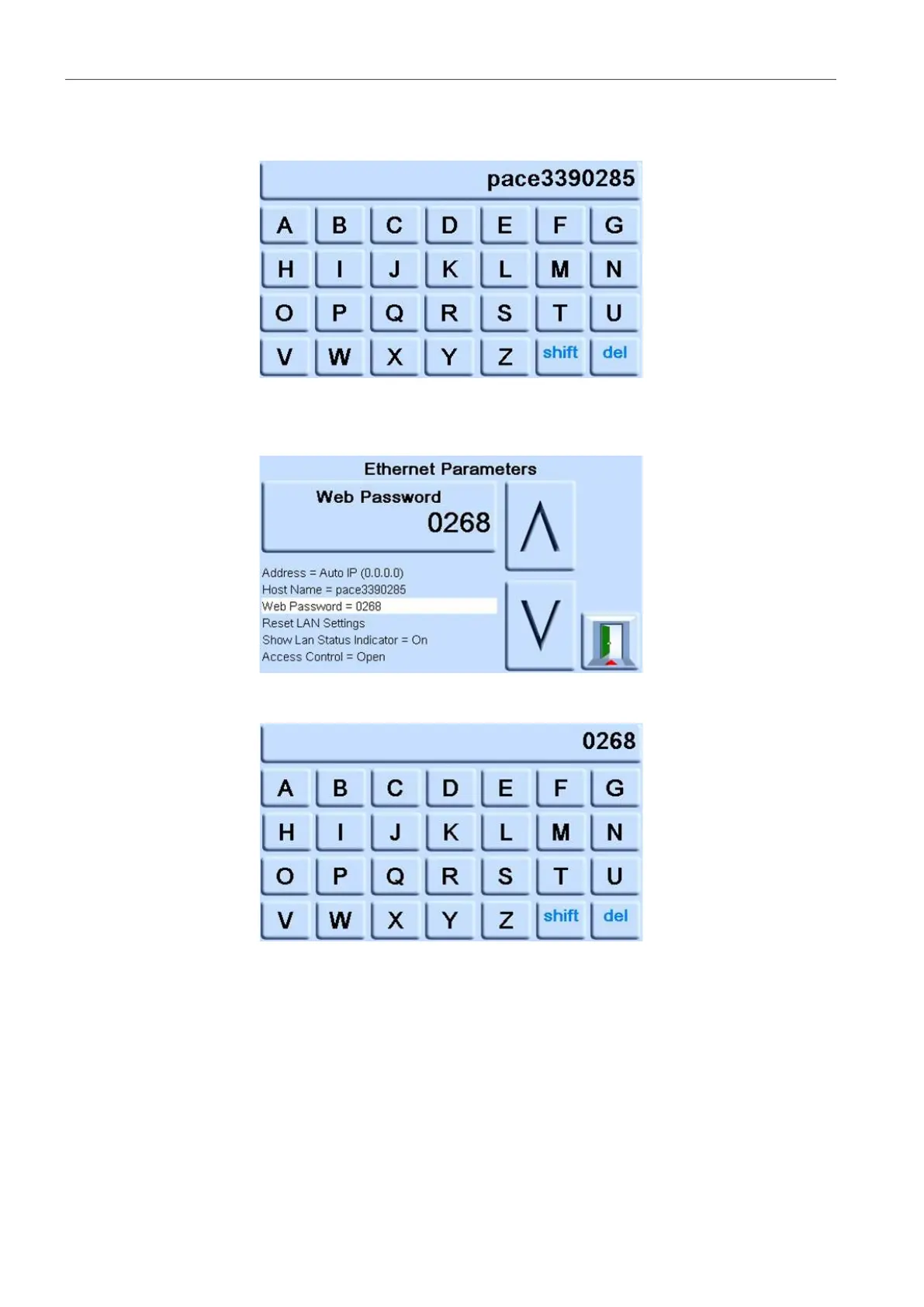
c. Use the keyboard to input the new host name and then press the top button on the
screen to set the host name. The screen automatically returns to the ETHERNET
PARAMETERS screen.
9. To change the web password, complete the following:
a. On the ETHERNET PARAMETER screen, use the UP and DOWN arrows on the right
of the screen to highlight the WEB PASWORD field.
b. Press the top touch pad on the screen to enter the WEB PASSWORD screen. The
keyboard screen opens.
c. Use the keyboard to input the new web password and then press the top touch area on
the screen to set the new password. The screen automatically returns to the
ETHERNET PARAMETERS screen.
10. To reset the LAN settings, complete the following:
a. On the ETHERNET PARAMETER screen, use the UP and DOWN arrows on the right
of the screen to highlight the RESET LAN SETTINGS field.
b. Press the RESET THE LAN SETTINGS touch pad on the top touch pad of the screen.


 To Next Page