SC-F2000 Revision C
DISASSEMBLY & ASSEMBLY Disassembly and Assembly Procedure 134
Confidential
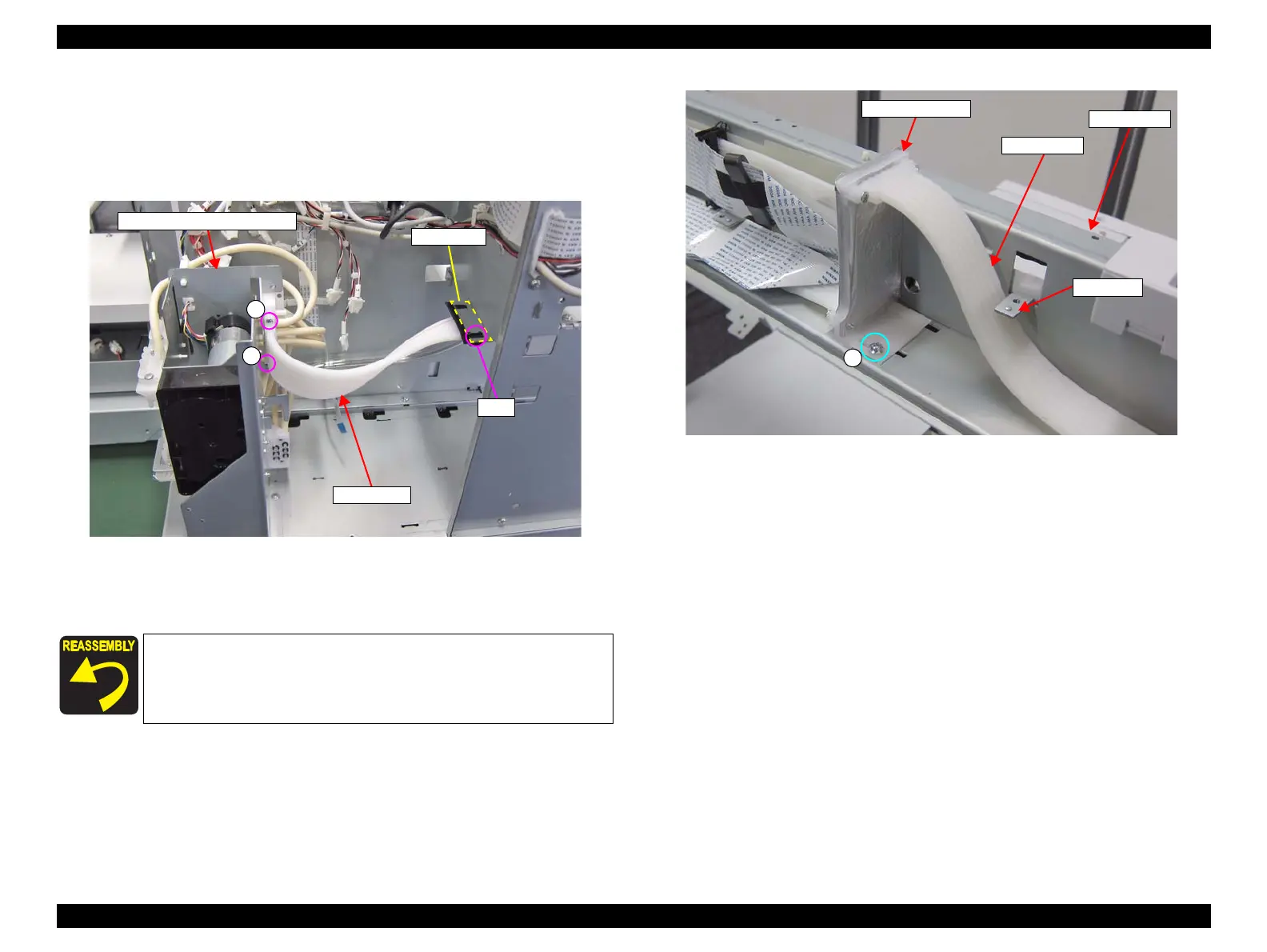
28. Remove the two screws, and remove the TUBE ASSY from the CIRCULATION
PUMP ASSY.
B) Silver M2.5x16 Bind machine screw: 2 pcs
29. Disengage the hook, and remove the tube clamp.
Figure 3-101. Removing from the CIRCULATION PUMP ASSY
30. Remove the screw, and remove the Tube Fixing Plate.
C) Silver M3x8 Cup S-tite screw: 1 pcs
Figure 3-102. Removing the Tube Fixing Plate
Go through the TUBE ASSY under the protrusion of the Front
Frame. (See Figure 3-102).
TUBE ASSY
CIRCULATION PUMP ASSY
A
A
Hook
Tube clamp
C
TUBE ASSY
Front Frame
Tube Fixing Plate
Protrusion


 To Next Page
 Loading...









