4. I/O
4.1 Introduction
4.1.1 System Introduction
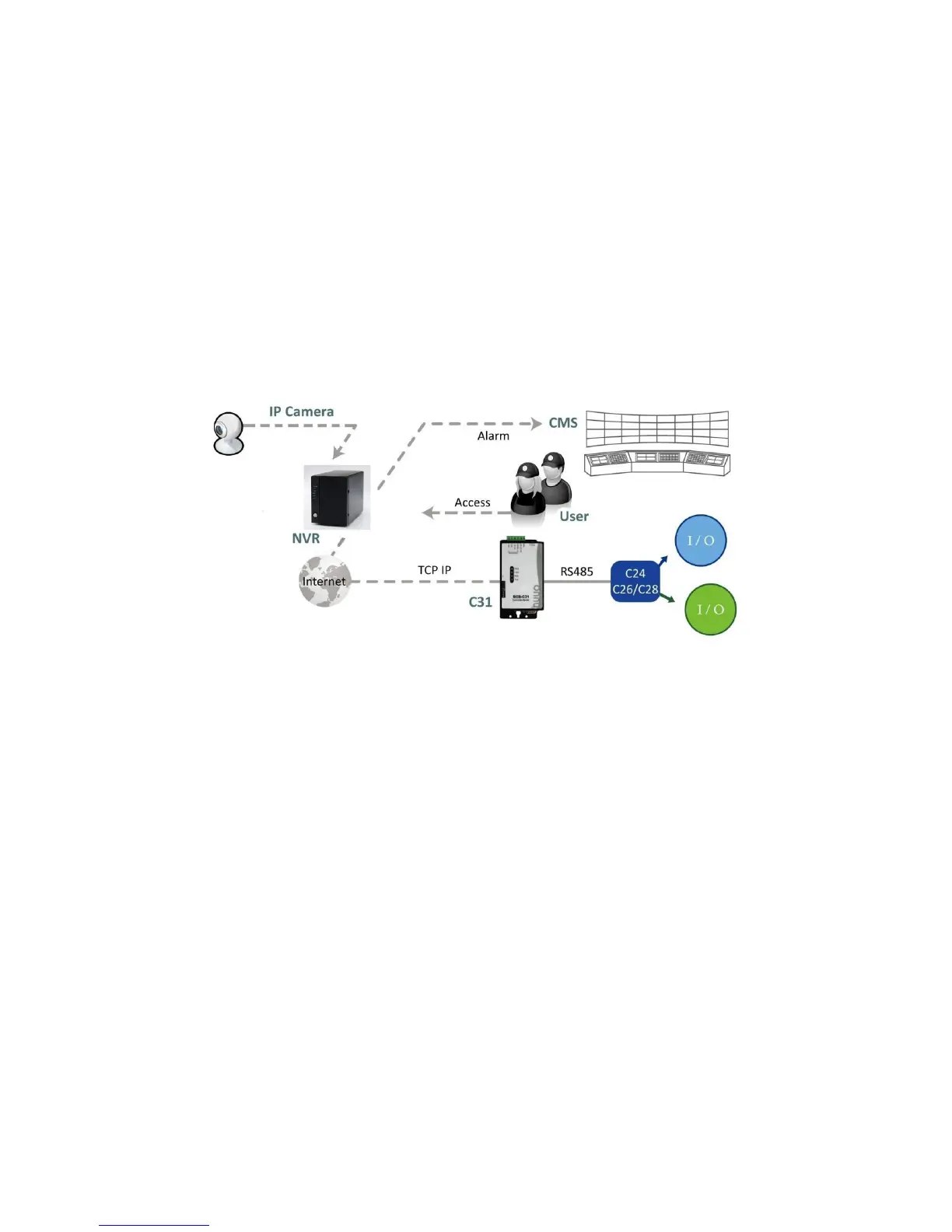
We provides remote I/O solution for NVR by connecting SCB-C31 with I/O Box
SCB-C24/26/28. Refer to the below architecture, I/O device is connected
directly with I/O Box, and input/output signal delivered in RS485 format are
converted to Ethernet through SCB-C31. NVR can use the signals to do more
sophisticated setup, such as starting recording when input triggered,
triggering output as an event happened, and much more.
4.1.2 HW Installation
SCB-C24/26/28 must work with SCB-C31 (Ethernet-RS485 converter).
Further, the C31 Box cannot be used for POS and converter at the same
time, and one C31 Box can be paired with one NVR unit only. Please
follow the steps below to configure the devices.
Step 1: Check the system switch of SCB-C31 is switched to OFF-OFF position.
Step 2: Connect SCB-C31 with power source.
Step 3: Connect SCB-C31 with internet by RJ45 LAN cable.
Step 4: Connect I/O Box with power source.
Step 5: Connect SCB-C31 and I/O Box with cable, positive connection
(TX+/D+ and DATA+) and negative connection (TX-/D- and DATA-). Take
SCB-C31 with I/O Box SCB-C24 for example as below.















 To Next Page