7800 MultiFrame Manual
7812DCDA2Q-HD (-AA, –AES4) Dual Path HDTV Down-converter
Revision 1.0 Page 19
6.1.2. Genlock Source
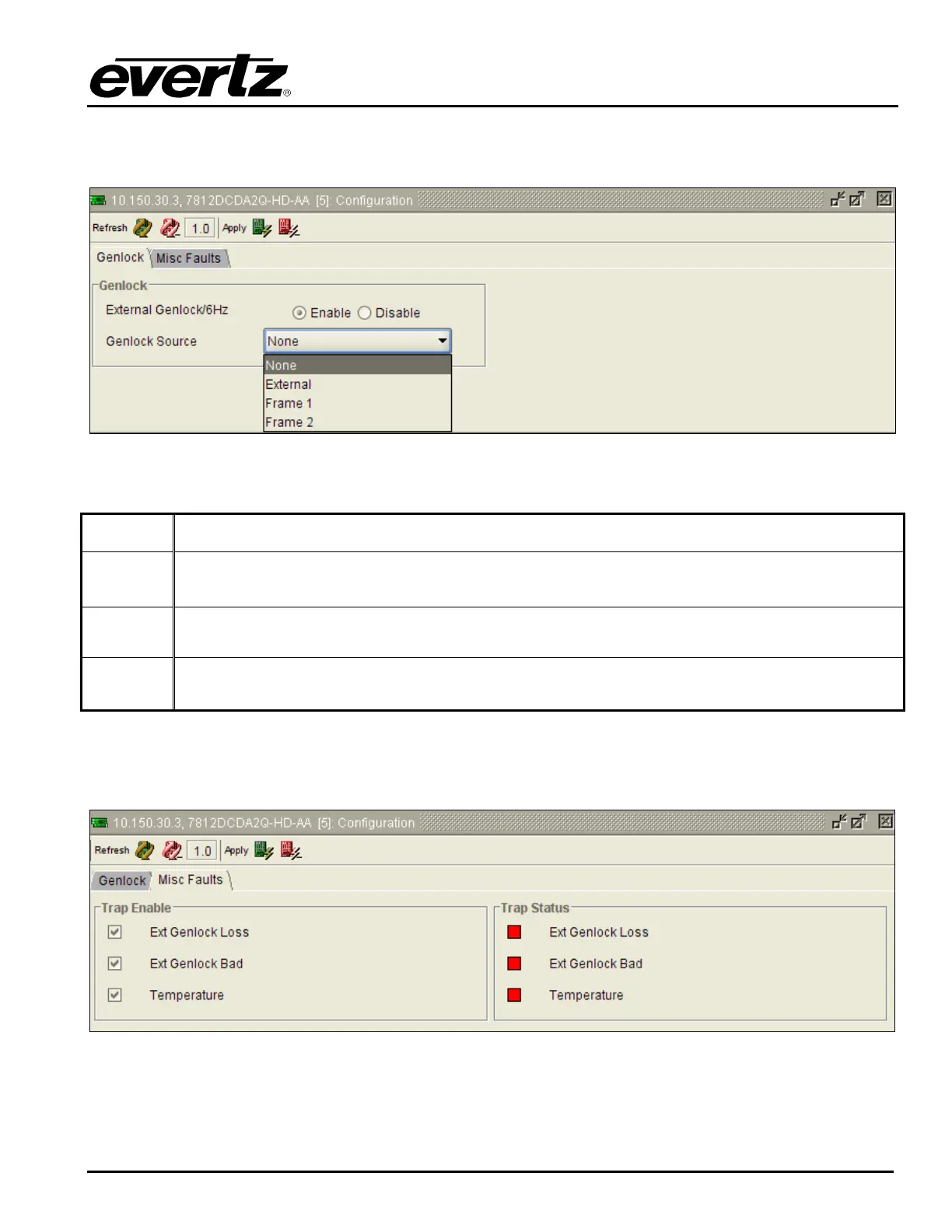
The VLPRO interface for the Genlock Source control appears as follows:
Figure 6-3: Genlock Source Control
The control values for the Genlock Source control have the following meanings
None
When None is selected, the module will lock to incoming video.
External
When External is selected, the module will lock to the external reference signal applied to the
module’s rear panel (DA4A/Genlock BNC). Reference bi-level black should only be used.
Frame 1
When Frame 1 is selected, the module will lock to the external reference applied to the 7800
frame REF 1 input.
Frame 2
When Frame 2 is selected, the module will lock to the external reference applied to the 7800
frame REF 2 input.
6.1.3. CONFIGURING HIGH LEVEL CARD CONTROLS – MISC FAULTS
The VLPRO interface for configuring the MISC FAULTS control tab appears as follows:
Figure 6-4: Misc Faults Tab
To enable a specific Fault trap, click the small box beside the relevant fault and ensure that a check mark
appears in the box. To disable a specific Fault trap, click the small box beside the relevant fault and
ensure that a check mark does not appear in the box.



 To Next Page