FIMER_PVS-175-TL A.1 Version_Product manual_EN_RevC-
F
64
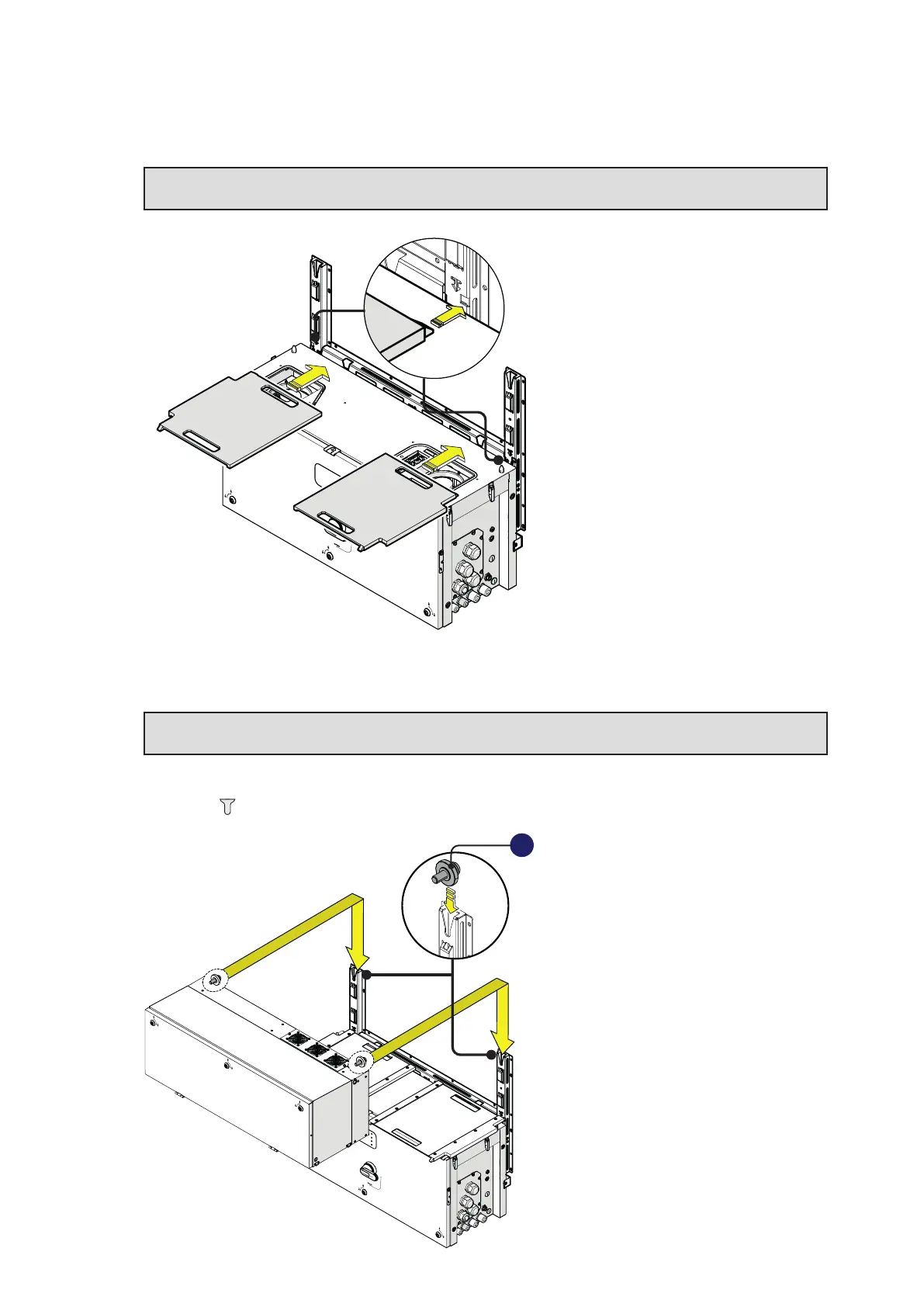
• Insert the two gasket protective covers (content in the “PVS-175 Installation Kit”) and slide them till
the positioning pins are inserted into the proper bracket holes. If the mounting results correct the
gasket protective cover will have a locked position.
ATTENTION – A Check the integrity of the gasket in the AC and DC compartments before
installing the two gasket protective covers.
PVS
•
Lift the power module (01) up to the bracket (03) and over the wiring box (02), using the handles (04)
or the M8 eyebolts.
LIFTING – U Risk of injury due to the heavy weight of the equipment. Always consider
the center of gravity of the enclosures while lifting.
• Insert the heads of two rear attachment pins (17) (placed on the rear part of the power module) into
the slots located on the bracket (03).
PVS
17



 To Next Page