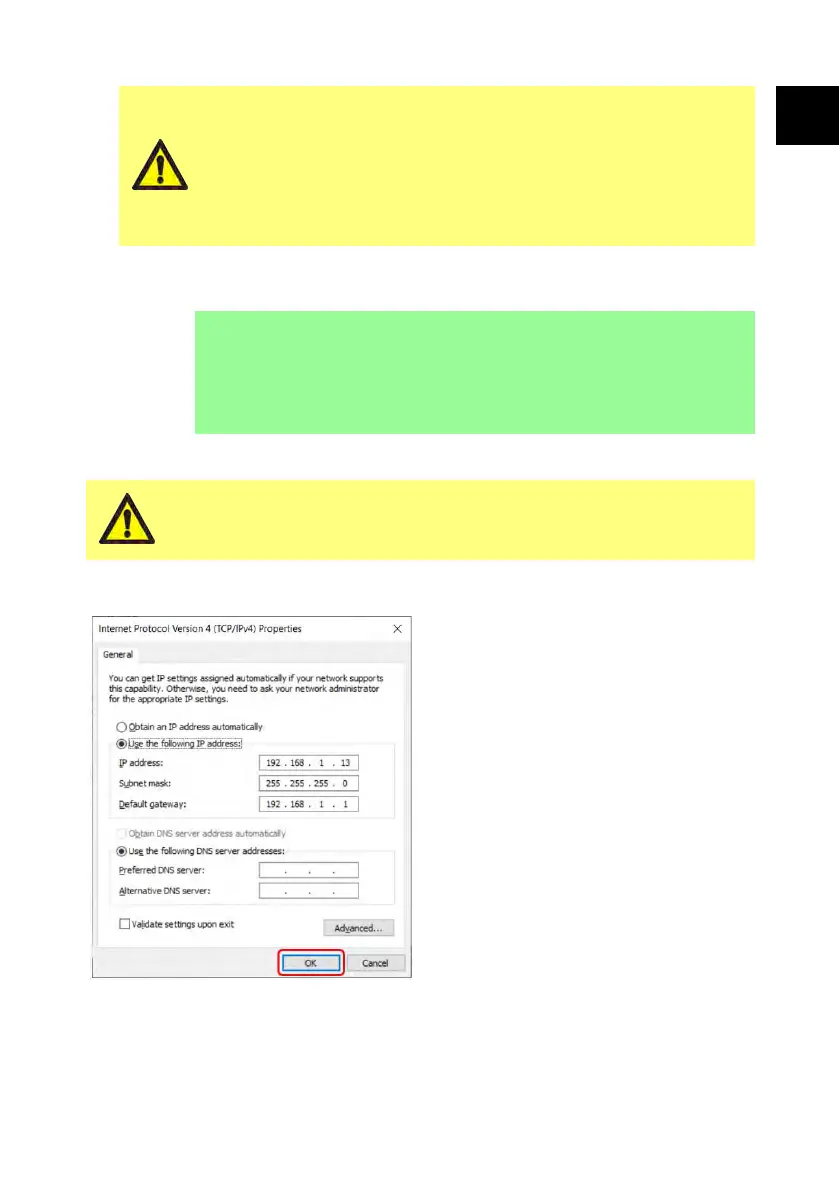
Manual configuration:
Network settings may be specific to your organisation.
Contact your systems administrator to ask if you can use the
example settings or to obtain correct configuration details for
IP Address, Subnet Mask and Default Gateway.
The IP address must be unique for each device.
3. Enter the required IP Address, Subnet Mask and Default Gateway (example
below).
i
The following example settings can be used:
l IP Address: 192.168.1.12
l Subnet Mask: 255.255.255.0
l Default Gateway: 192.168.1.1
26.1.2 Configure PC for direct connection
You may require permission from your systems administrator to
alter the following settings on your PC.
1. Type 'Network Connections' into
the start menu to find the View
Network Connections window in
Control Panel.
2. Right click Ethernet connection.
3. Click Properties.
4. Select Internet Protocol Version
4 (TCP/IPv4) in the list
5. Click Properties
6. In the Internet Protocol Version
4 (TCP/IPv4) Properties
window, select the Use the
following IP address button.
7. Enter the required IP Address,
Subnet Mask and Default Gateway
(example below).
8. Select OK (outlined in red).
9. Close all open windows.
PF7/PF7+ Peristaltic Filler with QC14 Pumphead User Manual 125
EN EN EN EN EN EN EN EN EN EN EN EN EN EN EN EN EN



 To Next Page